
Introduction and Overview
The Minolta Maxxum 3XI is a 35mm Single-Lens Reflex (SLR) film camera designed for both amateur and enthusiast photographers. It features automatic focus capabilities and a built-in flash, making it a versatile tool for capturing moments on traditional film. This manual provides essential information for setting up, operating, and maintaining your camera.
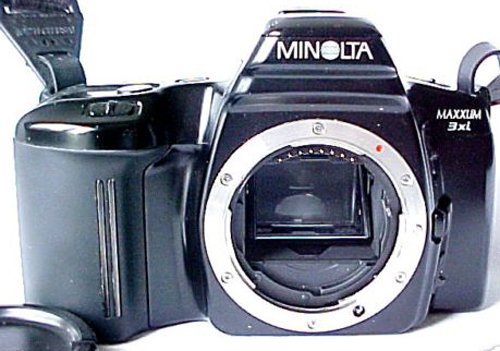
Figure 1: Front view of the Minolta Maxxum 3XI camera with the lens cap attached.
Product Features
- Lens Mount: Minolta A-Type
- Focus Type: Autofocus, with Manual focus option
- Flash: Built-in pop-up flash and hot shoe for external flash units
- Shutter Speed: 30 - 1/2000 seconds, including BULB mode for extended exposures
- Focus Lock: Available for precise focusing
- Film Format: 35mm film
Setup
1. Battery Installation
- Locate the battery compartment on the bottom of the camera.
- Open the battery compartment cover.
- Insert the required batteries, ensuring correct polarity as indicated inside the compartment.
- Close the battery compartment cover securely.
2. Film Loading
- Open the camera back by sliding the latch located on the side of the camera.
- Place a 35mm film canister into the film chamber on the left side.
- Pull the film leader across to the take-up spool on the right side, ensuring it catches on the spool's teeth.
- Close the camera back firmly until it clicks into place. The camera will automatically advance the film to the first frame.
Operating Instructions
1. Powering On/Off
To turn the camera on, slide the "LOCK • ON" switch, typically located near the top left of the camera, to the "ON" position. The camera's display will illuminate, and the lens will prepare for operation. To turn off, slide the switch back to "LOCK".
2. Taking a Photo
- Look through the viewfinder to compose your shot.
- Gently press the shutter button halfway down to activate the autofocus system. The camera will focus on your subject.
- Once focused, press the shutter button all the way down to take the picture. The camera will automatically advance the film to the next frame.
3. Using the Built-in Flash
The Minolta Maxxum 3XI features a built-in pop-up flash. In low-light conditions or when backlighting is detected, the camera may automatically deploy the flash. Consult the camera's specific mode settings for manual flash control options, if available.
Maintenance
- Cleaning the Lens: Use a soft, lint-free cloth and a specialized lens cleaning solution to gently clean the lens surface. Avoid touching the lens with your fingers.
- Camera Body: Wipe the camera body with a dry, soft cloth to remove dust and smudges. Do not use harsh chemicals or abrasive materials.
- Storage: When not in use, store the camera in a dry, cool place, away from direct sunlight and extreme temperatures. It is recommended to remove batteries during long periods of storage to prevent leakage.
- Film Handling: Always load and unload film in subdued light to prevent accidental exposure.
Troubleshooting
- Camera Not Powering On: Check if the batteries are correctly installed and fully charged. Replace batteries if necessary.
- Film Not Advancing: Ensure the film is properly loaded and the leader is securely attached to the take-up spool. Close the camera back firmly.
- Blurry Photos: Verify that the autofocus is engaged by pressing the shutter button halfway. Ensure sufficient lighting for proper focus.
- Flash Not Firing: Check if the flash is enabled in the camera's settings or if the ambient light conditions are too bright for automatic flash activation.
Specifications
| Feature | Detail |
|---|---|
| Brand | Minolta |
| Model | Maxxum 3XI |
| Film Format Type | 35mm |
| Lens Mount | Minolta A-Type |
| Focus Type | Autofocus, Manual |
| Shutter Speed | 30 - 1/2000 sec, with BULB on Manual |
| Flash | Built-in + Mount-On Ready |
| Depth | 2.5 inches |
| Height | 3.63 inches |
| Width | 5.75 inches |
| Weight | 14.88 ounces |
| ASIN | B004ET6T30 |
| Date First Available | December 2, 2010 |
Warranty and Support
For information regarding warranty coverage, technical support, or service, please refer to the official Minolta documentation that accompanied your purchase or visit the official Minolta support website. Contact details for customer service can typically be found on the manufacturer's website.


