
Metz MZ 50314N
Contents
User Manual
Metz 50 AF-1 Digital Flash for Nikon Cameras
Model: MZ 50314N
1. Introduction
This manual provides comprehensive instructions for the safe and effective operation of your Metz 50 AF-1 Digital Flash. Please read this manual thoroughly before using the product to ensure proper functionality and to prevent damage.
The Metz 50 AF-1 digital flash is designed for Nikon and Fujifilm camera systems, offering advanced features and high performance for various photographic needs. It includes a USB interface for firmware updates, ensuring future compatibility and enhanced functionality.
2. Safety Information
Always observe the following safety precautions:
- Do not expose the flash unit to water or excessive moisture.
- Avoid direct eye exposure to the flash light, especially at close range.
- Use only recommended batteries (4 x AA alkaline-magnesium or lithium batteries; 4 x AA NC or NiMH rechargeable batteries).
- Do not attempt to disassemble or repair the unit yourself. Refer to qualified service personnel.
- Keep out of reach of children.
3. Product Overview
The Metz 50 AF-1 Digital Flash is a versatile unit with a guide number of 50 (ISO 100/21° and 105 mm). Key features include:
- High guide number of 50 with ISO 100/21
- Metal foot with fast lock mechanism
- Firmware update capability via integrated USB port
- HSS (High Speed Synchronization) support
- Illuminated LCD display for easy operation
- Vertical (-7°/+90°) and horizontal (300°) swivel reflector
- Motor zoom for 24 - 105 mm illumination
- Integrated wide-angle diffuser for 12 mm illumination
- Extendible reflector card for soft flash illumination
- Modeling light (permanent light for checking the photo)
- Integrated autofocus measuring flash
- Flash readiness indicator and correct exposure display on unit and camera
- Flash range indicator in the LCD display
- Automatic unit switch-off and manual key lock
- TTL flash mode, manual flash mode with 8 partial lighting levels
- 1st and 2nd shutter curtain synchronization
- Manual flash exposure correction for TTL flash mode
- Automatic fill-in flash, flash bracketing
- i-TTL / D-TTL / 3D flash mode
- i-TTL remote mode (Slave and servo mode)
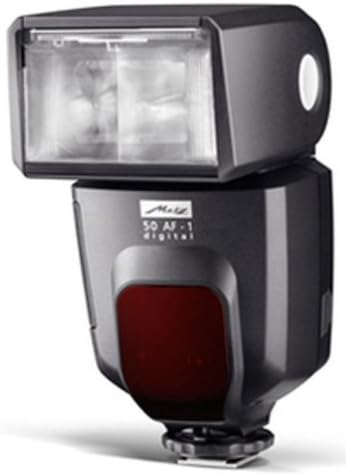
This image displays the overall design of the Metz 50 AF-1 Digital Flash, highlighting its compact form factor and the main flash head.

A close-up view of the durable metal hot shoe mount, designed for secure attachment to compatible camera systems.

This image shows the illuminated LCD display, which provides clear information on flash settings, and the intuitive control buttons for mode selection and adjustments.

A view of the USB port, allowing users to update the flash unit's firmware for improved performance and compatibility.

This image demonstrates the flexibility of the flash head, which can be swiveled vertically and horizontally for various bounce lighting techniques.
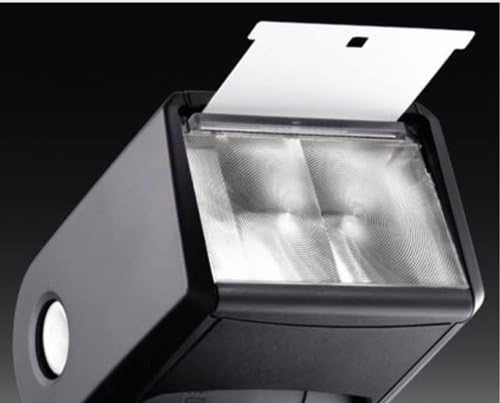
A close-up of the integrated pull-out reflector card, useful for adding a catchlight or subtle fill light when bouncing the flash.
4. Setup
4.1 Battery Installation
- Open the battery compartment cover located on the side of the flash unit.
- Insert four (4) AA alkaline-magnesium or lithium batteries, or four (4) AA NiMH rechargeable batteries, ensuring correct polarity (+/-).
- Close the battery compartment cover securely.
4.2 Mounting the Flash Unit
- Ensure your camera is turned off.
- Slide the flash unit's metal foot into the camera's hot shoe until it clicks into place.
- Tighten the locking ring on the flash unit to secure it firmly to the camera.
5. Operating Instructions
5.1 Power On/Off
To turn on the flash, slide the ON/OFF switch to the 'ON' position. The LCD display will illuminate. To turn off, slide the switch to 'OFF'. The unit also features automatic switch-off to conserve battery power.
5.2 Flash Modes
Press the MODE button to cycle through available flash modes:
- TTL Mode: (Through-The-Lens) Automatic flash exposure based on camera's metering.
- Manual Mode: Allows manual adjustment of flash output (8 partial lighting levels). Use the SELECT buttons (+/-) to adjust power.
- Slave Mode: The flash can be triggered wirelessly by another flash unit. Supports i-TTL remote mode.
5.3 Swivel Reflector and Diffuser
The flash head can be swiveled vertically from -7° to +90° and horizontally up to 300° for bounce flash photography. Pull out the integrated wide-angle diffuser for 12mm illumination or the reflector card for soft flash effects.
5.4 Firmware Updates
Connect the flash unit to your computer via the integrated USB port to update firmware. Visit the Metz official website for the latest firmware and instructions.
6. Maintenance
- Clean the flash unit with a soft, dry cloth. Do not use solvents or abrasive cleaners.
- Ensure the hot shoe contacts are clean and free of debris.
- Remove batteries if the unit will not be used for an extended period to prevent leakage.
- Store the flash in a cool, dry place, away from direct sunlight and extreme temperatures.
7. Troubleshooting
| Problem | Possible Cause | Solution |
|---|---|---|
| Flash does not fire. | Low or dead batteries; incorrect mounting; flash not turned on; camera settings. | Replace batteries; ensure flash is securely mounted and locked; turn on flash; check camera flash settings. |
| Flash output is too weak/strong. | Incorrect flash mode; exposure compensation; distance to subject. | Switch to TTL mode or adjust manual power; check flash exposure compensation on flash/camera; adjust shooting distance. |
| LCD display is blank. | Batteries depleted; unit off. | Replace batteries; turn on the flash unit. |
| Flash hot shoe stuck on camera. | Locking mechanism issue. | Ensure locking ring is fully loosened. If persistent, consult Metz support. |
8. Specifications
| Model Number | MZ 50314N |
| Guide Number | 50 (ISO 100/21° and 105 mm) |
| Dimensions (L x W x H) | 8.8 x 6 x 3.8 inches |
| Weight | 1 pounds |
| Compatible Mountings | Nikon, Fujifilm |
| Power Source | 4 x AA alkaline-magnesium or lithium batteries; 4 x AA NC or NiMH rechargeable batteries |
| Flash Sync Speed | Up to 1/250s (HSS up to 1/8000s) |
| Reflector Swivel | Vertical (-7°/+90°), Horizontal (300°) |
| Zoom Range | 24 - 105 mm (12 mm with wide-angle diffuser) |
| Connectivity | Integrated USB port for firmware updates |
9. Warranty and Support
For warranty information and technical support, please refer to the official Metz website or contact your local authorized Metz dealer. Keep your proof of purchase for warranty claims.
Online resources and firmware updates are available at the official Metz website: www.metz-ce.de/en/
Documents and downloads
Ask a question about this manual
Ask about setup, troubleshooting, compatibility, parts, safety, or missing instructions. Manuals+ will review the question and use this page’s manual context to help answer it.