

1. Introduction
The Benro DJ80 2-Way Monopod Tilt Head is designed to provide precise tilt control for cameras mounted on a monopod. Constructed from durable aluminum, this head offers a robust solution for photographers and videographers requiring forward and backward tilt adjustments. It features a quick-release plate system for easy camera attachment and detachment, along with an integrated bubble level for accurate leveling.
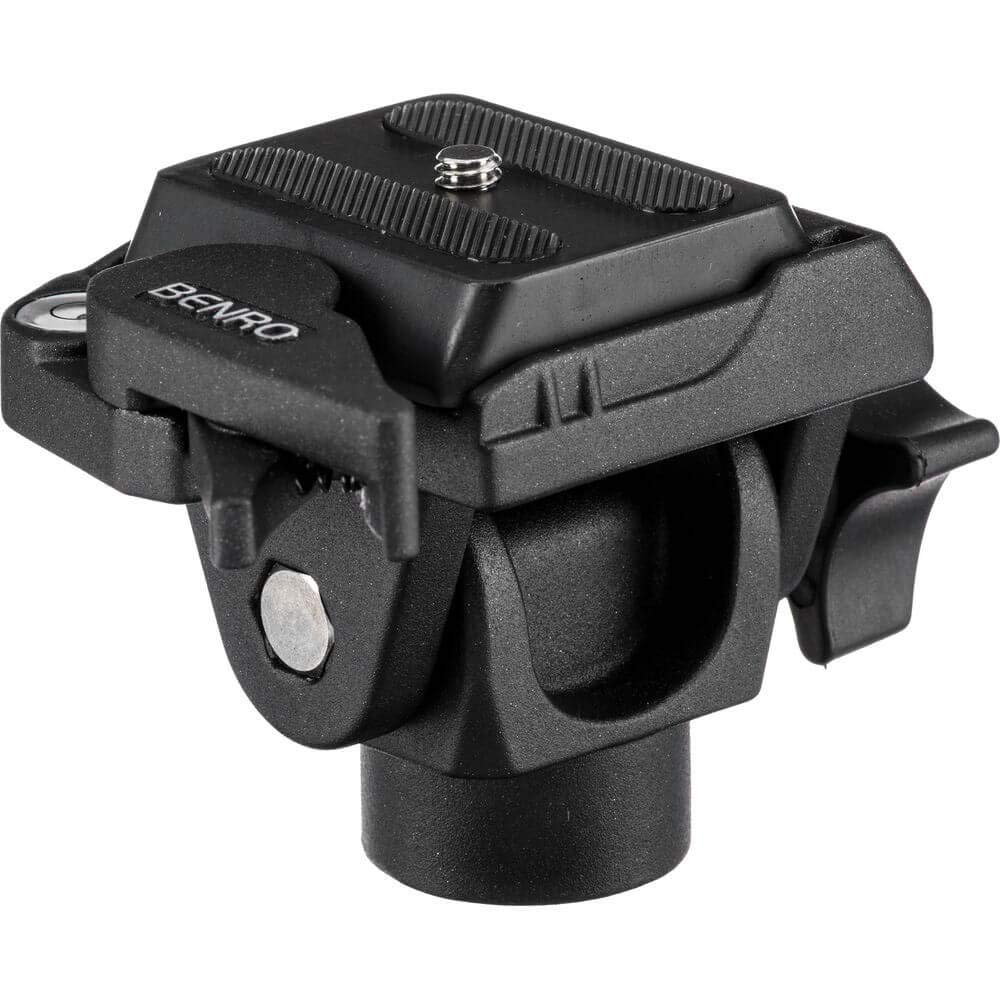
Image 1.1: The Benro DJ80 2-Way Monopod Tilt Head, showcasing its compact design and quick-release plate.
2. Safety Information
- Always ensure the tilt head is securely attached to the monopod and the camera is firmly mounted before use.
- Do not exceed the maximum load capacity of 2.5 kg to prevent damage to the equipment or potential injury.
- Avoid exposing the tilt head to extreme temperatures, moisture, or corrosive substances.
- Keep out of reach of children.
- Regularly inspect all components for wear and tear. Discontinue use if any damage is observed.
3. Package Contents
Please verify that all items are present in your package:
- Benro DJ80 2-Way Monopod Tilt Head
- PU-60 Quick Release Plate (Arca-Swiss type)
- 3/8" to 1/4" Adapter (non-fixed)
4. Product Overview
The Benro DJ80 features a robust aluminum construction designed for stability and durability. Key components include the main tilt mechanism, a locking knob for tilt adjustment, and a quick-release clamp for the camera plate. An integrated bubble level assists in achieving horizontal alignment.
Key Features:
- Uniaxial Tilt Control: Allows for precise forward and backward tilting of your camera.
- Quick Release Plate: Arca-Swiss type PU-60 plate for fast and secure camera mounting.
- Integrated Bubble Level: Ensures accurate horizontal alignment.
- Durable Construction: Made from high-quality aluminum.
5. Setup
5.1 Attaching the Tilt Head to a Monopod
- Locate the mounting screw on your monopod. The DJ80 tilt head has a 3/8" threaded hole at its base.
- If your monopod has a 1/4" screw, use the provided 3/8" to 1/4" adapter. Screw the adapter onto the monopod's 1/4" screw first, then attach the tilt head.
- Carefully screw the DJ80 tilt head onto the monopod's mounting screw until it is firmly secured. Do not overtighten.
5.2 Attaching Your Camera to the Tilt Head
- Ensure the quick release plate (PU-60) is detached from the tilt head. If it is attached, loosen the quick-release locking knob and slide the plate out.
- Locate the 1/4"-20 screw on the quick release plate.
- Screw the quick release plate onto the tripod mounting thread on the bottom of your camera. Tighten securely using a coin or screwdriver if necessary.
- With the quick-release clamp on the tilt head loosened, slide the camera with the attached quick release plate into the clamp.
- Push the camera down firmly and tighten the quick-release locking knob until the camera is securely held. Verify that the camera cannot slide out or wobble.
6. Operating
6.1 Adjusting Tilt Angle
The DJ80 tilt head allows for a tilt range of +90° to -90°.
- To adjust the tilt angle, locate the main tilt locking knob on the side of the head.
- Loosen the tilt locking knob by turning it counter-clockwise.
- Carefully tilt your camera to the desired angle.
- Once the desired angle is achieved, tighten the tilt locking knob by turning it clockwise until the camera is held firmly in place.
6.2 Using the Bubble Level
The integrated bubble level helps ensure your camera is perfectly horizontal, which is crucial for panoramic shots or maintaining a level horizon.
- Observe the small bubble level located near the quick release plate.
- Adjust the monopod's leg length or position until the bubble is centered within the two lines, indicating a level surface.

Image 6.1: Close-up view of a camera mounted on a Benro head, illustrating the tilt adjustment knob and quick release plate mechanism.
7. Maintenance
- Cleaning: Wipe the tilt head with a soft, dry cloth after each use to remove dust and dirt. For stubborn grime, use a slightly damp cloth and then dry thoroughly. Do not use harsh chemicals or abrasive cleaners.
- Lubrication: The tilt mechanism is factory-lubricated and generally does not require additional lubrication. If movement becomes stiff, consult a professional service technician.
- Storage: Store the tilt head in a cool, dry place, away from direct sunlight and extreme temperatures.
- Inspection: Periodically check all screws and connections to ensure they are tight. Do not overtighten.
8. Troubleshooting
Problem: Camera is not securely held by the quick release plate.
- Solution: Ensure the quick release plate is correctly attached to the camera and fully inserted into the clamp. Tighten the quick-release locking knob firmly. Check if the plate is compatible with the clamp (Arca-Swiss type).
Problem: Tilt movement is stiff or difficult.
- Solution: Loosen the tilt locking knob completely. If the issue persists, check for any obstructions or debris in the mechanism. Avoid forcing the movement.
Problem: Bubble level does not indicate level.
- Solution: Adjust the monopod's leg length or position until the bubble is centered. Ensure the monopod is on a stable, flat surface.
9. Specifications
| Feature | Specification |
|---|---|
| Model Number | DJ80 |
| Load Capacity | 2.5 kg (5.5 lbs) |
| Weight | 0.24 kg (0.53 lbs) |
| Tilt Range | +90° / -90° |
| Material | Aluminum |
| Quick Release Plate | Arca-Swiss type (PU-60, 50 x 48 mm) |
| Bubble Level | Integrated |
| Product Dimensions | 12.7 x 12.7 x 12.7 cm (5 x 5 x 5 inches) |
| Compatible Devices | Camera |
10. Warranty Information
Benro products are manufactured to high-quality standards. For specific warranty terms and conditions, please refer to the warranty card included with your product or visit the official Benro website. Keep your purchase receipt as proof of purchase for any warranty claims.
11. Customer Support
If you encounter any issues or have questions regarding your Benro DJ80 Monopod Tilt Head that are not covered in this manual, please contact Benro customer support. Contact information can typically be found on the official Benro website or on the product packaging.