
1. Introduction
This manual provides instructions for the proper setup, operation, and maintenance of your Benro BH00 Single Action Ballhead. The Benro BH00 is designed for secure and flexible camera positioning on tripods or monopods, featuring a compact design and a robust quick release system.
2. Key Features
- Patented Dual-Lock Quick Release System: Incorporates a dual lock-lever for secure camera mounting and accidental release prevention.
- Single Knob Adjustment: A single control knob allows for quick and precise positioning of the camera.
- Separate Pan Knob: Independent control for horizontal panning, allowing for precise panoramic adjustments without affecting ball tension.
- Compact and Lightweight Design: Optimized for portability and ease of use.
3. Package Contents
Please verify that all items are present in your package:
- Benro BH00 Single Action Ballhead unit
- Quick Release Plate (PH07 type)
4. Setup Instructions
4.1 Attaching the Ballhead to a Tripod/Monopod
- Locate the mounting screw on your tripod or monopod. The Benro BH00 typically uses a 3/8-inch thread, but may include a 1/4-inch adapter.
- Align the base of the BH00 ballhead with the mounting screw.
- Rotate the ballhead clockwise onto the tripod/monopod screw until it is securely tightened. Ensure it is firm but do not overtighten.
4.2 Attaching the Quick Release Plate to Your Camera
- Locate the 1/4-inch screw on the quick release plate.
- Align the screw with the tripod socket on the bottom of your camera.
- Turn the screw clockwise using a coin or the integrated D-ring (if present) until the plate is firmly attached to the camera. Do not overtighten.

Image 1: Benro BH00 Ballhead with the quick release plate mounted, ready for camera attachment. This view highlights the quick release mechanism and the main adjustment knob.
4.3 Mounting the Camera to the Ballhead
- Ensure the main adjustment knob on the ballhead is tightened enough to prevent the ball from moving freely, but not fully locked.
- Open the quick release lever on the ballhead. The patented dual-lock system may require pressing a safety button while opening the lever.
- Slide the camera (with the attached quick release plate) into the receiver on the ballhead. Ensure it is fully seated.
- Close the quick release lever firmly until it clicks into place. The dual-lock system provides additional security.
- Gently test the camera's stability before releasing your grip.
5. Operating the Ballhead
5.1 Adjusting Camera Position (Ball Movement)
- To adjust the camera's angle (tilt and swivel), loosen the large main adjustment knob located on the side of the ballhead.
- Carefully position your camera to the desired angle.
- Tighten the main adjustment knob firmly to lock the ball in place. Ensure the camera is stable before releasing your grip.
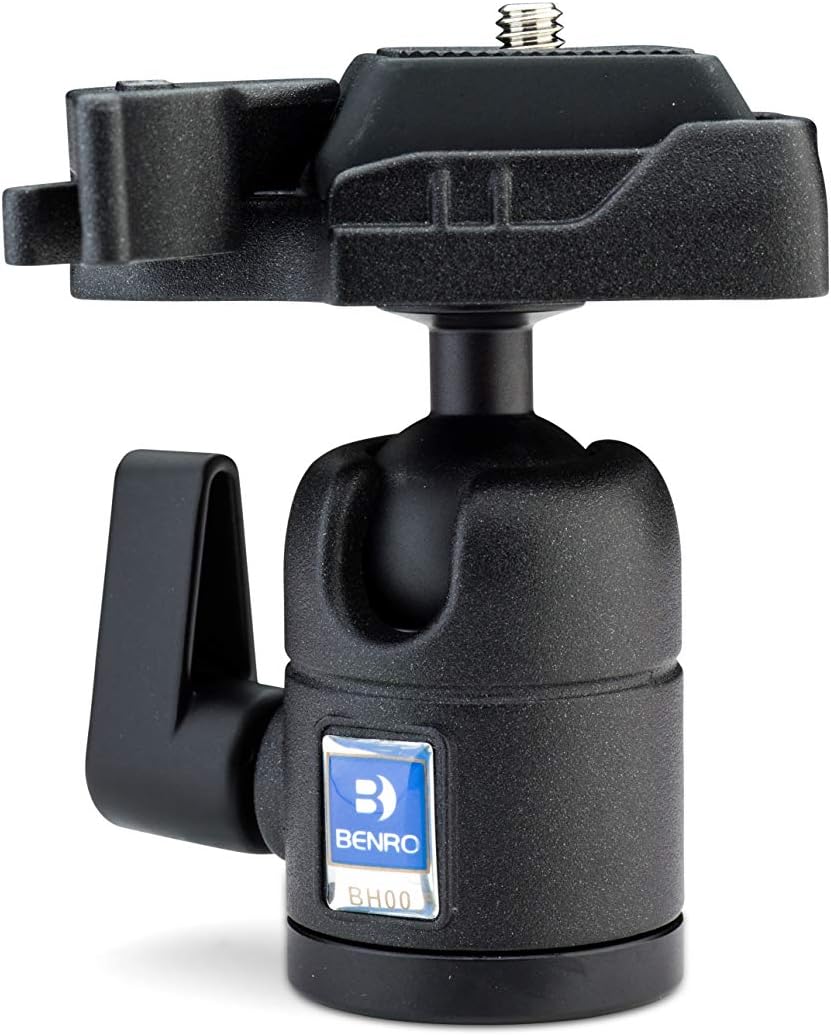
Image 2: Front view of the Benro BH00 Ballhead, illustrating the main adjustment knob on the left and the quick release lever on the right.
5.2 Using the Separate Pan Knob
The BH00 features a separate pan knob, typically located at the base of the ballhead, allowing for horizontal rotation independent of the ball's tilt and swivel.
- To pan the camera horizontally, ensure the main adjustment knob is tightened to lock the ball.
- Loosen the smaller pan knob at the base of the ballhead.
- Rotate the camera to the desired horizontal position.
- Tighten the pan knob to lock the horizontal movement.
6. Maintenance
- Cleaning: Use a soft, dry cloth to wipe down the ballhead after use. Avoid abrasive cleaners or solvents.
- Lubrication: The ballhead is designed for maintenance-free operation. Do not attempt to lubricate the ball or internal mechanisms, as this can attract dust and impair performance.
- Storage: Store the ballhead in a clean, dry environment, away from extreme temperatures and humidity.
- Inspection: Periodically check all screws and levers for tightness.
7. Troubleshooting
- Camera not secure: Ensure the quick release plate is firmly attached to the camera and fully seated in the ballhead's receiver. Confirm the quick release lever is fully closed and locked.
- Ballhead not holding position: Tighten the main adjustment knob more firmly. If the issue persists, inspect the ball for any debris or damage.
- Pan movement is stiff: Loosen the pan knob. If still stiff, check for any obstructions or debris around the panning base.
8. Specifications
| Feature | Detail |
|---|---|
| Model Number | BH00 |
| Maximum Load Capacity | 5.5 lbs (2.5 kg) |
| Product Dimensions | 5 x 5 x 5 inches |
| Item Weight | 6.3 ounces (0.18 kg) |
| Folded Height | 3.1 inches |
| Head Mount Thread | 1/4-20 (with potential 3/8-inch adapter) |
| Quick Release Type | Snap-In Style (PH07) |
| Color | Black |
| Compatible Devices | Camera |
9. Warranty and Support
Benro products are manufactured to high-quality standards. For specific warranty information, please refer to the warranty card included with your product or visit the official Benro website. For technical support or service inquiries, please contact Benro customer service through their official channels.
10. Product Videos
No official product videos from the seller were available for embedding in this manual.
