1. Introduction
This manual provides essential instructions for the installation, operation, and maintenance of your Panasonic Teflon-coated replacement kneading paddle. This high-quality replacement blade is designed to ensure optimal mixing and non-stick performance for your bread machine, facilitating cleaner and easier use.
It is compatible with various Panasonic bread machine models, including SD252, SD253, SD200, SD206, SD251, SD254, SD255, and SD257. Please read these instructions carefully before use to ensure proper function and longevity of the product.
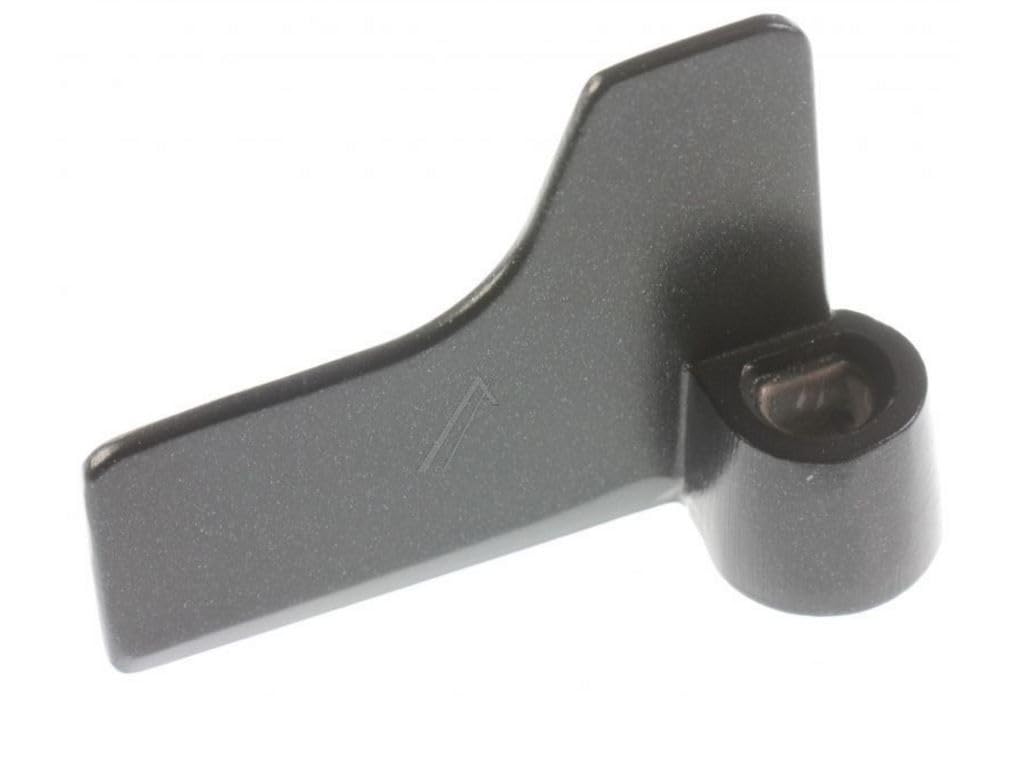
Image 1.1: The Panasonic Teflon-coated kneading paddle.
2. Setup
Follow these steps to correctly install the kneading paddle in your Panasonic bread machine:
- Prepare the Bread Pan: Ensure the bread pan is clean and completely dry before installation. Remove any residue from previous baking cycles.
- Locate the Drive Shaft: Inside the bread pan, identify the metal drive shaft at the bottom center.
- Install the Kneading Paddle: Align the opening at the bottom of the kneading paddle with the drive shaft. Press the paddle firmly down onto the shaft until it is securely seated. The paddle should fit snugly and not wobble.

Image 2.1: Illustration of the kneading paddle being placed onto the drive shaft inside the bread pan.
Note: Always ensure the paddle is correctly installed before adding ingredients to prevent damage to the bread machine or improper mixing.
3. Operating Instructions
The kneading paddle operates automatically as part of your Panasonic bread machine's baking cycle. No manual intervention is required during operation once installed correctly.
- Before Adding Ingredients: Double-check that the kneading paddle is firmly seated on the drive shaft.
- Adding Ingredients: Add your ingredients to the bread pan according to your recipe, ensuring they do not obstruct the paddle's movement.
- During Operation: The paddle will rotate to mix and knead the dough as programmed by your bread machine.
- After Baking: Once the baking cycle is complete, allow the bread to cool slightly within the pan. This helps the bread release more easily from the paddle and prevents large holes in the bottom of the loaf. Gently remove the bread from the pan. The non-stick Teflon coating should allow the paddle to detach easily from the baked loaf.

Image 3.1: A baked loaf of bread with the kneading paddle visible at its base, ready for removal.
4. Maintenance and Care
Proper care will extend the life of your kneading paddle and maintain its non-stick properties:
- Cleaning: After each use, remove the paddle from the bread pan. Wash it with warm, soapy water using a soft sponge or cloth. For stubborn dough residue, soak the paddle in warm water for a few minutes before cleaning.
- Drying: Thoroughly dry the paddle with a soft cloth after washing. Ensure no moisture remains, especially around the shaft opening, to prevent corrosion.
- Avoid Abrasives: Do not use abrasive cleaners, scouring pads, or metal utensils on the paddle, as these can damage the Teflon non-stick coating.
- Storage: Store the paddle in a dry place, preferably within the bread pan or with your bread machine accessories.
- Inspection: Periodically inspect the Teflon coating for any signs of wear or damage. A damaged coating can lead to sticking and reduced performance. Replace the paddle if significant wear is observed.

Image 4.1: A hand cleaning the Teflon-coated kneading paddle with a soft sponge.
5. Troubleshooting
If you encounter issues with your kneading paddle, refer to the following common problems and solutions:
| Problem | Possible Cause | Solution |
|---|---|---|
| Paddle not turning or mixing dough effectively. | Paddle not correctly seated on the drive shaft. | Remove the paddle and re-install it, ensuring it is pushed down firmly onto the shaft. |
| Bread sticking to the paddle after baking. | Damaged or worn Teflon coating; insufficient cooling time. | Allow bread to cool longer in the pan before removal. If coating is damaged, consider replacing the paddle. |
| Paddle detaches from the shaft during kneading. | Paddle not securely installed; worn drive shaft or paddle opening. | Ensure the paddle is firmly pressed onto the shaft. If the issue persists, inspect the drive shaft and paddle for wear. |
| Unusual noise during kneading. | Paddle rubbing against the pan or loose. | Check paddle installation. If noise continues, consult your bread machine's manual or contact Panasonic support. |
6. Specifications
- Brand: Panasonic
- Model Number (Paddle): PANADD96E160
- Compatible Bread Machine Models: SD252, SD253, SD200, SD206, SD251, SD254, SD255, SD257
- Material: Teflon-coated Stainless Steel
- Color: Black
- Dimensions (L x W x H): Approximately 6.6 x 5.2 x 10 cm (2.6 x 2.0 x 3.9 inches)
- Weight: Approximately 30 grams (1.1 ounces)
- Care Instructions: Wipe with a dry cloth; hand wash with warm soapy water.
7. Warranty and Support
For information regarding the warranty of this replacement kneading paddle, please refer to the documentation provided with your original purchase or contact the seller directly. As this is a replacement part, its warranty may be covered under the terms of the original bread machine or the specific seller's policy.
For further assistance or technical support related to your Panasonic bread machine or this replacement part, please visit the official Panasonic support website or contact their customer service department.
Please retain your proof of purchase for any warranty claims.


