
1. Introduction
This manual provides comprehensive instructions for the setup, operation, and maintenance of your OPPO BDP-93 Universal Network 3D Blu-ray Disc Player. The BDP-93 is designed to offer versatile playback of various disc formats and digital files, along with network streaming capabilities. Please read this manual thoroughly before using the product to ensure proper functionality and to maximize your viewing and listening experience.

Image 1: OPPO BDP-93 Player. This image shows the OPPO BDP-93 Universal Network 3D Blu-ray Disc Player from an angled front perspective, highlighting its sleek design and front panel display.
2. Key Features
- Universal Disc Playback: Supports Blu-ray Disc, Blu-ray 3D, DVD, CD, SACD, and DVD-Audio formats.
- Extensive File Compatibility: Plays a wide range of digital audio/video/picture files from USB and eSATA drives, including AVCHD, MP4, DivX, MKV, FLAC, and WAV.
- Dual HDMI 1.4 Outputs: Provides flexible connectivity for multiple displays or separate audio/video signal paths, supporting 3D and Deep Color.
- Advanced Video Processing: Incorporates Marvell's Kyoto-G2 video processor for enhanced picture quality, including noise reduction, de-interlacing, and up-conversion of standard definition content to high-definition.
- High Fidelity Audio: Features bit-stream output and internal decoding for Dolby TrueHD and DTS-HD Master Audio, with 7.1-channel analog audio outputs.
- Network Connectivity: Built-in Ethernet port and included wireless-N adapter for BD-Live content, firmware updates, and streaming services like Netflix.
- Source Direct Mode: Allows bypassing internal video processing for users with external video processors.
3. What's in the Box
Upon unpacking, please ensure all the following items are present:
- OPPO BDP-93 Universal Network 3D Blu-ray Disc Player
- Remote Control (with 2 AA batteries included)
- User Manual (this document)
- Wireless-N Adapter
- Power Cord
4. Setup Guide
4.1 Unpacking and Placement
Carefully remove the player and all accessories from the packaging. Place the player on a stable, level surface with adequate ventilation. Avoid placing it near heat sources or in direct sunlight.
4.2 Connecting to Power
Connect the provided power cord to the AC inlet on the rear of the player and then to a suitable wall outlet. The player supports 100V - 240V, 50/60Hz AC.
4.3 Audio/Video Connections
The BDP-93 offers various connection options. Choose the method that best suits your home theater system.
- HDMI Connection (Recommended): Use an HDMI cable to connect one or both HDMI outputs on the player to your TV or A/V receiver. For 3D content, ensure your TV and receiver are 3D compatible.
- Analog Audio: For multi-channel audio, connect the 7.1-channel analog outputs to your A/V receiver. For stereo, use the FL/FR outputs.
- Digital Audio: Use the Coaxial or Optical digital audio outputs to connect to an A/V receiver for digital audio signals.
- Analog Video: For older displays, Composite or Component Video (Y/Pb/Pr) outputs are available. Note that 720p/1080i is available for non-restricted content only.

Image 2: Rear Panel Connections. This image displays the rear panel of the OPPO BDP-93, highlighting the various input and output ports including dual HDMI, analog audio (7.1ch), digital audio (coaxial, optical), analog video (composite, component), LAN, USB, and eSATA ports.
4.4 Network Connection
Connect the player to your home network for firmware updates, BD-Live content, and streaming services.
- Wired Connection: Connect an Ethernet cable from your router to the LAN port on the player.
- Wireless Connection: Insert the included wireless-N adapter into one of the USB ports (front or rear). Navigate to the network settings in the player's menu to configure your Wi-Fi connection.
5. Operating Instructions
5.1 Powering On/Off
Press the Power button on the front panel or the remote control to turn the player on or off.
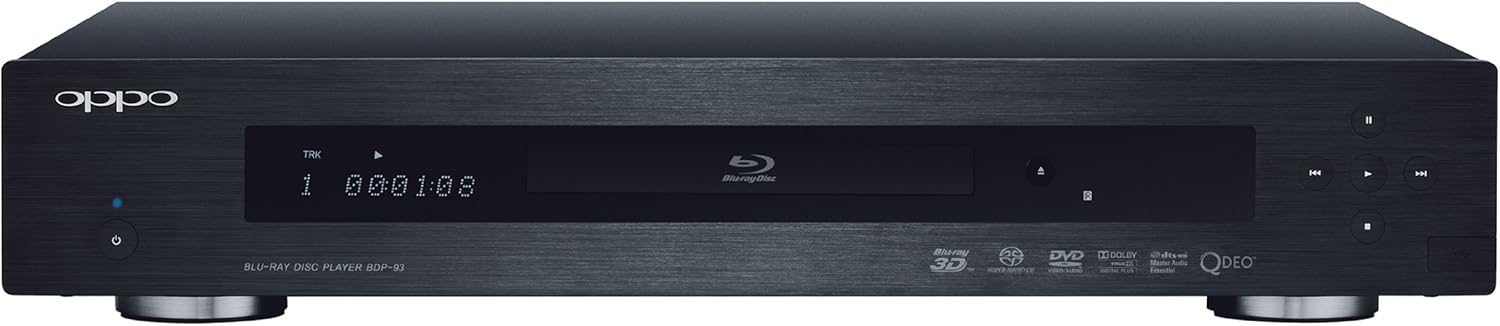
Image 3: Front Panel. This image shows the front of the OPPO BDP-93 player, featuring the disc tray, display screen, power button, and basic playback controls.
5.2 Disc Playback
- Press the Eject button on the front panel or remote to open the disc tray.
- Place a disc gently into the tray with the label side facing up.
- Press the Eject button again to close the tray. The player will automatically begin reading the disc.
- Use the remote control's playback buttons (Play, Pause, Stop, Skip) to control playback.
5.3 Playing Media from USB/eSATA Drives
Connect your USB flash drive or eSATA external hard drive to the corresponding port on the player. The player will detect the drive, and you can navigate its contents using the on-screen menu and remote control. Supported file formats include AVCHD, MP4, DivX, MKV, FLAC, and WAV.
5.4 Streaming Content
With a network connection, you can access streaming services such as Netflix.
- Ensure the player is connected to your network (wired or wireless).
- Navigate to the "Internet" or "Streaming Services" section in the player's main menu.
- Select the desired service (e.g., Netflix) and follow the on-screen prompts to log in or create an account.
5.5 Firmware Updates
OPPO regularly releases firmware updates to improve performance and add new features.
- Ensure the player is connected to the internet.
- Access the "Setup Menu" and navigate to the "Firmware Update" option.
- Follow the on-screen instructions to check for and install any available updates. Do not power off the player during an update.
6. 3D Technology Checklist
To experience Blu-ray 3D content with your BDP-93 player, ensure you have the following components:
- 3D-Ready Display: A 3D HDTV, 3D projector, or 3D computer monitor capable of displaying 3D content.
- 3D Content: Blu-ray 3D discs are required for the best 3D experience.
- 3D Glasses: Active Shutter glasses compatible with your 3D display. One pair is needed for each viewer.
- High-Speed HDMI Cable: A high-speed HDMI cable (bandwidth up to 10.2 Gbps) is necessary to transmit the 3D signal without quality loss.
7. Maintenance
To ensure the longevity and optimal performance of your OPPO BDP-93, follow these maintenance guidelines:
- Cleaning: Use a soft, dry cloth to clean the exterior of the player. Do not use liquid cleaners or abrasive materials.
- Disc Care: Handle discs by their edges. Store them in their cases to prevent scratches and dust accumulation. Clean dirty discs with a soft, lint-free cloth, wiping from the center outwards.
- Ventilation: Ensure the player's ventilation openings are not blocked to prevent overheating.
- Power Off: If the player will not be used for an extended period, disconnect it from the power outlet.
8. Troubleshooting
If you encounter issues with your BDP-93, refer to the following common problems and solutions:
- No Power:
- Check if the power cord is securely connected to the player and the wall outlet.
- Ensure the wall outlet is functioning by plugging in another device.
- No Picture:
- Verify that the HDMI or video cables are correctly connected to both the player and the display.
- Ensure the correct input source is selected on your TV or A/V receiver.
- Try a different HDMI cable.
- No Sound:
- Check audio cable connections (HDMI, analog, digital).
- Ensure the correct audio input is selected on your A/V receiver.
- Verify the player's audio settings and your receiver's volume level.
- Disc Not Playing/Reading:
- Ensure the disc is clean and free of scratches.
- Verify the disc type is supported by the player.
- Try a different disc.
- Network Connection Issues:
- For wired connections, check the Ethernet cable and your router.
- For wireless connections, ensure the wireless-N adapter is properly inserted and check your Wi-Fi password and signal strength in the player's network settings.
- Restart your router and modem.
If problems persist, please contact OPPO customer support.
9. Specifications
| Model Name | BDP-93 |
| Brand | OPPO |
| Dimensions (W x D x H) | 16.9 x 13.3 x 3 inches |
| Item Weight | 11.2 pounds |
| Power Supply | 100V - 240V, 50/60Hz AC |
| Media Type Support | Blu-Ray Disc, CD, DVD, SACD, DVD-Audio |
| Video Resolution | Up to 1920x1080 (1080p) |
| Connectivity | HDMI (x2), USB (x2), eSATA, LAN (Ethernet), Coaxial Digital Audio, Optical Digital Audio, 7.1ch Analog Audio, Composite Video, Component Video (Y/Pb/Pr), Wi-Fi (via included adapter) |
| Special Features | 3D Playback, Network Streaming, Firmware Updates |
| Included Batteries | 2 AA batteries (for remote) |
10. Warranty and Support
The OPPO BDP-93 Universal Network 3D Blu-ray Disc Player comes with a 1-year manufacturer's warranty. For technical support, service, or warranty claims, please refer to the contact information provided with your product documentation or visit the official OPPO website.
Legal Disclaimer: This unit is a USA purchased machine. The User Manual indicates BD-Video region code "A" and DVD-Video region code "1" and "ALL".


