
ALFA 22HW
ALFA 22HW Chopper Attachment Instruction Manual
Introduction
This instruction manual provides essential information for the safe and effective use of your ALFA 22HW Chopper Attachment. Please read this manual thoroughly before installation and operation, and retain it for future reference. This attachment is designed for use with compatible #22 hub meat grinders.
Safety Information
- Always ensure the main power to the meat grinder is disconnected before attaching, removing, or cleaning the chopper attachment.
- Keep hands and utensils away from moving parts during operation.
- Do not attempt to process bones or other hard, non-food items, as this can damage the attachment and the grinder.
- Ensure all parts are correctly assembled before use.
- Clean all parts thoroughly before first use and after each subsequent use.
- Store the attachment in a dry, safe place when not in use.
Product Overview
The ALFA 22HW Chopper Attachment is an economy worm designed specifically for #22 hub meat grinders. This component is crucial for the grinding process, moving food material through the grinder mechanism.
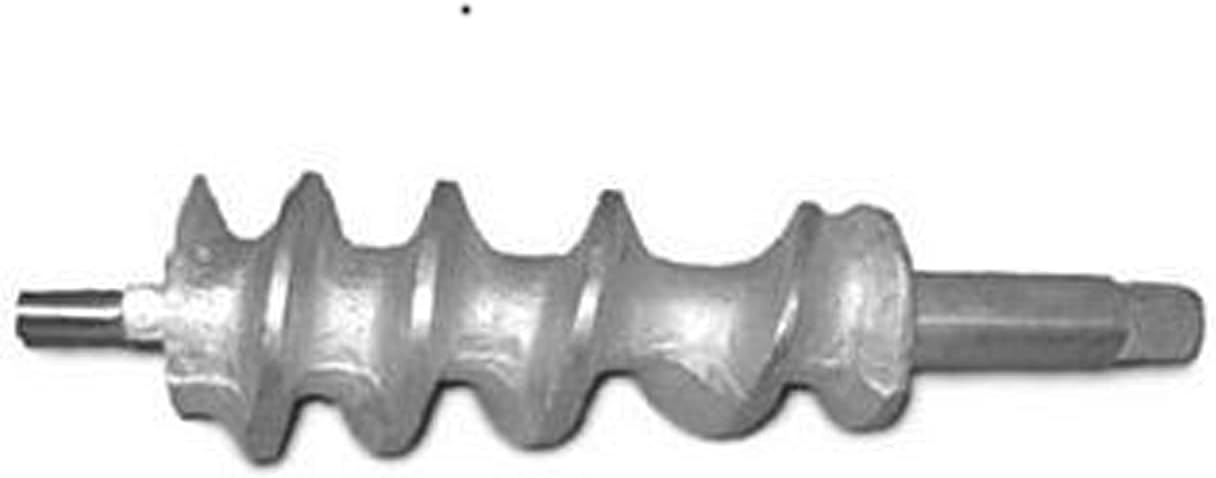
Figure 1: ALFA 22HW Chopper Attachment Worm. This image displays the metal worm component of the ALFA 22HW Chopper Attachment, featuring a helical screw design with a shaft on each end for connection to a compatible #22 hub meat grinder.
Setup Instructions
- Unpack: Carefully remove the ALFA 22HW Chopper Attachment from its packaging. Inspect for any signs of damage.
- Clean: Before first use, wash the worm thoroughly with warm, soapy water. Rinse completely and dry immediately to prevent rust.
- Prepare Grinder: Ensure your meat grinder is unplugged and clean. Refer to your meat grinder's manual for specific instructions on preparing the #22 hub.
- Insert Worm: Carefully slide the ALFA 22HW worm into the grinder housing, ensuring the square drive end aligns correctly with the grinder's drive shaft. The helical screw should face towards the front of the grinder.
- Assemble Remaining Parts: Attach the blade, grinding plate, and retaining ring/collar according to your meat grinder's instructions. Ensure all components are securely fastened.
Operating Instructions
- Prepare Food: Cut meat or other food items into pieces that fit easily into the grinder's feed tube. Remove any bones, gristle, or tough connective tissue.
- Power On: Plug in your meat grinder and turn it on.
- Feed Food: Slowly feed the prepared food into the grinder's feed tube. Use the food pusher to guide the food down, but never force it.
- Monitor Operation: Observe the grinding process. If the grinder struggles or jams, turn it off immediately.
- Turn Off: Once grinding is complete, turn off the meat grinder and unplug it from the power outlet.
Important: Never use your fingers or any non-food object to push food into the grinder. Always use the provided food pusher.
Maintenance and Cleaning
Proper maintenance and cleaning will extend the life of your ALFA 22HW Chopper Attachment.
- Disassembly: After each use, unplug the grinder and disassemble the chopper attachment by reversing the setup steps.
- Initial Rinse: Rinse all parts under cold running water to remove large food particles.
- Washing: Wash the worm and other attachment parts with warm, soapy water using a brush to remove any remaining food residue.
- Rinsing: Rinse all parts thoroughly with clean water.
- Drying: Immediately dry all metal parts completely with a clean cloth to prevent rust. Air drying is not recommended for metal components.
- Storage: Store the dry parts in a clean, dry place.
Troubleshooting
| Problem | Possible Cause | Solution |
|---|---|---|
| Grinder jams or slows down significantly. |
|
|
| Food is not grinding properly (mashing instead of cutting). |
|
|
| Rust spots appear on the worm. |
|
|
Specifications
- Model: 22HW
- Compatibility: #22 Hub Meat Grinders
- Part Type: Economy Worm
- Material: Metal (typically cast iron or stainless steel)
- Item Weight: Approximately 3 pounds (1.36 kg)
- Manufacturer: Alfa International
Warranty and Support
For warranty information or technical support regarding your ALFA 22HW Chopper Attachment, please refer to the documentation provided with your original meat grinder or contact ALFA International directly. Keep your purchase receipt as proof of purchase.
You can visit the ALFA Store for more information: ALFA Store on Amazon
Related documents22HW

Ask a question about this manual
Ask about setup, troubleshooting, compatibility, parts, safety, or missing instructions. Manuals+ will review the question and use this page’s manual context to help answer it.