
Ergotron 33-296-195
Contents
Ergotron 33-296-195 LX Triple/Dual Display Lifting Stand
Instruction Manual
1. Introduction
Thank you for choosing the Ergotron 33-296-195 LX Triple/Dual Display Lifting Stand. This manual provides essential information for the safe and efficient setup, operation, and maintenance of your new monitor stand. Designed for ergonomic comfort and enhanced productivity, this stand allows you to simultaneously lift and tilt up to three monitors, transforming your workspace with ultimate precision and efficiency.
2. Product Overview
The Ergotron LX Triple/Dual Display Lifting Stand is engineered to support multiple flat-panel displays, offering flexible positioning and a clutter-free desktop. Its robust design and Constant Force lift technology ensure smooth, effortless adjustments.
- Product Type: Triple Display Lifting Stand
- Color: Black
- Features: Recommended display size up to 21 inches per screen; Flat panel mount interface supporting VESA 100 x 100 mm and 75 x 75 mm standards; Accommodates triple flat panels; Utilizes Constant Force lift technology for easy adjustment.
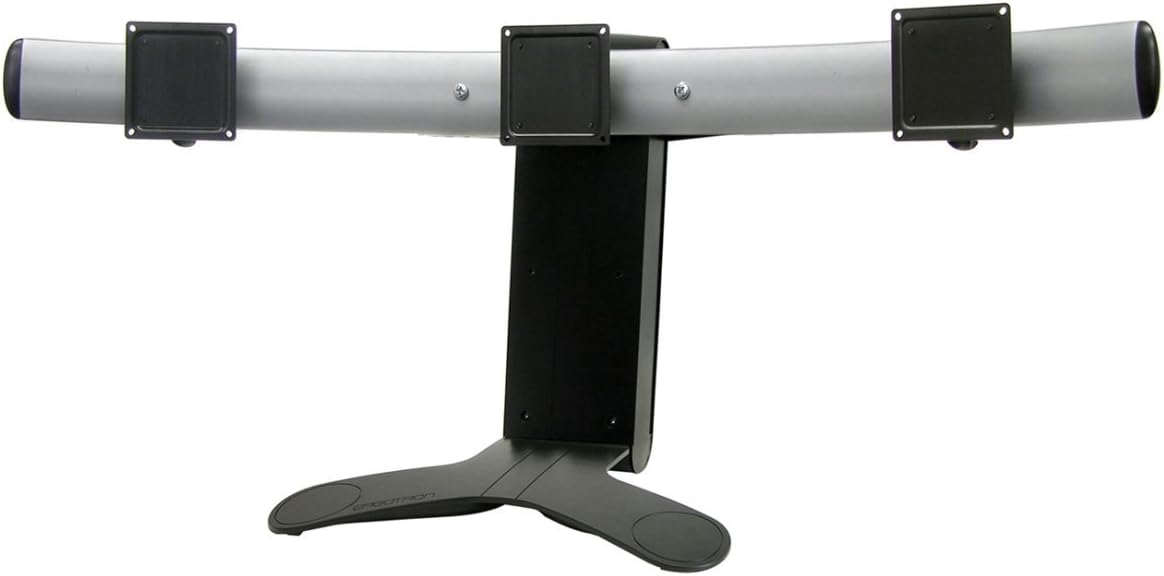
Figure 2.1: The Ergotron LX Triple/Dual Display Lifting Stand, showcasing its robust base and monitor mounting arms.

Figure 2.2: The stand supporting three monitors in a standard aligned configuration, demonstrating its multi-display capability.

Figure 2.3: The stand with three monitors, illustrating the tilt functionality of one of the displays for ergonomic viewing.

Figure 2.4: The stand configured with two monitors rotated to portrait orientation, showing the versatility for different work needs.
3. Setup Instructions
Follow these steps carefully to assemble and set up your Ergotron LX Triple/Dual Display Lifting Stand.
- Unpack Components: Carefully remove all parts from the packaging. Verify that all components listed in the packing list are present and undamaged.
- Assemble Base: Attach the vertical support column to the base using the provided screws. Ensure it is securely fastened.
- Attach Monitor Bar: Slide the horizontal monitor bar onto the top of the vertical support column. Secure it with the designated locking mechanism or screws.
- Mount Monitors: Attach your VESA-compatible monitors to the mounting plates on the horizontal bar. Ensure the VESA pattern (75x75mm or 100x100mm) matches your monitor and the stand. Secure each monitor firmly with the provided screws.
- Cable Management: Route monitor cables through the integrated cable management channels or clips on the stand to maintain a tidy workspace.
- Position Stand: Place the assembled stand on a stable, flat surface. Ensure there is adequate space for monitor movement and adjustment.
4. Operating Instructions
The Ergotron LX Triple/Dual Display Lifting Stand is designed for easy adjustment. Use the following guidelines for optimal use:
- Height Adjustment: To adjust the height, grasp the center monitor or the horizontal bar and gently lift or lower it to your desired ergonomic position. The Constant Force technology will hold it in place.
- Tilt Adjustment: Each monitor can be tilted independently. Loosen the tilt knob or lever behind the monitor, adjust the screen to your preferred angle, and then re-tighten to secure.
- Pan/Swivel: The entire monitor bar can be swiveled left or right on the vertical column. Individual monitors can also be panned slightly on their mounting plates.
- Rotation: Monitors can be rotated from landscape to portrait orientation by gently turning the screen on its mounting plate. Ensure cables have enough slack for rotation.
Always adjust monitors slowly and carefully to prevent accidental damage or injury.
5. Maintenance
Regular maintenance will ensure the longevity and optimal performance of your Ergotron LX Triple/Dual Display Lifting Stand.
- Cleaning: Use a soft, damp cloth to wipe down the stand. Avoid abrasive cleaners or solvents that could damage the finish.
- Inspection: Periodically check all screws and connections to ensure they are tight and secure. Re-tighten if necessary.
- Lubrication: The Constant Force mechanism is designed to be maintenance-free and does not require lubrication.
6. Troubleshooting
If you encounter issues with your monitor stand, refer to the following common problems and solutions:
- Monitors are not level: Ensure all monitors are securely mounted and that the horizontal bar is level. Minor adjustments can be made by slightly loosening and re-tightening the monitor mounting screws.
- Stand feels unstable: Verify that the base is placed on a flat, stable surface and that all base assembly screws are fully tightened. Ensure the total weight of your monitors does not exceed the stand's maximum weight capacity.
- Difficulty adjusting height: Check if any cables are snagged or obstructing movement. Ensure the Constant Force mechanism is not locked (if applicable, though typically it's always active). If the issue persists, contact customer support.
7. Specifications
| Attribute | Detail |
|---|---|
| Brand | Ergotron |
| Model | 33-296-195 |
| Color | Black |
| Product Dimensions | 114.3 x 48.26 x 19.69 cm (45 x 19 x 7.75 inches) |
| Product Weight | 18.89 kg (41.65 lbs) |
| Manufacturer | Ergotron |
| Recommended Display Size | Up to 21 inches per display |
| VESA Compatibility | 75x75mm, 100x100mm |
| Date First Available | January 4, 2016 |
8. Warranty and Support
Warranty: The Ergotron 33-296-195 LX Triple/Dual Display Lifting Stand comes with a 5-year warranty from the date of purchase. This warranty covers defects in materials and workmanship under normal use.
Customer Support: For technical assistance, troubleshooting beyond this manual, or warranty claims, please contact Ergotron customer support through their official website or the contact information provided with your purchase. Please have your model number (33-296-195) and purchase date ready when contacting support.
Documents and downloads
Ask a question about this manual
Ask about setup, troubleshooting, compatibility, parts, safety, or missing instructions. Manuals+ will review the question and use this page’s manual context to help answer it.