
1. Introduction
Thank you for purchasing the Ariete Saladino Cordless Vegetable Slicer. This innovative appliance is designed to simplify your food preparation by allowing you to quickly and efficiently slice a variety of vegetables directly into your serving bowl or cooking pot. Its cordless design offers maximum flexibility and ease of use in any kitchen setting. Please read this manual carefully before first use to ensure safe and optimal operation of your new appliance.
2. Safety Instructions
To prevent injury or damage to the appliance, always observe the following safety precautions:
- Read all instructions: Familiarize yourself with the appliance's operation before use.
- Sharp Blades: The slicing discs are extremely sharp. Handle them with extreme care, especially during assembly, disassembly, and cleaning. Always hold discs by the plastic center.
- Keep fingers clear: Never insert fingers or other utensils into the feeding chute while the appliance is operating. Use the food pusher provided.
- Children and Pets: Keep the appliance out of reach of children and pets. This appliance is not intended for use by persons with reduced physical, sensory, or mental capabilities unless supervised.
- Power Source: Only use the original charger provided with the appliance. Ensure the voltage matches your power supply (230V).
- Water and Moisture: Do not immerse the main unit in water or any other liquid. Do not operate with wet hands.
- Damage: Do not operate the appliance if the cord, plug, or appliance itself is damaged. Contact customer support for repair.
- Proper Use: Use the appliance only for its intended purpose of slicing vegetables. Do not attempt to slice hard items like bones, frozen foods, or coffee beans.
- Unplug when not in use: Always unplug the charger from the wall outlet when the appliance is not in use, before cleaning, or before assembling/disassembling parts.
- Ventilation: Ensure proper ventilation around the appliance during operation.
3. Product Overview
The Ariete Saladino Cordless Vegetable Slicer consists of several key components designed for ease of use and versatility:
- Main Unit: Houses the motor and battery.
- Feeding Chute: Where vegetables are inserted for slicing.
- Food Pusher: Used to guide vegetables into the blades safely.
- Transparent Lid: Covers the slicing disc area.
- Slicing Discs (4 included):
- Thick Slice Disc
- Thin Slice Disc
- Julienne Disc
- Wavy Slice Disc
- Charging Adapter: For recharging the internal battery.
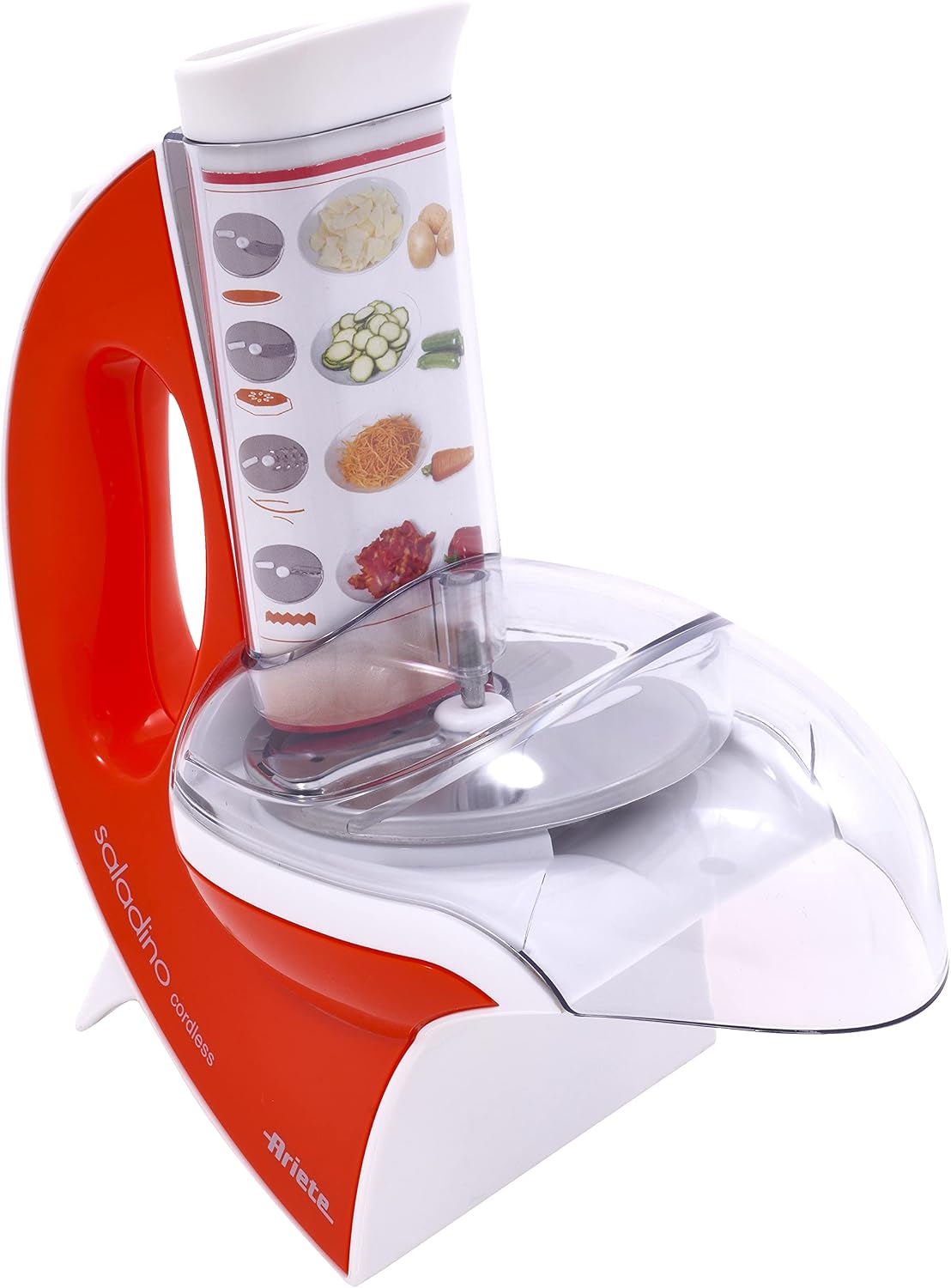
Figure 3.1: Overall view of the Ariete Saladino Cordless Vegetable Slicer, showing the main unit, feeding chute, and transparent lid.

Figure 3.2: The Saladino slicer with one of its interchangeable stainless steel slicing discs displayed separately.

Figure 3.3: Rear view of the Saladino slicer, illustrating the charging port and the included power adapter.
4. Setup
Before using your Ariete Saladino for the first time, follow these steps:
- Unpack: Carefully remove all components from the packaging. Retain packaging for future storage or transport.
- Clean: Wash all removable parts (slicing discs, transparent lid, food pusher) with warm soapy water, rinse thoroughly, and dry completely. The main unit should be wiped with a damp cloth.
- Charge Battery: Connect the charging adapter to the charging port on the back of the main unit and plug it into a 230V wall outlet. Allow the unit to fully charge before first use. The charging indicator light (if present) will show charging status.
- Assemble: Place the desired slicing disc onto the spindle inside the main unit, ensuring it sits securely. Place the transparent lid over the disc and align it properly.
5. Operating Instructions
Using your Ariete Saladino is straightforward:
- Prepare Vegetables: Wash and peel vegetables as needed. Cut larger vegetables into pieces that fit comfortably into the feeding chute.
- Position Appliance: Place the slicer on a stable, flat surface. Position a bowl or plate directly under the slicing outlet to collect the sliced food.
- Insert Disc: Ensure the correct slicing disc is securely installed.
- Start Slicing: Turn on the appliance using the power switch. Carefully place a piece of vegetable into the feeding chute.
- Use Food Pusher: Gently press the vegetable down using the food pusher. Do not apply excessive force. The appliance will automatically slice the vegetable.
- Continue Slicing: Repeat the process for all vegetables.
- Turn Off: Once finished, turn off the appliance and unplug the charger if it was connected.
Tips for Best Results:
- For firm vegetables like carrots or potatoes, apply steady, even pressure with the food pusher.
- For softer vegetables, a lighter touch may be sufficient.
- Ensure the battery is fully charged for optimal performance.
6. Maintenance and Cleaning
Regular cleaning ensures the longevity and hygiene of your Ariete Saladino:
- Disconnect Power: Always ensure the appliance is turned off and disconnected from the charging adapter before cleaning.
- Disassemble: Remove the transparent lid and the slicing disc.
- Wash Removable Parts: The slicing discs, transparent lid, and food pusher are dishwasher safe. Alternatively, they can be washed by hand with warm soapy water. Rinse thoroughly to remove all soap residue.
- Clean Main Unit: Wipe the exterior of the main unit with a damp cloth. Do not immerse the main unit in water.
- Dry Completely: Ensure all parts are completely dry before reassembling or storing the appliance.
- Storage: Store the appliance and its accessories in a clean, dry place, away from direct sunlight and extreme temperatures.
7. Troubleshooting
If you encounter issues with your Ariete Saladino, refer to the following common problems and solutions:
| Problem | Possible Cause | Solution |
|---|---|---|
| Appliance does not turn on. | Battery is not charged. | Charge the appliance fully using the provided adapter. |
| Blades spin slowly or stop during slicing. | Battery low; vegetable too hard or too large; blades jammed by residue. | Recharge the battery. Cut vegetables into smaller pieces. Clean the blades and disc area thoroughly. |
| Slices are uneven or jammed. | Improper disc installation; vegetable not properly positioned; residue build-up. | Ensure the slicing disc is correctly and securely installed. Guide vegetables straight into the chute. Clean the appliance. |
| Appliance makes unusual noise. | Foreign object inside; component not properly assembled. | Turn off and unplug. Check for any foreign objects. Reassemble all parts correctly. If noise persists, discontinue use. |
8. Specifications
| Feature | Detail |
|---|---|
| Brand | Ariete |
| Model Number | AR1789-OR |
| Color | Orange |
| Product Dimensions | 26 x 13 x 24 cm (10.2 x 5.1 x 9.4 inches) |
| Voltage | 230 Volts |
| Material | Stainless Steel |
| Special Features | Cordless, Rechargeable, Multi-use, Easy to Clean, 4 Stainless Steel Slicing Discs |
| Item Weight | 1 Kilogram (2.2 pounds) |
| Recommended Uses | Vegetables |
| Care Instructions | Dishwasher Safe |
| Blade Material | Stainless Steel |
| Blade Shape | V-shape |
| Operation Mode | Automatic |
9. Warranty and Support
Your Ariete Saladino Cordless Vegetable Slicer comes with a one-year warranty from the date of purchase, covering manufacturing defects. Please retain your proof of purchase for warranty claims.
For technical support, spare parts, or warranty service, please contact Ariete customer service through their official website or the retailer where you purchased the product. Do not attempt to repair the appliance yourself, as this will void the warranty.