
1. Introduction
Welcome to the user manual for your Thule Dynamic 900 Roof Box. This guide provides essential information to ensure safe and effective use of your new cargo solution. Please read all instructions carefully before installation and operation to prevent damage and ensure your safety.
The Thule Dynamic 900 is a sporty, aerodynamic, and sleek cargo box designed to integrate seamlessly with your vehicle's roof, offering significant additional storage capacity without compromising aesthetics or performance.
2. Product Overview
Key Features
- Sporty, aerodynamically designed with diffuser technology to optimize air flow around the box and a roof-hugging baseline to fit your car roof.
- Fast and secure fitting using only one hand due to pre-installed Power-Click quick-mount system with integrated torque indicator.
- Convenient mounting, loading, and unloading, thanks to dual side opening with outside lid handles.
- Central Locking system provides maximum safety and the grip-friendly Thule Comfort key can only be removed if all locking points are securely closed.
- Full access to your car’s trunk without interference as the roof box is designed for a forward position on the car roof.
Components Included
- Thule Dynamic 900 Roof Box
- Installation Kit
- Clamps (part of Power-Click system)
- Thule Comfort Key

Figure 2.1: Front view of the Thule Dynamic 900 Roof Box, showcasing its sleek, aerodynamic design.

Figure 2.2: Side profile of the Thule Dynamic 900 Roof Box, highlighting its low-profile and integrated appearance.
3. Setup and Installation
3.1 Before Installation
- Ensure your vehicle is equipped with a compatible roof rack system (Thule recommends Thule WingBar Edge for optimal fit and height).
- Verify the maximum permissible roof load for your vehicle as specified in your car's owner's manual. The total weight of the roof box, its contents, and the roof rack must not exceed this limit.
- Clean the roof rack bars where the box will be mounted.
3.2 Installation Steps
- Carefully lift the roof box onto your vehicle's roof rack. Position it centrally and as far forward as possible to allow full access to the vehicle's trunk.
- Open the roof box lid. Locate the Power-Click quick-mount system clamps inside the box.
- Rotate the Power-Click knobs (Figure 3.1) until the clamps firmly grip the roof rack bars. The integrated torque indicator will click when the optimal tightness is reached, ensuring a secure fit without overtightening.
- Repeat for all four Power-Click clamps.
- Close the lid and ensure all locking points are engaged. The Thule Comfort key can only be removed when the box is securely locked.
- Before driving, gently push and pull on the roof box to confirm it is securely attached to the roof rack.

Figure 3.1: A hand demonstrating the operation of the Power-Click quick-mount system, which provides fast and secure attachment to roof bars.
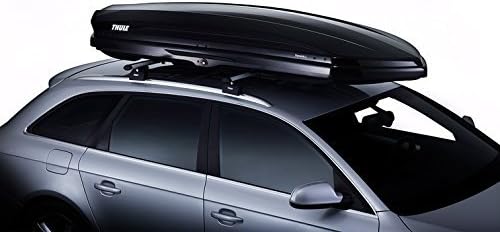
Figure 3.2: The Thule Dynamic 900 Roof Box securely mounted on a vehicle, demonstrating its forward position for trunk access.
4. Operating Instructions
4.1 Opening and Closing
The Thule Dynamic 900 features a dual-side opening mechanism for convenient access from either side of the vehicle. To open, insert the Thule Comfort key into the lock and turn. Lift the lid using the outside lid handles. To close, lower the lid and ensure it clicks into place. Turn the key to lock. The key can only be removed when all locking points are securely engaged.
4.2 Loading and Unloading
- Distribute the load evenly inside the box. Heavy items should be placed in the center, directly over the roof rack bars.
- Secure items using the integrated load straps or other suitable restraints to prevent shifting during transit.
- Do not exceed the maximum load capacity of the roof box (refer to specifications).
- Ensure the lid can close completely and securely without forcing it.
4.3 Driving with the Roof Box
- Adjust your driving style: Be aware of the increased height and wind resistance. Reduce speed, especially in strong winds, when cornering, and when braking.
- Observe height restrictions: Always be mindful of the increased vehicle height when entering garages, carports, or low-clearance areas.
- Check security: Periodically check the security of the roof box and its contents during long journeys.
5. Maintenance
5.1 Cleaning
Clean the roof box regularly with mild soap and water. Avoid abrasive cleaners or solvents that could damage the finish. Rinse thoroughly and dry completely before storage.
5.2 Storage
When not in use, store the roof box in a dry, cool place, away from direct sunlight. If storing vertically, ensure it is properly supported to prevent warping or damage.
5.3 Inspection
Before each use, inspect the roof box for any signs of damage, cracks, or wear. Check the integrity of the locking mechanism and the Power-Click clamps. Do not use the box if any components are damaged.
6. Troubleshooting
6.1 Key Cannot Be Removed
Issue: The Thule Comfort key cannot be removed from the lock.
Solution: This is a safety feature. The key can only be removed when all locking points on the roof box are securely closed and engaged. Ensure the lid is fully closed and pressed down firmly, then try turning the key to the locked position and removing it.
6.2 Box Feels Loose After Installation
Issue: The roof box feels loose or wobbly on the roof rack after installation.
Solution: Re-check all four Power-Click quick-mount system knobs. Ensure they have clicked, indicating optimal tightness. If the issue persists, verify that the roof rack bars are correctly installed and tightened according to their own manual.
6.3 Difficulty Closing Lid
Issue: The lid is difficult to close or does not close completely.
Solution: Check for overloaded contents or items obstructing the closing mechanism. Ensure items are properly secured and not protruding. Redistribute the load if necessary.
7. Technical Specifications
| Specification | Value |
|---|---|
| Model Name | Thule Dynamic L - Black |
| Item Model Number | 612900 |
| Colour | Black Glossy |
| Item Volume | 430 Litres |
| Product Dimensions (L x W x H) | 235 x 94 x 35 cm |
| Item Weight | 23 kg |
| Shell Type | Hard |
| Closure Type | Latch / Lock (Central Locking System) |
| Water Resistance Level | Water Resistant |
| Mounting Type | PowerClick Quick-Mount System |

Figure 7.1: Comparison chart illustrating various Thule roof box models and their dimensions, including the Thule Dynamic series.
8. Warranty and Support
8.1 Warranty Information
Thule products are tested and are subject to strict quality controls. Thule guarantees all products against defects in material and workmanship. For detailed warranty terms and conditions, please refer to the official Thule website or contact Thule customer support.
8.2 Customer Support
For further assistance, technical support, or spare parts, please visit the official Thule website or contact your local Thule dealer. You can find more information and contact details at www.thule.com.
