
Quantum J-32U Portable CD/MP3 Player, USB, Radio, and Cassette Recorder User Manual
Model: J-32U
1. Introduction
Thank you for purchasing the Quantum J-32U Portable CD/MP3 Player, USB, Radio, and Cassette Recorder. This device is designed to provide versatile audio playback and recording capabilities in a compact, portable unit. Please read this manual thoroughly before operating the unit to ensure proper use and to maximize its performance.
Keep this manual for future reference.
2. Important Safety Instructions
- Power Source: Operate the unit only from the power source indicated on the marking label.
- Ventilation: Do not block any ventilation openings. Install in accordance with the manufacturer's instructions.
- Water and Moisture: Do not use this apparatus near water or moisture.
- Cleaning: Clean only with a dry cloth.
- Heat: Do not install near any heat sources such as radiators, heat registers, stoves, or other apparatus (including amplifiers) that produce heat.
- Servicing: Refer all servicing to qualified service personnel. Servicing is required when the apparatus has been damaged in any way.
- Batteries: Dispose of used batteries according to local regulations. Do not expose batteries to excessive heat.
3. Package Contents
Please check that the following items are included in your package:
- Quantum J-32U Portable Audio System
- AC Power Cord
- User Manual (this document)
4. Product Overview
4.1 Front Panel
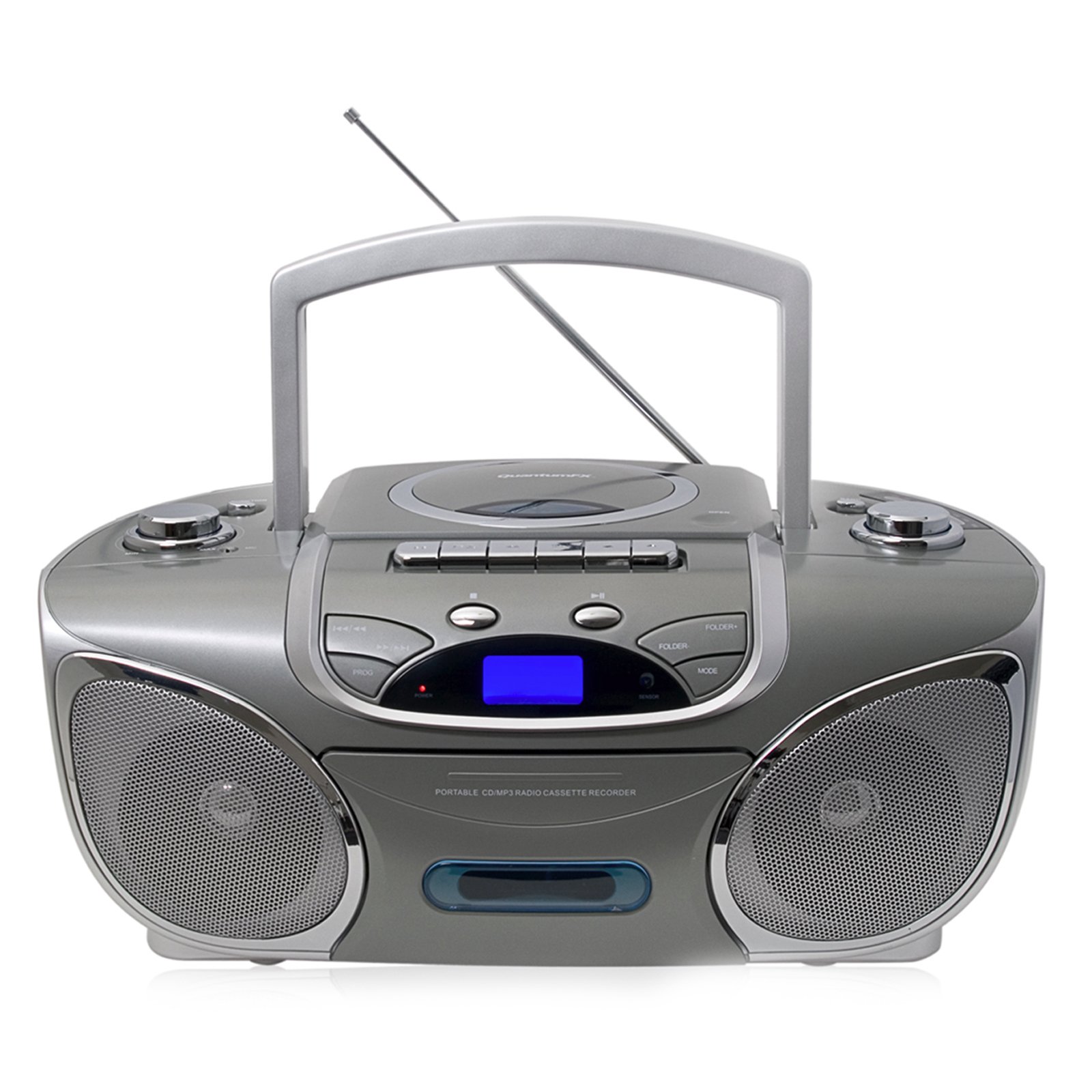
Image: Front view of the Quantum J-32U, showing the speaker grilles, display, and control buttons.
- Speakers: Stereo speakers for audio output.
- LCD Display: Shows current mode, track number, and radio frequency.
- Function Buttons: Play/Pause, Stop, Skip/Search (Forward/Backward).
- Volume Control: Rotary knob to adjust audio output level.
- Mode Button: Selects between CD, USB/SD, Radio, and Cassette modes.
4.2 Top Panel
Image: Top view of the Quantum J-32U, highlighting the CD compartment, cassette deck, USB port, and SD/MMC slot.
- CD Compartment: Top-loading CD/MP3 disc tray.
- Cassette Deck: For playing and recording cassette tapes.
- USB Port: For connecting USB flash drives.
- SD/MMC Card Slot: For inserting SD or MMC memory cards.
- Tuning Knob: For manual radio frequency selection.
- Cassette Control Buttons: Play, Record, Fast Forward, Rewind, Stop/Eject.
4.3 Rear Panel
Image: Rear view of the Quantum J-32U, showing the AC power input and battery compartment.
- AC Power Input: Connect the supplied AC power cord here.
- Battery Compartment: For inserting batteries for portable operation.
- FM Antenna: Telescopic antenna for FM radio reception.
5. Setup
5.1 Powering the Unit
The J-32U can be powered by AC mains or batteries.
AC Power
- Ensure the unit is turned off.
- Connect the supplied AC power cord to the AC power input on the rear panel of the unit.
- Plug the other end of the AC power cord into a standard wall outlet.
Battery Power
- Open the battery compartment cover on the rear panel.
- Insert the required number of "C" size batteries (not included), ensuring correct polarity (+/-).
- Close the battery compartment cover securely.
- Note: Disconnect the AC power cord when operating on batteries.
6. Operating Instructions
6.1 General Operation
- Power On/Off: Press the POWER button to turn the unit on or off.
- Mode Selection: Press the MODE button repeatedly to cycle through CD, USB/SD, Radio (AM/FM), and Cassette modes.
- Volume Adjustment: Rotate the VOLUME knob to increase or decrease the sound level.
6.2 CD/MP3 Playback
- Press the MODE button to select CD mode.
- Open the CD compartment cover.
- Place a CD or MP3 CD with the label side facing up.
- Close the CD compartment cover. The unit will read the disc.
- Press the PLAY/PAUSE button to start playback.
- Press SKIP FORWARD or SKIP BACKWARD to navigate tracks.
- Press and hold SKIP FORWARD or SKIP BACKWARD to fast forward or rewind within a track.
- Press the STOP button to stop playback.
6.3 USB/SD/MMC Playback
- Insert a USB flash drive into the USB port or an SD/MMC card into the card slot.
- Press the MODE button to select USB/SD mode. The unit will automatically detect and begin playing MP3 files.
- Use PLAY/PAUSE, STOP, SKIP FORWARD, and SKIP BACKWARD buttons as with CD playback.
6.4 Radio Operation (AM/FM Stereo)
- Press the MODE button to select Radio mode.
- Extend the FM telescopic antenna for better FM reception. For AM, rotate the unit for optimal reception.
- Rotate the TUNING knob to select your desired radio station.
- The frequency will be displayed on the LCD screen.
6.5 Cassette Playback and Recording
Playback
- Press the MODE button to select Cassette mode.
- Press the STOP/EJECT button to open the cassette deck.
- Insert a cassette tape and close the deck.
- Press the PLAY button to start playback.
- Use FAST FORWARD or REWIND buttons to navigate the tape.
- Press STOP/EJECT to stop playback.
Recording (from CD/USB/SD/Radio)
- Insert a blank cassette tape into the cassette deck.
- Select the desired source (CD, USB/SD, or Radio) using the MODE button.
- Start playback on the source (e.g., play a CD track, tune to a radio station).
- While the source is playing, press the RECORD button on the cassette deck. The PLAY button will also engage.
- To stop recording, press the STOP/EJECT button.
- Note: Ensure the cassette tape has its record protection tabs intact for recording.
7. Maintenance
- Cleaning the Unit: Use a soft, dry cloth to clean the exterior of the unit. Do not use abrasive cleaners or solvents.
- CD Lens Cleaning: If CD playback becomes erratic, use a commercially available CD lens cleaner disc to clean the laser lens.
- Cassette Head Cleaning: Periodically clean the cassette deck's heads, pinch rollers, and capstan with a cotton swab lightly dampened with isopropyl alcohol.
- Storage: When not in use for extended periods, disconnect the AC power cord and remove batteries. Store the unit in a cool, dry place.
8. Troubleshooting
| Problem | Possible Cause | Solution |
|---|---|---|
| No power | AC cord not connected; Batteries depleted or incorrectly inserted. | Check AC cord connection; Replace batteries or ensure correct polarity. |
| No sound | Volume too low; Incorrect mode selected. | Increase volume; Press MODE to select correct source. |
| CD skips or does not play | Disc dirty or scratched; CD compartment not closed; Disc inserted incorrectly. | Clean or replace disc; Close CD compartment firmly; Insert disc label side up. |
| Poor radio reception | Antenna not extended; Unit position. | Extend FM antenna fully; Rotate unit for better AM reception. |
| Cassette tape not playing/recording | Tape incorrectly inserted; Record protection tab removed (for recording). | Ensure tape is correctly inserted; Cover record protection tab with tape for recording. |
9. Specifications
- Model: J-32U
- Power Source: AC 120V ~ 60Hz or DC 9V (6 x "C" size batteries)
- CD Player: Top-loading CD/MP3 compatible
- USB/SD/MMC: Supports MP3 audio playback
- Radio Frequencies: AM/FM Stereo
- Cassette Deck: Playback and Recording function
- Speakers: Stereo
- Compatible Devices: MP3 Player, Smartphone (via USB/SD for file playback, not direct audio input)
- GTIN: 606540009864
10. Warranty and Support
Quantum products are designed for reliability and performance. For warranty information, please refer to the warranty card included with your purchase or visit the official Quantum website. For technical support or service inquiries, please contact Quantum customer service.
Online Support: www.quantumfx.com/support (Note: This is a placeholder URL as no specific support link was provided.)
Customer Service: Refer to your product packaging or warranty card for contact details.
