
1. Introduction
Thank you for purchasing the Alaska BM2600 Bread Maker. This appliance is designed to simplify the process of baking fresh, homemade bread. Please read this instruction manual carefully before using the bread maker to ensure safe and efficient operation. Keep this manual for future reference.
2. Important Safety Instructions
- Always ensure the appliance is unplugged from the power outlet before cleaning or when not in use.
- Do not immerse the appliance, cord, or plug in water or any other liquid.
- This appliance is not intended for use by persons (including children) with reduced physical, sensory, or mental capabilities, or lack of experience and knowledge, unless they have been given supervision or instruction concerning use of the appliance by a person responsible for their safety.
- Do not operate any appliance with a damaged cord or plug, or after the appliance malfunctions or has been damaged in any manner.
- Avoid contact with moving parts.
- Do not place the appliance on or near a hot gas or electric burner, or in a heated oven.
- Do not use the appliance for other than intended use.
- Always handle the bread pan and kneading paddle with care, especially when hot. Use oven mitts.
3. Product Overview
The Alaska BM2600 Bread Maker features a compact design with an intuitive control panel and an LCD display for easy operation. It includes a removable bread pan and a kneading paddle for efficient mixing.
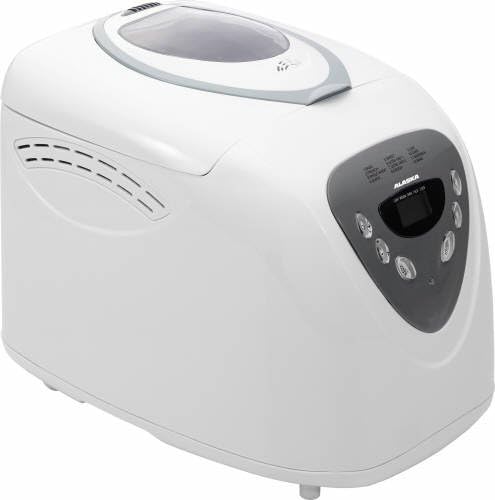
Figure 1: Overall view of the Alaska BM2600 Bread Maker. The appliance is white with a grey control panel on the front and a viewing window on the lid.
3.1 Control Panel and Display
The control panel allows you to select programs, adjust settings, and start/stop the baking process. The LCD display shows the selected program, time remaining, crust color, and loaf size.

Figure 2: Close-up of the Alaska BM2600 Bread Maker control panel. It features an LCD screen displaying '7:06' and buttons for 'MENU', 'LOAF SIZE', 'COLOR', and 'START/STOP'. Program numbers 1-12 are listed above the display.
Key controls include:
- MENU: Selects one of the 12 available programs.
- LOAF SIZE: Adjusts the loaf size (e.g., 1.5lb, 2.0lb).
- COLOR: Selects the desired crust browning (Light, Medium, Dark).
- START/STOP: Initiates or cancels a program.
- LCD Display: Shows program number, time, crust color, and loaf size settings.
4. Setup
- Unpacking: Carefully remove the bread maker and all accessories from the packaging.
- Initial Cleaning: Wash the bread pan and kneading paddle with warm, soapy water. Rinse thoroughly and dry completely. Wipe the exterior of the appliance with a damp cloth.
- Placement: Place the bread maker on a stable, flat, heat-resistant surface, away from direct sunlight and heat sources. Ensure adequate ventilation around the appliance.
- Insert Bread Pan: Place the clean bread pan into the bread maker, ensuring it is securely locked in position.
- Power Connection: Plug the power cord into a grounded electrical outlet (230V, 50Hz). The appliance will beep, and the default program will appear on the LCD display.
5. Operating Instructions
5.1 Adding Ingredients
Always add ingredients in the order specified by your recipe, typically liquids first, then dry ingredients, and finally yeast. Ensure the kneading paddle is correctly installed in the bread pan before adding ingredients.
5.2 Program Selection
The Alaska BM2600 offers 12 programs for various bread types and functions:
- BASIC: For white and mixed breads.
- FRENCH: For light breads made from fine flour.
- WHOLE WHEAT: For whole wheat breads.
- QUICK: For quick baking of white bread.
- SWEET: For sweet breads with additives like fruit or sugar.
- ULTRA FAST-I: Very fast baking cycle for smaller loaves.
- ULTRA FAST-II: Very fast baking cycle for larger loaves.
- DOUGH: Prepares dough for rolls, pizza, or pastries without baking.
- JAM: For making homemade jams.
- CAKE: For baking cakes and quick breads.
- SANDWICH: For light, fluffy sandwich bread.
- BAKE: For additional baking time or to bake pre-made dough.
Press the MENU button repeatedly to cycle through the programs until the desired program number appears on the LCD display.
5.3 Loaf Size and Crust Color
- Loaf Size: Press the LOAF SIZE button to select the desired loaf weight (e.g., 1.5lb or 2.0lb, corresponding to approximately 900g maximum capacity).
- Crust Color: Press the COLOR button to choose between Light, Medium, or Dark crust browning.
5.4 Delay Timer Function
The programmable timer allows you to delay the start of the baking process by up to 13 hours. This is useful for having fresh bread ready at a specific time. After selecting your program, loaf size, and crust color, use the time adjustment buttons (often integrated with MENU or separate +/- buttons, refer to specific model for exact buttons) to set the delay time. Then press START/STOP.
5.5 Starting and Stopping
- Start: Once all settings are configured, press the START/STOP button. The bread maker will begin its cycle.
- Stop/Cancel: To stop or cancel a program, press and hold the START/STOP button for a few seconds until the machine resets.
5.6 Keep Warm Function
After the baking cycle is complete, the bread maker will automatically switch to a 1-hour keep warm function to maintain the bread's temperature. The display will show '0:00' and then count up for the keep warm period. After 1 hour, the machine will beep and turn off.
6. Recipes
The Alaska BM2600 Bread Maker is versatile and can produce a variety of bread types. While specific recipes are typically provided in a separate recipe booklet, here are examples of bread types you can make:
- White Bread
- Walnut and Raisin Bread
- Poppy Seed Bread
- Coarse White Bread
- French White Bread
- Oat Bread
- Buttermilk Bread
- Sweet Bread
Always follow a reliable bread maker recipe for best results, paying close attention to ingredient measurements and order.
7. Maintenance and Cleaning
Regular cleaning ensures the longevity and optimal performance of your bread maker.
- Unplug: Always unplug the appliance and allow it to cool completely before cleaning.
- Bread Pan and Kneading Paddle: Remove the bread pan and kneading paddle. Wash them with warm, soapy water. If the kneading paddle is stuck, fill the pan with warm water and let it soak for about 30 minutes before attempting to remove it. Do not use abrasive cleaners or metal scouring pads.
- Exterior: Wipe the exterior of the bread maker with a soft, damp cloth. Do not use harsh chemicals or abrasive cleaners.
- Interior: Clean the interior of the baking chamber with a damp cloth. Remove any crumbs or flour residue.
- Storage: Ensure all parts are completely dry before reassembling and storing the bread maker in a clean, dry place.
8. Troubleshooting
If you encounter issues with your Alaska BM2600 Bread Maker, refer to the following common problems and solutions:
- Bread does not rise: Check yeast freshness, ensure correct ingredient measurements, verify water temperature (not too hot or cold), and confirm the correct program was selected.
- Bread is too dense: This can be due to too much flour, too little liquid, or inactive yeast. Ensure accurate measurements.
- Kneading paddle stuck in bread: Allow the bread to cool slightly, then carefully remove the paddle using a non-metallic utensil. Soaking the pan in warm water can help loosen it for cleaning.
- Machine does not start: Ensure the power cord is securely plugged in and the bread pan is correctly seated. Check your household circuit breaker.
- Uneven crust color: Ensure the bread maker is placed on a level surface and that the crust color setting is appropriate for your recipe.
For persistent issues, please contact customer support.
9. Specifications
- Model: Alaska BM2600
- Power: 600 Watts
- Voltage: 230 Volts
- Frequency: 50 Hz
- Maximum Loaf Capacity: 900g
- Programs: 12 automatic programs
- Timer: Up to 13-hour programmable delay timer
- Keep Warm Function: 1 hour automatic
- Crust Settings: Light, Medium, Dark
10. Warranty and Support
Warranty information for the Alaska BM2600 Bread Maker is typically provided with your purchase documentation or can be found on the manufacturer's official website. Please retain your proof of purchase for warranty claims.
For technical support, spare parts, or service inquiries, please contact Alaska customer service through their official channels. Contact details are usually available in the product packaging or on the brand's website.
