
1. Introduction
The Hitech iC-808UL-LCD is an advanced 8-bank smart quick charger and discharger designed for Ni-MH and Ni-CD AA and AAA rechargeable batteries. It features individual charging channels, an LCD display for status monitoring, and multiple safety protections to ensure efficient and safe battery management. This manual provides essential information for the proper use and maintenance of your charger.
2. Safety Information
- Use only Ni-MH or Ni-CD rechargeable batteries. Do not attempt to charge alkaline, carbon-zinc, or any other non-rechargeable battery types, as this may lead to leakage, rupture, or explosion.
- Do not disassemble or modify the charger. Unauthorized modifications can result in electric shock, fire, or damage to the unit.
- Avoid exposing the charger to water, high humidity, or extreme temperatures. Operate in a dry, well-ventilated area.
- Keep the charger out of reach of children.
- Unplug the charger from the power outlet when not in use or before cleaning.
- Ensure proper battery polarity (+/-) when inserting batteries into the charging slots. Incorrect insertion can damage the charger and batteries.
- Do not cover the charger during operation to prevent overheating.
3. Package Contents
Verify that all items are present in the package:
- Hitech iC-808UL-LCD Charger/Discharger Unit
- AC Power Adapter (100V-240V universal voltage)
- Car DC Charger
4. Product Overview
The Hitech iC-808UL-LCD charger features eight independent charging slots, two LCD displays, and two refresh buttons. It is designed for simultaneous charging or discharging of AA and AAA batteries.
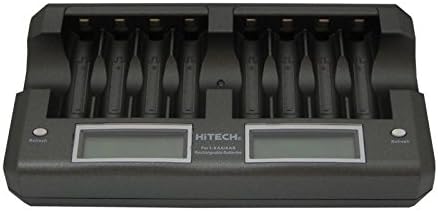
Figure 1: Front view of the Hitech iC-808UL-LCD charger with all eight battery slots empty. The two LCD screens and two 'Refresh' buttons are visible.
Components:
- Charging Slots (1-8): Eight individual slots for AA or AAA batteries.
- LCD Displays: Two LCD screens, each displaying the status for four battery slots.
- Refresh Buttons: Two buttons, one for each bank of four slots, to initiate the discharge/refresh cycle.
- Power Input: Located at the rear for connecting the AC adapter or car DC charger.
5. Setup
- Connect Power: Plug the AC power adapter into a standard wall outlet and then into the charger's power input port. Alternatively, use the car DC charger for in-vehicle use.
- Initial Check: The LCD displays will briefly illuminate, indicating the charger is powered on and ready for use.
6. Operating Instructions
6.1. Charging Batteries
- Insert Batteries: Place 1 to 8 AA or AAA Ni-MH/Ni-CD rechargeable batteries into the charging slots, ensuring correct polarity (+/-). The charger can accommodate a mix of AA and AAA batteries simultaneously.
- Automatic Detection: The charger will automatically detect the battery type and capacity, and begin charging. The LCD display for each slot will show the charging status.
- Charging Indication: The LCD will display a charging icon or progress bar. Once charging is complete, the display will indicate 'FULL' or a similar completion status.
- Remove Batteries: Once charging is complete, remove the batteries from the charger.

Figure 2: The Hitech iC-808UL-LCD charger with eight AA batteries inserted into the charging slots. The LCD screens are illuminated, indicating active charging.
6.2. Discharging / Refreshing Batteries
The refresh function helps to eliminate memory effect in Ni-CD batteries and can improve the performance and lifespan of Ni-MH batteries by fully discharging them before recharging.
- Insert Batteries: Place batteries into the desired slots (up to 4 per bank).
- Initiate Refresh: Press the 'Refresh' button corresponding to the bank of batteries you wish to refresh. The LCD will indicate a discharge cycle (e.g., a downward arrow or 'DISCH').
- Automatic Cycle: The charger will fully discharge the batteries, then automatically switch to a charging cycle.
- Completion: Once the refresh and subsequent charge cycle are complete, the LCD will indicate 'FULL'.
6.3. LCD Indicators
The LCD displays provide real-time information about the status of each battery:
- Charging Icon/Progress Bar: Indicates that the battery is currently charging.
- 'FULL': The battery is fully charged.
- 'DISCH' / Downward Arrow: The battery is currently discharging during a refresh cycle.
- Flashing Icon / 'ERROR': Indicates a problem such as an incompatible battery (e.g., alkaline), incorrectly inserted battery, short circuit, or a defective battery. Remove the battery and re-insert correctly or replace if defective.
6.4. Estimated Charging Times
Actual charging times may vary based on battery capacity, discharge level, age, and ambient temperature.
| Battery Type | Capacity | Approximate Charging Time |
|---|---|---|
| AA Ni-MH/Ni-CD | 2000mAh | 2 to 4 hours |
| AA Ni-MH/Ni-CD | 2500mAh | 2.5 to 5 hours |
| AA Ni-MH/Ni-CD | 2700mAh | 2.7 to 6 hours |
| AAA Ni-MH/Ni-CD | 850mAh | 0.8 to 1.6 hours |
| AAA Ni-MH/Ni-CD | 1000mAh | 1 to 2 hours |
7. Maintenance
- Cleaning: Disconnect the charger from power before cleaning. Use a soft, dry cloth to wipe the exterior. Do not use abrasive cleaners or solvents.
- Storage: Store the charger in a cool, dry place away from direct sunlight and moisture when not in use.
- Battery Care: For optimal battery life, perform a refresh cycle periodically, especially for older batteries or those showing reduced performance.
8. Troubleshooting
If you encounter issues with your Hitech iC-808UL-LCD charger, refer to the following table:
| Problem | Possible Cause | Solution |
|---|---|---|
| LCD shows 'ERROR' or flashes | Incorrect battery type (e.g., alkaline), reversed polarity, short circuit, or defective battery. | Ensure only Ni-MH/Ni-CD batteries are used. Check battery polarity. Remove and re-insert the battery. If the error persists, the battery may be defective. |
| Batteries not charging | Charger not powered, poor battery contact, or defective battery. | Verify power connection. Ensure batteries are properly seated in slots. Try a different battery to isolate the issue. |
| Charger feels warm during operation | Normal operation, especially during fast charging. | Ensure adequate ventilation around the charger. If it becomes excessively hot, disconnect power and allow it to cool. |
| Refresh function not working | Button not pressed correctly, or battery is already fully discharged/charged. | Press the 'Refresh' button firmly. Ensure the battery is not already at its full or empty state. |
9. Specifications
| Feature | Specification |
|---|---|
| Model | iC-808UL-LCD |
| Compatible Battery Types | AA, AAA Ni-MH/Ni-CD |
| Number of Charging Slots | 8 (individual channels) |
| Input Voltage | 100V-240V AC (Universal) |
| Output Voltage | 1.2 Volts (per battery) |
| Charge Current (AA) | 500mA (max) |
| Charge Current (AAA) | 250mA (max) |
| Safety Features | Negative Delta V detection, Reverse Polarity Protection, Alkaline Battery Detection, Temperature Protection, Short Circuit Protection, Safety Timer |
| Dimensions | 6.5 x 5.1 x 3.6 inches (Package) |
| Weight | 13.6 ounces |
10. Warranty and Support
Specific warranty information for the Hitech iC-808UL-LCD charger is not provided in this manual. Please refer to the product packaging or contact your retailer for details regarding warranty coverage and customer support. For technical assistance or inquiries, please reach out to the manufacturer or authorized service centers.