
1. Introduction
The Triplett Fox & Hound HotWire (Model 3388) is a comprehensive kit designed for tracing live and unpowered circuits. This kit includes the Fox HotWire Tone Generator and the Hound HotWire Inductive Amplifier, providing a versatile solution for identifying and tracing various types of wiring.
It is suitable for tracing 120VAC and 220VAC circuits, as well as common wires such as telephone, cable TV, LAN cables, and security system wires. The kit offers features like multiple tone generation, visual and audible continuity tests, and advanced tracing capabilities through various materials.

Figure 1.1: The Fox HotWire Tone Generator and Hound HotWire Inductive Amplifier.

Figure 1.2: Complete Triplett Fox & Hound HotWire kit with accessories.
2. Safety Information
WARNING: This product can expose you to chemicals including lead, which is known to the State of California to cause cancer and birth defects or other reproductive harm. For more information go to www.P65Warnings.ca.gov.
- Always ensure the circuit is de-energized before connecting the Fox HotWire for unpowered tracing, unless specifically using the live circuit tracing feature.
- Do not exceed the maximum voltage rating of 250 VAC.
- Use caution when working with live circuits. Always wear appropriate personal protective equipment (PPE).
- Never use the HotWire Fox with the battery cover removed when tracing live circuits. Dangerous voltages may be present.
- Keep the device dry and clean. Do not expose to moisture.
3. What's in the Box
The Triplett 3388 Fox & Hound HotWire Live Wire Tone and Probe Wire Tracing Kit includes the following items:
- Fox HotWire Tone Generator
- Hound HotWire Inductive Amplifier
- Test Leads (24" and 60")
- Flat Blades
- Pointed Probes
- Alligator Clips
- Hard Carrying Case
- Two (2) 9V Batteries (included)

Figure 3.1: The Triplett Fox & Hound HotWire kit in its hard carrying case.
4. Components Overview
4.1 Fox HotWire Tone Generator
The Fox HotWire is the transmitter unit. It generates a signal (tone) that is injected into the wire to be traced. Key features include:
- Multiple Tones: Generates Pulse or Warble tones.
- Continuity Test: Visual and audible indication.
- TrueTrace & TripLatch Tests: Proprietary tracing and latching functions.
- Overload Protection: Up to 250 VAC.
- Power Options: Can be powered by a 9-volt battery or the high voltage line it is toning.
- Magnetic Back: Allows for hands-free operation by attaching to metal surfaces.

Figure 4.1: Front panel of the Fox HotWire Tone Generator.

Figure 4.2: Rear view of the Fox HotWire, showing battery access and quick instructions.
4.2 Hound HotWire Inductive Amplifier
The Hound HotWire is the receiver unit, used to detect the tone generated by the Fox HotWire. Key features include:
- Adjustable Sensitivity: Thumbwheel control for precise signal detection.
- Signal Strength Indicator: LED provides visual feedback.
- Built-in LED Headlight: Illuminates dark work areas and helps reduce fluorescent light noise.
- Bandpass Filter: Suppresses unwanted frequencies for clearer signal detection.
- Earphone Jack: For use in noisy or quiet environments.
- Easy Access Battery Cover: For convenient battery replacement.

Figure 4.3: Front view of the Hound HotWire Inductive Amplifier.

Figure 4.4: Side view of the Hound HotWire, highlighting the sensitivity control and earphone jack.

Figure 4.5: The built-in LED headlight on the Hound HotWire.
5. Setup
5.1 Battery Installation
Both the Fox HotWire and Hound HotWire require one 9V battery each. To install:
- Locate the battery compartment on the back of each unit.
- Open the battery cover.
- Connect a 9V battery to the battery clip, observing correct polarity.
- Place the battery into the compartment and close the cover securely.
Note: The Fox HotWire can also be powered by the live circuit it is tracing, but a 9V battery is required for low voltage tracing and continuity tests.
5.2 Initial Check
Before use, perform a quick check:
- Ensure batteries are installed in both units.
- On the Fox HotWire, press the UNLOCK button and set the switch to 'TRACER TONE'.
- Set the RF LEVEL knob to midrange.
- On the Hound HotWire, set the sensitivity thumbwheel to midrange and press the 'PUSH ON' button.
- Bring the tip of the Hound near the test leads of the Fox. You should hear an audible tone and see the signal strength LED illuminate.
6. Operating Instructions
6.1 Tracing Live Circuits (120VAC/220VAC)
The HotWire kit is designed to safely trace live AC circuits up to 250VAC.
- Connect the Fox HotWire to the live circuit. For an outlet, use the provided test leads with flat blades or pointed probes. Ensure a secure connection. The 'VOLTAGE PRESENT' LED on the Fox will illuminate.
- Set the Fox HotWire switch to 'TRACER TONE' and select either 'PULSE' or 'WARBLE' tone.
- Adjust the RF LEVEL knob on the Fox to an appropriate setting.
- Activate the Hound HotWire by setting its sensitivity to midrange and pressing 'PUSH ON'.
- Move the tip of the Hound along the suspected path of the wire. The signal strength LED and audible tone will indicate the wire's location.
- Adjust the Hound's sensitivity as needed to pinpoint the wire. A lower sensitivity setting helps in isolating a specific wire in a bundle.
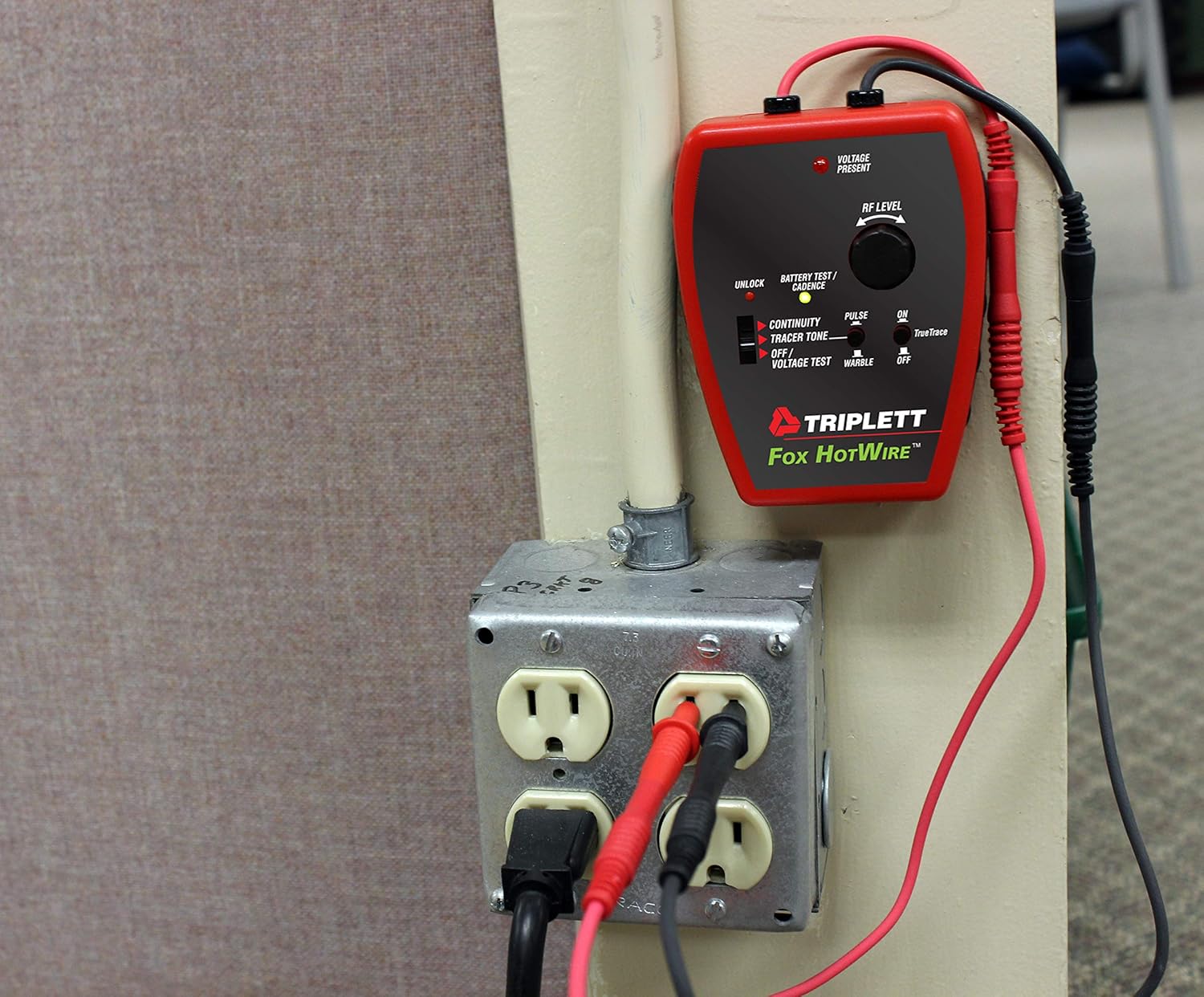
Figure 6.1: Fox HotWire connected to a live outlet.

Figure 6.2: Hound HotWire tracing a circuit breaker.
6.2 Tracing Unpowered Wires
For unpowered wires (e.g., telephone, LAN, security, or de-energized electrical circuits):
- Ensure the circuit is completely de-energized.
- Connect the Fox HotWire test leads to the wire pair or single wire to be traced. For a single wire, connect one lead to the wire and the other to a good ground.
- Set the Fox HotWire switch to 'TRACER TONE' and select a tone.
- Use the Hound HotWire as described in Section 6.1 to trace the wire.
6.3 Tracing Through Building Materials
The HotWire's RF signal can penetrate various building materials.
- Drywall, Plaster, Wood, Cement: The Hound can detect signals through these materials. Move the Hound slowly and adjust sensitivity to find the strongest signal.
- Metal Conduit: The TrueTrace feature on the Fox HotWire allows the RF signal to be sensed through most metal conduits.

Figure 6.3: Hound HotWire tracing a wire through drywall.
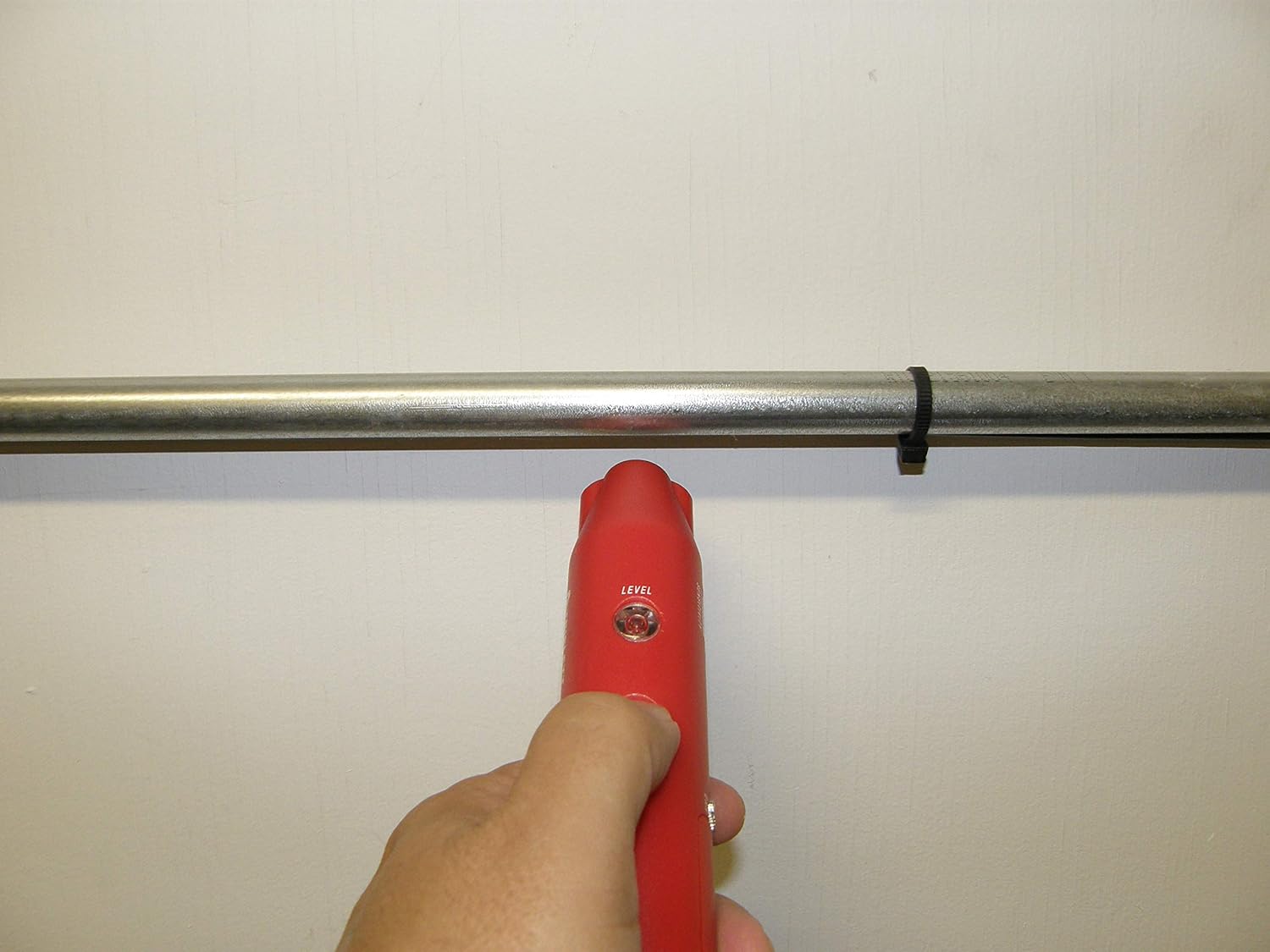
Figure 6.4: Hound HotWire tracing a wire within a conduit.
6.4 Tracing Underground Wires
The HotWire can trace shallow underground wires up to 6 inches deep, such as those for 'Invisible Fences', cable television, telephone, or low voltage landscape lighting.
- Connect the Fox HotWire to the underground wire. Ensure the other end of the wire is either open or grounded, depending on the tracing method.
- Set the Fox HotWire to 'TRACER TONE'.
- Walk along the suspected path of the underground wire with the Hound HotWire held close to the ground.
- Adjust sensitivity to locate the strongest signal, indicating the wire's path.

Figure 6.5: Hound HotWire tracing an underground wire.
6.5 Continuity Test
The Fox HotWire can perform a visual and audible continuity test.
- Set the Fox HotWire switch to 'CONTINUITY'.
- Connect the test leads across the circuit or wire to be tested.
- An audible tone and visual indicator will confirm continuity.
7. Maintenance
7.1 Battery Replacement
Replace the 9V batteries in both the Fox and Hound units when the battery test indicator shows low power or when the units do not function correctly.
- Open the battery compartment cover.
- Disconnect the old battery and replace it with a new 9V alkaline battery.
- Close the battery cover securely.
7.2 Cleaning
Clean the units with a soft, damp cloth. Do not use abrasive cleaners or solvents. Ensure the units are dry before storage or use.
8. Troubleshooting
| Problem | Possible Cause | Solution |
|---|---|---|
| No tone from Hound | Dead battery in Fox or Hound Fox not generating tone Hound sensitivity too low Wire not connected properly | Replace batteries Check Fox settings (TRACER TONE) Increase Hound sensitivity Verify connections to wire/circuit |
| Weak or inconsistent signal | Low battery High interference Wire too deep or shielded Sensitivity setting incorrect | Replace batteries Minimize external noise sources (e.g., fluorescent lights) Adjust Hound sensitivity, try different tracing angles Ensure proper grounding for unpowered wires |
| False signals or bleed-over | High sensitivity Multiple wires in close proximity External RF interference | Reduce Hound sensitivity Slowly move the Hound to find the peak signal Turn off nearby electronic devices |
| Fox 'VOLTAGE PRESENT' LED not lit on live circuit | No voltage on circuit Poor connection Faulty test lead | Verify circuit is live with a multimeter Ensure test leads are securely connected Inspect test leads for damage |
9. Specifications
| Feature | Specification |
|---|---|
| Model | 3388 Fox & Hound HotWire |
| Brand | Triplett |
| Max Voltage (Fox) | 250 VAC |
| Tracing Distance | Up to 1000 feet |
| Underground Tracing Depth | Up to 6 inches |
| Power Source | Battery Powered (2 x 9V batteries, included) or AC line powered (Fox) |
| Item Weight | 0.01 Ounces (approx. 0.28 grams, likely package weight) |
| Product Dimensions | 12.5 x 12 x 3 inches (packaging dimensions) |
| Safety Compliance | CE, ETL, UL |
10. Video Demonstration
Watch this official video for a visual guide on using the Triplett 3388 Fox & Hound HotWire kit.
Video 10.1: Triplett 3388 Live Wire Tone and Probe Wire Tracing Kit demonstration. This video provides an overview of the kit's features and how to use it for tracing wires.
11. Warranty and Support
The Triplett 3388 Fox & Hound HotWire kit comes with a 3-year warranty. For technical support, service, or warranty claims, please contact Triplett customer service. You can find more information and contact details on the official Triplett website.
Official Website: www.triplett.com


