
1. Introduction
This manual provides instructions for the proper use and maintenance of the HM Digital HMDCOM100 Waterproof EC/TDS and Temperature Combo Meter. This device is designed for accurate measurement of electrical conductivity (EC), total dissolved solids (TDS), and temperature in various water quality applications, including water purification, aquaculture, hydroponics, and environmental testing.
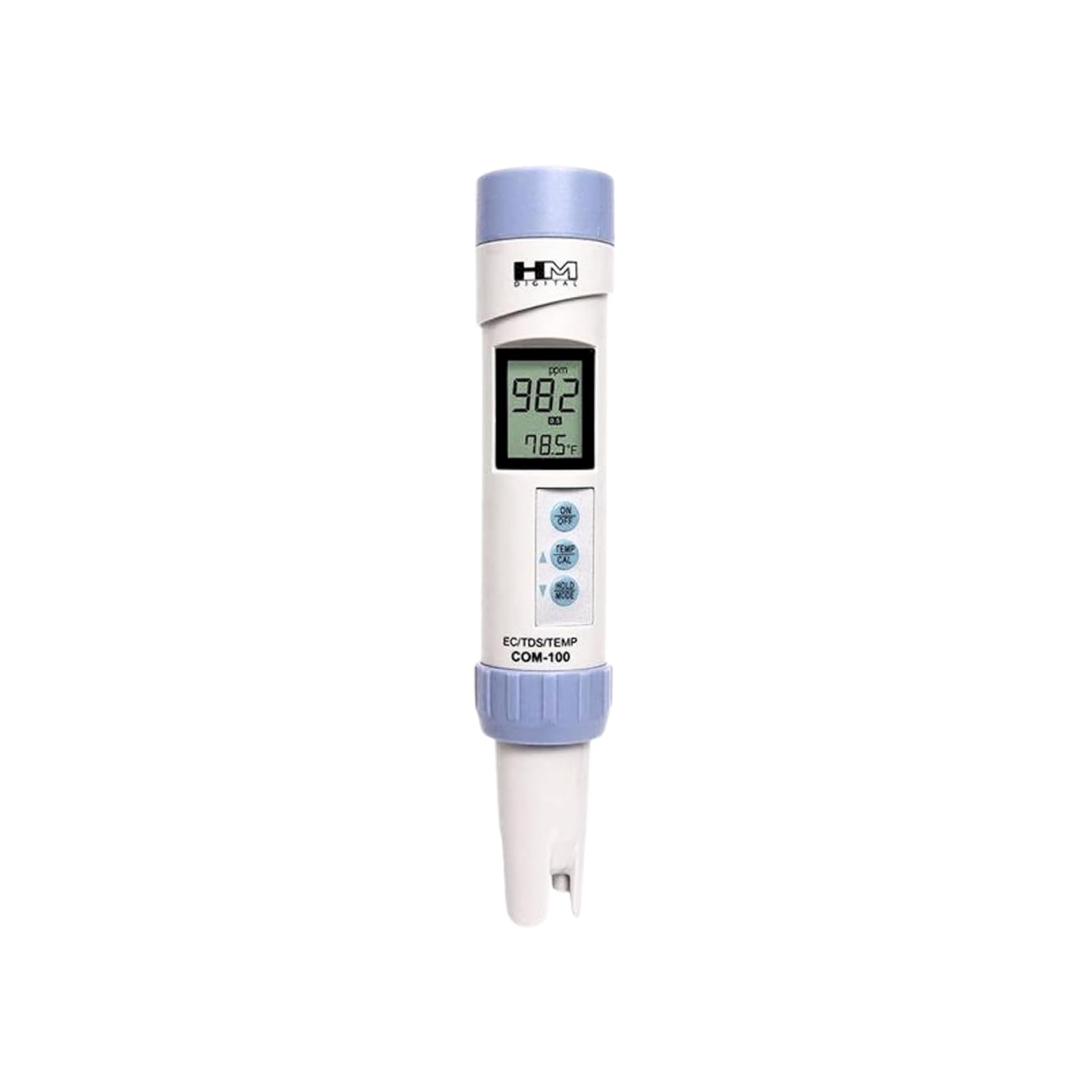
Figure 1: HM Digital HMDCOM100 Meter. This image displays the full view of the HM Digital COM-100 meter, highlighting its compact design and digital display.
2. Product Overview
2.1 Key Features
- Measures electrical conductivity (EC), total dissolved solids (TDS), and temperature.
- Four measurement scales: µS (microsiemens), mS (millisiemens), ppm (parts per million), and ppt (parts per thousand).
- Three nonlinear EC-to-TDS conversion factors: KCl, 442™, and NaCl.
- Waterproof housing with an IP67 rating for durability.
- Measurement Range: 0-9990 µS; 0-8560 ppm; 0-9.99 mS; 0-8.56 ppt.
- Automatic temperature compensation (ATC).
- Auto-off function to conserve battery life.
- Data-hold function for convenient reading.
- Low-battery indicator.
- Large, easy-to-read LCD screen with simultaneous temperature display.
- Digital calibration using push buttons.

Figure 2: Key Features of the COM-100 Meter. This image highlights the primary measurement capabilities and scales of the device.

Figure 3: Waterproof Design. The COM-100 meter is shown in water, demonstrating its IP67 waterproof rating for reliable use in wet environments.
2.2 Components
The HM Digital COM-100 meter consists of the following main components:
- Protective Cap: Covers the electrodes when not in use.
- Electrodes: Sensing elements for EC/TDS measurements.
- Temperature Sensor: Integrated for automatic temperature compensation.
- LCD Display: Shows measurement readings and temperature.
- Control Buttons:
- ON/OFF Button: Powers the unit on or off.
- MODE Button: Cycles through measurement scales (µS, mS, ppm, ppt) and enters calibration mode.
- HOLD/TEMP Button: Freezes the current reading or switches between Celsius and Fahrenheit temperature display.
- UP/DOWN Arrows: Used for digital calibration adjustments.
- Battery Compartment: Located at the top, houses AAA batteries.
3. Setup
3.1 Battery Installation
- Twist the top cap of the meter counter-clockwise to remove it.
- Carefully remove the old batteries if present.
- Insert two (2) AAA batteries, ensuring correct polarity (+/-).
- Replace the top cap by twisting it clockwise until secure.
Note: Ensure the battery compartment is sealed properly to maintain the meter's waterproof integrity.
3.2 Initial Preparation
- Remove the protective cap from the bottom of the meter.
- Rinse the electrodes with distilled or deionized water before first use and between different samples.
- Gently shake off excess water. Do not wipe the electrodes, as this can cause static electricity.
4. Operation
4.1 Taking a Measurement
- Press the ON/OFF button to turn on the meter.
- Immerse the electrode end of the meter into the sample solution, ensuring the electrodes are fully submerged.
- Gently stir the meter to remove any air bubbles.
- Allow the reading to stabilize. The display will show the EC/TDS value and temperature simultaneously.
- To hold the reading on the display, press the HOLD/TEMP button briefly. Press again to release.
- After measurement, rinse the electrodes with distilled water and replace the protective cap.
- The meter will automatically shut off after a period of inactivity to conserve battery. To manually turn off, press the ON/OFF button.
4.2 Changing Measurement Scales
The COM-100 meter supports four measurement scales and three EC-to-TDS conversion factors. To cycle through these options:
- With the meter on, press the MODE button repeatedly.
- The display will cycle through µS, mS, ppm (with conversion factor indicated, e.g., NaCl, 442™), and ppt.
- Select the desired scale for your application.
4.3 Changing Temperature Units
To switch between Celsius (°C) and Fahrenheit (°F):
- With the meter on, press and hold the HOLD/TEMP button for approximately 3 seconds.
- The temperature unit on the display will change. Repeat to switch back.
5. Calibration
The HM Digital COM-100 meter is factory calibrated with a 1413 µS solution. Regular recalibration is recommended to ensure accuracy, especially after prolonged use or if readings appear inconsistent. Digital calibration is performed using the meter's push buttons.
5.1 Calibration Procedure
- Obtain a fresh, standard calibration solution appropriate for your expected measurement range (e.g., 1413 µS or 342 ppm).
- Turn on the meter and immerse the electrodes into the calibration solution.
- Press and hold the MODE button for approximately 5 seconds until "CAL" appears on the display.
- The primary reading will flash, indicating calibration mode. Use the UP and DOWN arrow buttons to adjust the reading to match the value of your calibration solution.
- Once the value is set, press the HOLD/TEMP button to confirm and exit calibration mode. "END" will briefly appear, and the meter will return to normal operation.
- Rinse the electrodes with distilled water after calibration.
Important: Always use fresh calibration solution and ensure the solution temperature is stable during calibration.
6. Maintenance
6.1 Cleaning the Electrodes
- After each use, rinse the electrodes thoroughly with distilled or deionized water.
- If the electrodes become coated with residue, gently clean them using a soft brush or cotton swab with a mild detergent solution, then rinse thoroughly.
- Avoid abrasive materials or harsh chemicals that could damage the electrodes.
6.2 Storage
- Always replace the protective cap after use to prevent damage to the electrodes.
- Store the meter in a cool, dry place.
- For long-term storage, it is recommended to remove the batteries to prevent leakage.
6.3 Battery Replacement
When the low-battery indicator appears on the display, replace the batteries as described in the "Battery Installation" section (3.1). Timely battery replacement ensures consistent performance.
7. Troubleshooting
| Problem | Possible Cause | Solution |
|---|---|---|
| Meter does not turn on. | Dead or incorrectly installed batteries. | Replace batteries, ensuring correct polarity. |
| Inaccurate or unstable readings. |
|
|
| Low battery indicator displayed. | Batteries are low. | Replace batteries immediately. |
| Meter not waterproof after battery change. | Battery compartment cap not sealed properly. | Ensure the top cap is twisted clockwise until fully secure. |
8. Specifications
| Parameter | Value |
|---|---|
| Measurement Range | EC: 0-9990 µS; 0-9.99 mS TDS: 0-8560 ppm; 0-8.56 ppt Temperature: 0-80 °C (32-176 °F) |
| Resolution | EC: 1 µS (0-999 µS); 0.1 mS (1.00-9.99 mS) TDS: 1 ppm (0-999 ppm); 0.1 ppt (1.00-8.56 ppt) Temperature: 0.1 °C/°F |
| Accuracy | ±2% Full Scale |
| EC-to-TDS Conversion Factors | KCl, 442™, NaCl (selectable) |
| Automatic Temperature Compensation (ATC) | Yes (1-50 °C / 33-122 °F) |
| Calibration | Digital calibration by push button |
| Waterproof Rating | IP67 |
| Power Source | 2 x AAA batteries |
| Auto-off | 10 minutes of inactivity |
| Dimensions | 8.9 x 2.9 x 2.1 inches (22.6 x 7.4 x 5.3 cm) |
| Weight | 4.23 ounces (120 grams) |
| Manufacturer | HM Digital |

Figure 4: Physical Dimensions of the COM-100 Meter. This image illustrates the meter's size, approximately 7.3 inches in length and 1.3 inches in width.
9. Warranty and Support
HM Digital products are manufactured to high standards and are warranted against defects in materials and workmanship. For specific warranty details, duration, and terms, please refer to the warranty card included with your product or visit the official HM Digital website.
For technical support, troubleshooting assistance, or to inquire about replacement parts, please contact HM Digital customer service through their official channels. When contacting support, please have your product model number (COM-100) and purchase information readily available.
Contact Information: Please refer to the HM Digital official website for the most current contact details.


