
Zalman PS92252H
Zalman PS92252H DC12V 3.36W Fan User Manual
Model: PS92252H
1. Introduction
This manual provides detailed instructions for the installation, operation, maintenance, and troubleshooting of your Zalman PS92252H DC12V 3.36W fan. Please read this manual thoroughly before using the product to ensure proper functionality and safety.
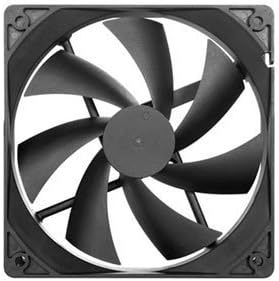
Figure 1: Zalman PS92252H Fan. This image displays the fan's design, featuring a black square frame and seven black, curved fan blades designed for efficient airflow.
2. Safety Information
Always observe the following safety precautions to prevent injury or damage to the product:
- Ensure power is disconnected from the system before installation or maintenance.
- Do not touch the fan blades while the fan is operating.
- Keep the fan away from water or excessive moisture.
- Do not attempt to disassemble or modify the fan. This may void the warranty and cause damage.
- Use only with compatible power sources (DC 12V).
3. Setup and Installation
Follow these steps to properly install your Zalman PS92252H fan:
- Prepare your system: Power off your computer and disconnect it from the power outlet. Open the computer case to access the fan mounting locations.
- Identify mounting location: Determine the desired location for the fan (e.g., front, rear, top, bottom of the case). Ensure there is sufficient clearance.
- Mount the fan: Align the fan with the screw holes in the case. Secure the fan using appropriate fan screws (typically included with the case or fan). Ensure the fan is oriented to push or pull air in the desired direction (indicated by arrows on the fan frame).
- Connect power: Connect the fan's power connector (usually a 3-pin or 4-pin connector) to an available fan header on your motherboard or a fan controller.
- Close case and power on: Close your computer case, reconnect the power, and power on your system. Verify the fan is spinning correctly.
4. Operating Instructions
Once installed, the Zalman PS92252H fan operates automatically when the system is powered on, providing airflow for cooling. Its speed is typically regulated by the motherboard's fan control settings, which can often be adjusted in the BIOS/UEFI or via system monitoring software.
- Fan Speed Control: If connected to a 4-pin PWM header, the fan speed can be dynamically controlled by the motherboard based on system temperature. If connected to a 3-pin header, the fan will typically run at a constant speed or be voltage-controlled.
- Airflow Direction: Ensure the fan is installed to provide optimal airflow for your system's cooling needs. Fans typically have arrows on their frame indicating airflow direction and blade rotation.
5. Maintenance
Regular maintenance helps ensure optimal performance and longevity of your fan:
- Dust Removal: Periodically (e.g., every 3-6 months), power off your system and use compressed air or a soft brush to gently remove dust accumulation from the fan blades and frame. Dust can impede airflow and increase noise.
- Inspection: Check for any loose cables or obstructions around the fan. Ensure the fan spins freely without any grinding or unusual noises.
6. Troubleshooting
If you encounter issues with your Zalman PS92252H fan, refer to the following common problems and solutions:
| Problem | Possible Cause | Solution |
|---|---|---|
| Fan not spinning | No power; incorrect connection; faulty fan header; fan failure. | Check power cable connection. Try a different fan header on the motherboard. Ensure system is powered on. |
| Excessive noise | Dust accumulation; loose mounting screws; bearing wear; obstruction. | Clean fan blades. Tighten mounting screws. Check for cable obstructions. If noise persists, fan may need replacement. |
| Poor airflow | Dust accumulation; incorrect fan orientation; fan running too slow. | Clean fan. Verify fan is installed in the correct direction. Adjust fan speed settings in BIOS/UEFI if possible. |
7. Specifications
Key technical specifications for the Zalman PS92252H fan:
- Brand: Zalman
- Model: PS92252H
- Voltage: 12 Volts DC
- Wattage: 3.36 watts
- Noise Level: 30 dB
- Material: Copper
- ASIN: B00457581K
- Date First Available: March 16, 2012
8. Warranty and Support
For warranty information or technical support, please contact Zalman customer service. Keep your purchase receipt as proof of purchase.
You can find more information and contact details on the official Zalman website or through your retailer.
For general inquiries, you may visit the Zalman Store on Amazon.
Related Documents - PS92252H
 |
ZALMAN X3 ATX Mid Tower Computer Case User's Manual Comprehensive user's manual for the ZALMAN X3 ATX Mid Tower Computer Case, covering installation precautions, detailed specifications, component compatibility, and assembly instructions for building a PC. |
 |
Zalman X3 ATX Mid-Tower Computer Case User Manual Comprehensive user manual for the Zalman X3 ATX Mid-Tower computer case. Details installation steps, technical specifications, accessories, I/O ports, RGB LED controller, fan specs, and warranty information for PC builders. |
 |
Zalman R2 ATX Mid Tower Case User's Manual User's manual for the Zalman R2 ATX Mid Tower Case, providing installation instructions, precautions, technical specifications, and component details. |
 |
Zalman N5 MF ATX Mid-Tower Computer Case User Manual Comprehensive user manual for the Zalman N5 MF ATX Mid-Tower Computer Case, detailing installation steps, precautions, technical specifications, accessories, I/O ports, and warranty information. |
 |
Zalman Z1 NEO ATX Mid Tower Computer Case Installation Guide Comprehensive installation guide for the Zalman Z1 NEO ATX Mid Tower Computer Case. Covers product overview, safety precautions, component identification, step-by-step installation of motherboard, drives, and cables, front I/O port details, and warranty information. Includes detailed textual descriptions of diagrams. |
 |
Zalman P40 DS ATX Mid-Tower Computer Case User Manual Comprehensive user manual for the Zalman P40 DS ATX Mid-Tower Computer Case, covering installation, specifications, precautions, and warranty information. |