
Introduction
The Phiaton PS 20 NC Active Noise Cancelling Earphones are designed to provide an enhanced listening experience by reducing ambient noise. Featuring Phiaton's exclusive "Noise Blocker" technology, these earphones aim to block up to 95% of outside noise, allowing for immersive audio playback. The "EverPlay" feature ensures continuous music listening even if the battery depletes. With a lightweight and ergonomic design, the PS 20 NC earphones are suitable for various activities, including travel and exercise.

Image: Phiaton PS 20 NC earphones and their inline control unit.
What's in the Box
Verify that all items are present in the packaging:
- Phiaton PS 20 NC Earphones
- 4 sizes of silicon ear tips (XS, S, M, L)
- Carrying case
- 1 AAA battery
- Airplane adapter
- Owner’s Guide (including 1-year warranty information)
- Product registration card
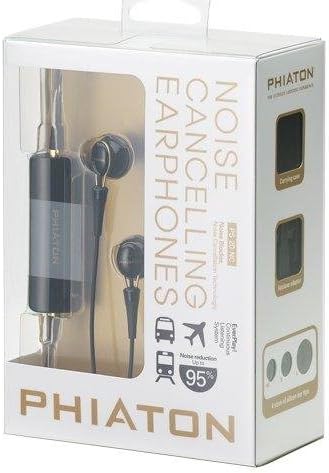
Image: Retail packaging for the Phiaton PS 20 NC earphones, showing contents.
Setup
1. Battery Installation
- Locate the battery compartment on the inline control unit.
- Gently slide open the battery cover.
- Insert one AAA battery, ensuring correct polarity (+/-).
- Close the battery cover securely.

Image: Detailed view of the inline control unit, showing the battery compartment area.
2. Ear Tip Selection and Fitting
Proper ear tip selection is crucial for optimal sound quality and noise cancellation. Experiment with the four provided sizes (XS, S, M, L) to find the best fit for your ears.
- Choose an ear tip size that creates a snug seal in your ear canal without causing discomfort.
- Gently insert the earphone into your ear, ensuring a secure and comfortable fit.
- The "half in-ear" design is intended to fit just outside the ear canal.

Image: Close-up of the Phiaton PS 20 NC earphones, highlighting the ear tips.
3. Connecting to Your Device
The PS 20 NC earphones connect via a standard 3.5mm audio jack.
- Plug the 3.5mm jack into the headphone port of your audio device (smartphone, tablet, laptop, MP3 player, etc.).
- For airplane use, connect the airplane adapter to the 3.5mm jack, then plug the adapter into the aircraft's audio port.

Image: Detail of the 3.5mm audio jack and cable of the Phiaton PS 20 NC earphones.
Operating Instructions
1. Active Noise Cancellation (Noise Blocker)
- To activate noise cancellation, locate the power switch on the inline control unit and slide it to the "ON" position.
- A small indicator light may illuminate to confirm activation.
- The "Noise Blocker" technology will reduce up to 95% of ambient noise, ideal for noisy environments like subways, trains, and airplanes.
- To deactivate noise cancellation, slide the switch to the "OFF" position.
2. EverPlay Feature
The "EverPlay" feature allows you to continue listening to audio even if the AAA battery for noise cancellation runs out or is not installed.
- When the battery is depleted, the noise cancellation function will cease, but audio playback will continue through the wired connection.
- Replace the AAA battery to restore active noise cancellation functionality.
3. Remote Control
The compact inline remote control provides convenient access to basic functions:
- Play/Pause: Press the central button once.
- Next Track: Press the central button twice quickly.
- Previous Track: Press the central button three times quickly.
- Answer/End Call: Press the central button once during an incoming call or active call.
Note: Volume control functionality may vary depending on the connected device.
Maintenance
- Cleaning: Regularly clean the ear tips with a soft, dry cloth. For deeper cleaning, remove the ear tips and wash them with mild soap and water, ensuring they are completely dry before reattaching.
- Storage: When not in use, store the earphones in the provided carrying case to protect them from dust, dirt, and tangling.
- Battery: Remove the AAA battery if the earphones will not be used for an extended period to prevent leakage.
- Cable Care: Avoid sharp bends or excessive pulling on the cable to prevent damage. Use the cord adjuster to manage cable length.
Troubleshooting
| Problem | Solution |
|---|---|
| No sound or low volume. |
|
| Noise cancellation is not working. |
|
| Distorted sound. |
|
Specifications
| Feature | Detail |
|---|---|
| Model Name | PS 20 NC |
| Brand | Phiaton |
| Connectivity | Wired (3.5mm Jack) |
| Noise Control | Active Noise Cancellation (up to 95% reduction) |
| Power Source | 1 AAA Battery (for Noise Cancellation) |
| Special Features | EverPlay (passive listening without battery), Lightweight, Compact Remote Control |
| Ear Placement | In Ear (Half in-ear design) |
| Material | Plastic, Silicone |
| Dimensions | 2.3 x 2.8 x 4 inches |
| Weight | 1.13 ounces (0.03 Kilograms) |
| Compatible Devices | Laptops, Desktops, Tablets, Telephones, Smart Speakers, Televisions, Car Audio Systems, Cellphones |
Official Product Video
Video: An official overview of the Phiaton PS 20 NC Active Noise Cancelling Earphones, highlighting key features and design. Duration: 1 minute, 10 seconds.
Warranty and Support
The Phiaton PS 20 NC earphones come with a 1-year limited warranty. Please refer to the included Owner's Guide for detailed warranty terms and conditions.
For product support, technical assistance, or to register your product, please consult the product registration card or visit the official Phiaton website (details typically found in the Owner's Guide).


