
1. Introduction
This manual provides essential instructions for the installation, operation, and maintenance of the HEWLETT PACKARD 9000 Server System I/O Board, part number A3262-69103, model RP000305616. Please read this manual thoroughly before proceeding with any procedures to ensure proper functionality and to prevent damage to the component or system.
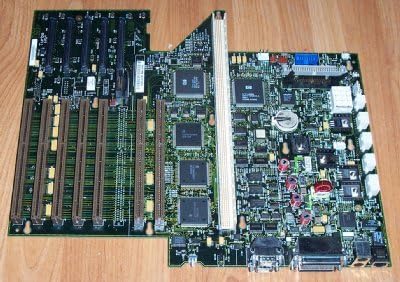
Figure 1: HEWLETT PACKARD 9000 Server System I/O Board (Model RP000305616). This image displays the full board, highlighting various components such as expansion slots, integrated circuits, and connectors.
2. Setup and Installation
Proper installation is crucial for the functionality of the I/O board. Follow these steps carefully:
- Safety Precautions: Before handling the I/O board, ensure the server system is powered off and disconnected from all power sources. Wear an anti-static wrist strap to prevent electrostatic discharge (ESD) damage.
- Prepare the Server Chassis: Open the server chassis according to the server's specific instructions. Identify the appropriate slot for the I/O board.
- Install the I/O Board: Carefully align the I/O board with the designated slot. Apply even pressure to seat the board firmly into the slot. Ensure all connectors are properly aligned.
- Secure the Board: Use the provided screws or retention clips to secure the I/O board within the chassis.
- Connect Peripherals: Connect any necessary cables (e.g., SATA, power) to the I/O board. Refer to your server system's manual for specific cabling requirements. The board supports SATA 1 system bus standard.
- Close Chassis: Once the board is securely installed and all connections are made, close the server chassis.
3. Operating Instructions
After successful installation, the I/O board operates as an integral part of the server system. No direct user interaction is typically required for its core function.
- System Power-Up: Power on the server system. The I/O board will be initialized during the system boot process.
- BIOS/UEFI Configuration: Access the server's BIOS or UEFI settings if specific I/O configurations are required. Consult your server's documentation for instructions on accessing and modifying these settings.
- Driver Installation: Ensure all necessary drivers for the I/O board components are installed on the operating system. These are typically provided by the server manufacturer or HEWLETT PACKARD.
4. Maintenance
The HEWLETT PACKARD 9000 Server System I/O Board is designed for reliability and requires minimal maintenance. However, periodic checks can help ensure optimal performance.
- Dust Removal: Periodically inspect the server chassis and the I/O board for dust accumulation. Use compressed air to gently remove dust, ensuring the system is powered off and disconnected from power.
- Firmware Updates: Check the HEWLETT PACKARD support website for any available firmware updates for the I/O board or the server system. Apply updates as recommended by the manufacturer.
- Component Inspection: During dust removal, visually inspect the board for any signs of damage, loose connections, or bulging capacitors.
5. Troubleshooting
If you encounter issues with the I/O board, consider the following troubleshooting steps:
- No Power/System Not Booting:
- Verify all power connections to the server and the I/O board are secure.
- Ensure the I/O board is correctly seated in its slot.
- Check the server's power supply unit (PSU) for proper operation.
- Peripheral Detection Issues:
- Confirm that all peripheral cables are correctly connected to the I/O board.
- Check for updated drivers for the I/O board components.
- Test peripherals on another system if possible to rule out device failure.
- System Instability/Crashes:
- Ensure the server's cooling system is functioning correctly to prevent overheating.
- Check for any error messages during system boot or in the operating system's event logs.
- Consider reseating the I/O board and any connected components.
If problems persist after attempting these steps, contact HEWLETT PACKARD technical support or a qualified service technician.
6. Specifications
Key technical specifications for the HEWLETT PACKARD 9000 Server System I/O Board (Model RP000305616):
| Feature | Detail |
|---|---|
| Brand | HEWLETT PACKARD |
| Model Number | RP000305616 |
| Part Number | A3262-69103 |
| Item Weight | 11.02 pounds |
| Memory Slots Available | 2 |
| S/PDIF Connector Type | Optical |
| System Bus Standard Supported | SATA 1 |
| First Available Date | September 30, 2010 |


