1. Introduction
This manual provides essential instructions for the installation, operation, and maintenance of your Majestic AP-210 2-Way 165mm Speaker System. Please read this manual thoroughly before using the product to ensure proper function and longevity.
Package Contents
- Majestic AP-210 Speakers (2 units)
- Mounting Brackets (inferred)
- Mounting Hardware (inferred)
Note: Specific included components may vary. Please check your product packaging.

Image 1: The retail packaging for the Majestic AP-210 speakers, indicating "AP 210 6½" 2 WAY" and "200W PER PAIR POWER HANDLING". This image provides context for the product's presentation and some key features.
2. Safety Information
- Ensure all connections are secure before powering on any audio equipment.
- Do not expose speakers to extreme temperatures or direct sunlight for prolonged periods.
- Avoid using excessive volume levels, which can cause hearing damage or speaker damage.
- These speakers are waterproof; however, avoid submerging them in water.
- Installation should be performed by a qualified professional if you are unsure about wiring or mounting procedures.
3. Setup and Installation
3.1 Mounting the Speakers
The Majestic AP-210 speakers are designed for flush mount installation. Use the provided mounting brackets and hardware for secure placement.
- Choose a suitable mounting location that provides adequate space and structural support for the speakers.
- Carefully cut an opening of the appropriate size (refer to specifications for speaker dimensions) in the mounting surface.
- Insert the speaker into the opening.
- Secure the speaker using the mounting brackets and screws. Ensure a tight fit to prevent vibrations.
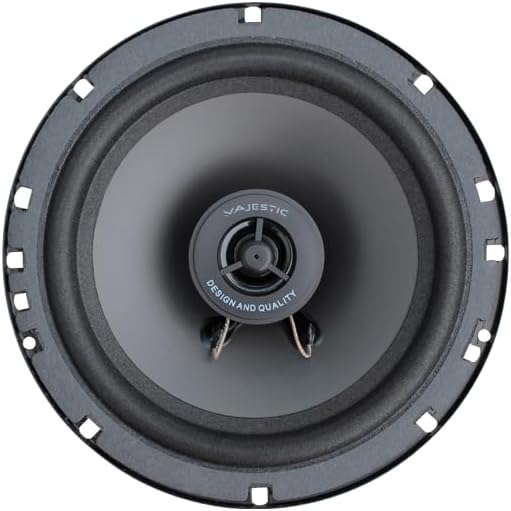
Image 2: Front view of a single Majestic AP-210 speaker, showing the coaxial design and polypropylene cone. This image illustrates the speaker's appearance for mounting.

Image 3: A pair of Majestic AP-210 speakers. One speaker is shown from the front, highlighting its design, while the other is shown from the rear, displaying the magnet and connection terminals. This image helps in understanding the speaker's physical characteristics for installation.
3.2 Wiring Connections
The AP-210 speakers have an impedance of 4 Ohms. Connect them to an amplifier or audio source that is compatible with this impedance rating.
- Identify the positive (+) and negative (-) terminals on both the speaker and your amplifier.
- Connect the positive terminal of the speaker to the positive terminal of the amplifier.
- Connect the negative terminal of the speaker to the negative terminal of the amplifier.
- Ensure all connections are tight and free from short circuits.
Note: These are passive speakers and require an external amplifier for operation. The "Corded Electric" power source specification refers to the power required for the amplifier, not the speakers directly.
3.3 Bluetooth Connectivity
The Majestic AP-210 speakers themselves do not have integrated Bluetooth. The "Bluetooth" feature mentioned refers to their compatibility with Bluetooth-enabled audio sources (e.g., smartphones, tablets, laptops) when connected to a Bluetooth-enabled amplifier or receiver. To use Bluetooth:
- Ensure your amplifier/receiver has Bluetooth functionality and is powered on.
- Enable Bluetooth on your audio source device (smartphone, tablet, etc.).
- Pair your audio source device with your Bluetooth-enabled amplifier/receiver according to its specific instructions.
- Once paired, audio will be transmitted wirelessly to the amplifier/receiver and played through the AP-210 speakers.
4. Operating Instructions
4.1 Basic Audio Playback
- Ensure the speakers are correctly wired to a compatible amplifier.
- Connect your audio source (e.g., smartphone, tablet, computer, projector, television) to the amplifier.
- Power on the amplifier and select the appropriate input source.
- Begin audio playback from your source device.
- Adjust the volume level on your amplifier to your desired listening level.
4.2 Voice Control
The "Voice" control method listed in specifications refers to the ability to control your connected audio source device (e.g., smartphone with voice assistant) which then sends audio signals to the amplifier and speakers. The speakers themselves do not have integrated voice control functionality.
5. Maintenance
5.1 Cleaning
- Wipe the speaker grilles and cones gently with a soft, dry cloth.
- For stubborn dirt, a slightly damp cloth can be used, but ensure no water enters the speaker components.
- Avoid using harsh chemicals, solvents, or abrasive cleaners.
5.2 Waterproof Care
These speakers are designed to be waterproof. However, to maintain their integrity:
- Do not intentionally submerge the speakers in water.
- If exposed to splashes or rain, wipe them dry as soon as possible.
- Ensure all mounting points and seals remain intact to prevent water ingress.
6. Troubleshooting
| Problem | Possible Cause | Solution |
|---|---|---|
| No sound from speakers. |
|
|
| Distorted sound. |
|
|
| One speaker not working. |
|
|
7. Specifications
| Brand | Majestic |
| Model Name | AP-210 |
| Item Model Number | AP210BL |
| Speaker Type | Coaxial, 2-Way |
| Speaker Size | 165 mm (6.5 inches) |
| Material Type | Polypropylene |
| Impedance | 4 Ohms |
| Nominal Output Power | 50 Watts (per speaker) |
| Maximum Wattage | 100 Watts (peak per speaker, 200W peak per pair) |
| Is Waterproof | Yes |
| Connectivity Technology | Wired (Compatible with Bluetooth via external amplifier) |
| Audio Output Mode | Stereo (when used as a pair) |
| Mounting Type | Flush Mount |
| Product Dimensions (each) | 16.5 x 16.5 x 6 cm |
| Item Weight (each) | 1.4 kg |
| Compatible Devices | Desktop, Laptop, Projector, Smartphone, Tablet, Television (via compatible amplifier) |
| Included Components | Speakers (2), Mounting Brackets (inferred) |
Note: Specifications are subject to change without notice.
8. Warranty Information
Majestic products are manufactured to high-quality standards. For specific warranty terms and conditions, please refer to the warranty card included with your product or contact Majestic customer support. Keep your purchase receipt as proof of purchase for any warranty claims.
9. Customer Support
If you encounter any issues or have questions regarding your Majestic AP-210 speakers that are not covered in this manual, please contact your retailer or the manufacturer's customer support for assistance.
For further information, you may visit the official Majestic website (if available).


