
Fancierstudio FS 15x15 BB
Fancierstudio Digital Heat Press Instruction Manual
Model: FS 15x15 BB | Brand: Fancierstudio
Introduction
This manual provides comprehensive instructions for the safe and efficient operation of your Fancierstudio Digital Heat Press. This industrial-quality heat press is designed for applying transfers, letters, numbers, and images onto various materials such as t-shirts, garments, bags, mouse mats, jigsaw puzzles, ID badges, ceramic tiles, and other items. Please read this manual thoroughly before initial use and retain it for future reference.
Safety Information
Your Fancierstudio Heat Press operates at high temperatures and pressure. Adherence to safety guidelines is crucial to prevent injury and damage to the equipment.
- Electrical Safety: Ensure the unit is connected to a 110-volt power outlet. Do not overload circuits. Always unplug the machine when not in use or before cleaning/maintenance.
- Hot Surfaces: The heat platen and surrounding areas become extremely hot during operation. CAUTION: HOT SURFACES! Avoid direct contact with hot surfaces. Use heat-resistant gloves if necessary.
- Unattended Operation: WARNING: DO NOT LEAVE MACHINE UNATTENDED WHILE IN USE.
- Stable Surface: Always place the heat press on a sturdy, level, and heat-resistant surface capable of supporting its weight (approximately 37.6 lbs). Ensure there is ample space around the machine for safe operation and heat dissipation.
- Clearance: Maintain adequate clearance around the machine for ventilation and safe operation.
- Children and Pets: Keep children and pets away from the heat press at all times.
Components Overview
Familiarize yourself with the main components of your heat press:
- Heat Platen: The upper heating element (15x15 inches).
- Silicon Rubber Base: The lower platen, designed for easy replacement.
- Pressure Adjustment Knob: Located at the top, used to adjust the clamping pressure.
- Digital Control Panel: Displays and controls temperature and time.
- Power Switch: On/off switch, typically located on the side.
- Handle: Used to open and close the heat platen.
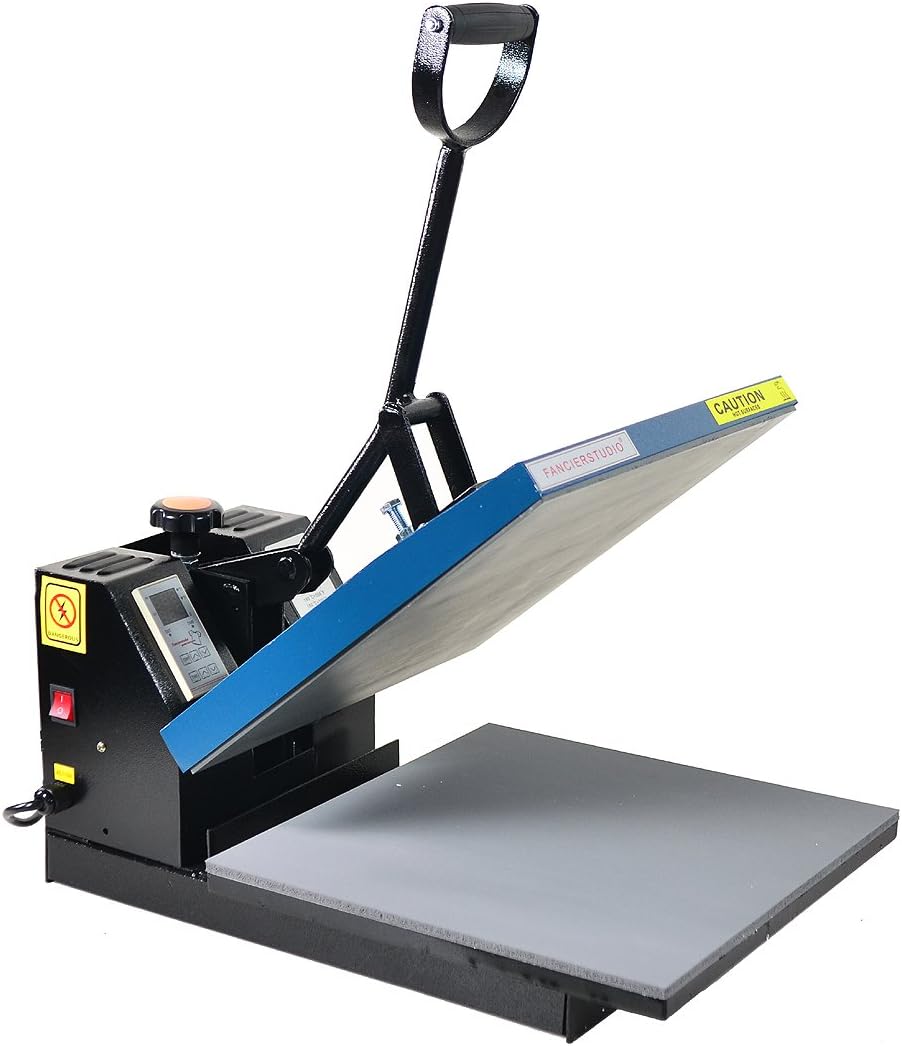
Figure 1: Fancierstudio Heat Press with the upper platen in the open position, showing the handle and digital control panel.
Setup
- Unpacking: Carefully remove the heat press from its packaging. Inspect for any damage during transit.
- Placement: Place the heat press on a sturdy, flat, and heat-resistant surface capable of supporting its weight (approximately 37.6 lbs). Ensure there is ample space around the machine for safe operation and heat dissipation.
- Power Connection: Plug the power cord into a grounded 110-volt electrical outlet. It is recommended to use a dedicated circuit if possible, as the unit draws 1400 watts.
Operating Instructions
Follow these steps for successful heat transfer applications:
- Power On: Flip the red power switch on the side of the machine to the 'ON' position. The digital display will illuminate.
- Set Temperature: Use the 'TEMP' buttons (up/down arrows) on the digital control panel to set your desired temperature. The temperature range is 0-500°F. Refer to your transfer material's instructions for recommended temperature.
- Set Time: Use the 'TIME' buttons (up/down arrows) on the digital control panel to set your desired press time in seconds. Refer to your transfer material's instructions for recommended time.
- Preheating: Allow the machine to reach the set temperature. The 'PV' (Process Value) display will show the current temperature, and 'SV' (Set Value) will show your target temperature. The machine will beep when it reaches the set temperature.
- Adjust Pressure: The pressure is adjustable via the large knob located at the top of the heat platen. Turn clockwise for more pressure, counter-clockwise for less. Test the pressure by closing the handle on a blank garment. It should require moderate effort to close.
- Prepare Garment: Place your garment or item onto the silicon rubber base. Ensure it is flat and free of wrinkles. You may pre-press the garment for 3-5 seconds to remove moisture and wrinkles.
- Position Transfer: Carefully place your transfer material (e.g., HTV, sublimation print) onto the garment in the desired position.
- Press: Lower the heat platen by pushing down the handle firmly until it locks into place. The timer will automatically begin counting down.
- Completion: Once the timer reaches zero, an alarm will sound. Lift the handle to open the heat press.
- Remove Transfer: Follow your transfer material's specific instructions for hot peel or cold peel. Carefully remove the transfer backing.

Figure 2: Digital control panel for setting temperature and time.

Figure 3: The heat press in the closed position during operation.
Maintenance
- Cleaning: Ensure the heat press is unplugged and completely cool before cleaning. Use a soft, damp cloth to wipe down the exterior. For the heat platen, use a non-abrasive cleaner specifically designed for heat press platens if residue builds up.
- Silicon Pad Replacement: The silicon rubber base is lightly glued down for easy replacement if it becomes damaged or worn.
- Storage: Store the heat press in a dry, dust-free environment when not in use.
Troubleshooting
| Problem | Possible Cause | Solution |
|---|---|---|
| Machine not heating up. | Power switch off, loose connection, circuit breaker tripped. | Ensure power switch is on. Check power cord connection. Reset circuit breaker if tripped. |
| Inconsistent temperature. | Fluctuating power supply, sensor issue. | Ensure stable power supply. If problem persists, contact customer support. |
| Transfer not adhering properly. | Incorrect temperature/time/pressure, moisture in garment, incorrect transfer material. | Verify settings with transfer material instructions. Pre-press garment to remove moisture. Ensure correct transfer type for material. Adjust pressure. |
| Handle is hard to press down. | Pressure adjustment too tight. | Turn the pressure adjustment knob counter-clockwise to loosen. |
Specifications
- Model: FS 15x15 BB
- Voltage: 110 Volts
- Power: 1400 Watts
- Heat Press Style: Clamshell
- Temperature Range: 0-500°F (0-260°C)
- Platen Size: 15 x 15 inches
- Product Dimensions: 33 x 23 x 20 inches (or 24"L x 17.9"W x 13.8"H) - Note: Discrepancy in provided data, using both for completeness.
- Item Weight: 37.6 pounds
- Material: STEEL FRAME ALUMINUM HEAT PLATEN
- Color: Blue Black
- Manufacturer: Fancierstudio
- Recommended Uses: T-Shirt, Mouse Pad, Bag
Warranty & Support
For warranty information, technical support, or replacement parts, please refer to the official Fancierstudio website or contact their customer service directly. A user guide in PDF format is also available for download: User Guide (PDF).
Related documentsFS 15x15 BB


Ask a question about this manual
Ask about setup, troubleshooting, compatibility, parts, safety, or missing instructions. Manuals+ will review the question and use this page’s manual context to help answer it.