
Titan Controls 734100
Titan Controls Apollo 8 Mechanical Timer User Manual
Dual Outlet, 120V - Model 734100
Introduction
This manual provides comprehensive instructions for the safe and efficient operation of your Titan Controls Apollo 8 Mechanical Timer. The Apollo 8 is a 24-hour mechanical timer designed for controlling various electrical devices in hydro systems, such as pumps and fans. It features two outlets and a 15 Amp capacity, offering precise control with 96 non-detachable 15-minute trippers.
Please read this manual thoroughly before initial use and retain it for future reference.
Important Safety Information
- Ensure the timer is connected to a 120V, 60Hz power source.
- Do not exceed the maximum load capacity of 15 Amps.
- Do not immerse the timer in water or expose it to excessive moisture. The enclosure resists dust, rust, and moisture, but is not waterproof.
- Always unplug the timer from the power outlet before cleaning or performing any maintenance.
- Keep out of reach of children.
- Do not disassemble the unit. Refer all servicing to qualified personnel.
Product Overview
The Titan Controls Apollo 8 is a robust mechanical timer designed for reliable operation. Key features include:
- Two (2) grounded outlets for connecting devices.
- 96 non-detachable 15-minute trippers for precise scheduling.
- Manual override switch for continuous power.
- Heavy-duty construction for durability.

Image: Front view of the Titan Controls Apollo 8 Mechanical Timer, showing the central dial with time segments and the two outlets on the side.
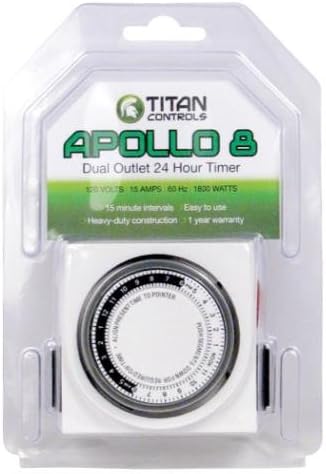
Image: The Titan Controls Apollo 8 Mechanical Timer displayed in its clear retail packaging, highlighting the product name and key features.
Setup
- Unpack the Timer: Carefully remove the Apollo 8 timer from its packaging.
- Identify Components: Familiarize yourself with the timer's dial, 15-minute trippers, and the manual override switch.
- Set Current Time: Rotate the outer dial clockwise until the current time aligns with the "ALIGN PRESENT TIME TO POINTER" arrow. The dial is marked with 12 AM and 12 PM indicators.
- Program ON/OFF Times:
- Each segment on the dial represents 15 minutes.
- To set an "ON" period, push the corresponding segments (trippers) down.
- To set an "OFF" period, leave the corresponding segments in the up position.
- Ensure all segments for the desired "ON" duration are pushed down.
- Connect Devices: Plug the devices you wish to control into the two outlets on the side of the timer. Ensure the total amperage does not exceed 15 Amps.
- Plug into Wall Outlet: Insert the timer's plug into a standard 120V wall outlet.
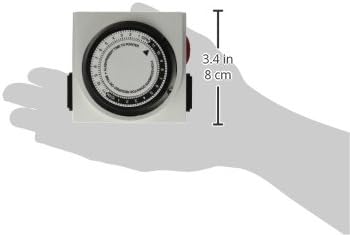
Image: A hand holding the Titan Controls Apollo 8 Mechanical Timer, illustrating its compact size and showing approximate dimensions of 3.4 inches (8 cm) in height.
Operating Instructions
Automatic Operation
Once the timer is plugged in and programmed, it will automatically turn connected devices ON and OFF according to the set schedule. The internal clock will continuously advance, cycling through the 24-hour period.
Manual Override
The Apollo 8 features a manual override switch, typically located on the side of the unit. This switch allows you to bypass the timer's schedule and provide continuous power to the connected devices, or to turn them off regardless of the schedule.
- To turn devices ON continuously: Move the manual override switch to the "ON" position.
- To turn devices OFF continuously: Move the manual override switch to the "OFF" position.
- To resume automatic operation: Return the manual override switch to the "TIMER" or "AUTO" position (if labeled). If no specific "TIMER" position, simply ensure it's not in the "ON" or "OFF" override state.
Note: The manual override switch does not affect the internal clock's progression or the set program. It only temporarily overrides the power output.
Maintenance
- Cleaning: Disconnect the timer from the power outlet before cleaning. Wipe the exterior with a soft, dry cloth. Do not use abrasive cleaners or solvents.
- Storage: If storing the timer for an extended period, ensure it is clean and dry. Store in a cool, dry place away from direct sunlight and extreme temperatures.
- Inspection: Periodically inspect the power cord and plug for any signs of damage. If damaged, discontinue use and replace the unit.
Troubleshooting
| Problem | Possible Cause | Solution |
|---|---|---|
| Timer not turning ON/OFF at programmed times. |
|
|
| Timer making a loud noise. |
|
|
| Connected device not receiving power. |
|
|
Specifications
| Model Number | 734100 |
| Voltage | 120 Volts |
| Frequency | 60 Hz |
| Maximum Amperage | 15 Amps |
| Outlets | Two (2) grounded outlets |
| Timing Intervals | 15 minutes (96 non-detachable trippers) |
| Dimensions (L x W x H) | 4.4 x 2.6 x 6.3 inches |
| Weight | 7.2 ounces |
| Material | Plastic |
| Color | Natural |
Warranty Information
The Titan Controls Apollo 8 Mechanical Timer typically comes with a 1-year limited warranty from the date of purchase, covering defects in materials and workmanship. Please refer to the original product packaging or contact Titan Controls customer support for specific warranty terms and conditions.
Note: Warranty may be voided by improper use, unauthorized repairs, or exceeding specified electrical limits.
Customer Support
For technical assistance, troubleshooting not covered in this manual, or warranty inquiries, please contact Titan Controls customer support.
- Manufacturer: Sunlight Supply Inc. (Parent company of Titan Controls)
- Online Resources: Visit the official Titan Controls website for FAQs and additional product information.
- User Guide (PDF): A digital version of the Instructions for Use (IFU) is available for download: Download PDF Manual