
Introduction
The TYT TH-F5 is a compact and powerful handheld VHF and 2-meter amateur radio transceiver designed for reliable communication. This device operates within a frequency range of 136-174 MHz and offers multiple power output settings. It features direct keypad frequency and function entry, 128 alphanumeric memory channels, and various scanning modes. This manual provides essential information for the proper setup, operation, and maintenance of your TH-F5 transceiver.
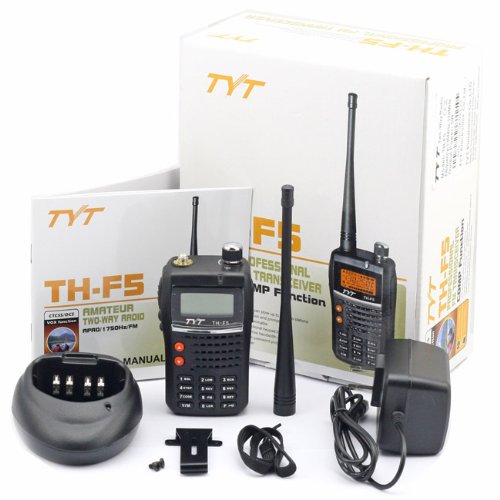
Image: The TYT TH-F5 radio, along with its charger, antenna, and user manual, displayed within its product packaging.
Package Contents
Please verify that all items listed below are included in your package. If any items are missing or damaged, contact your dealer immediately.
- TYT TH-F5 Transceiver Unit
- Antenna
- 1500mA Li-Ion High Capacity Battery
- Drop-in Desktop Quick Charger
- AC Adapter for Charger
- Belt Clip
- Hand Strap
- User Manual
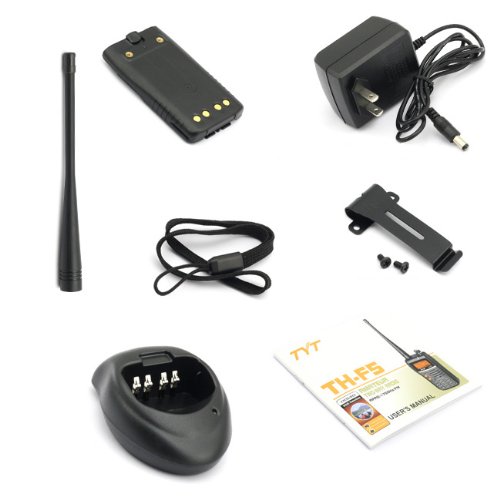
Image: A complete view of the TYT TH-F5 package contents, including the antenna, battery, desktop charger, AC adapter, belt clip, hand strap, and the user manual.
Product Overview
The TH-F5 features a robust design with essential controls for amateur radio operation. Key components include the antenna connector, volume/power knob, LCD display, keypad, and speaker/microphone jacks.
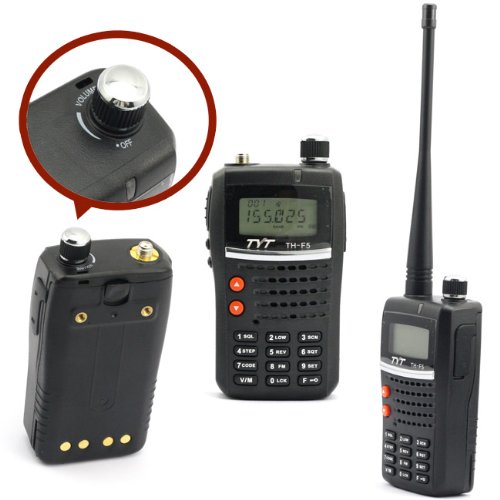
Image: The TYT TH-F5 radio, highlighting its front panel with the display and keypad, alongside a detailed close-up of the top-mounted volume and power control knob.
Setup
1. Battery Installation
- Align the battery pack with the grooves on the back of the transceiver.
- Slide the battery pack upwards until it clicks into place.
- To remove, press the battery release latch and slide the battery downwards.
2. Antenna Attachment
- Screw the antenna clockwise onto the SMA antenna connector located on the top of the transceiver.
- Do not overtighten.
3. Charging the Battery
- Connect the AC adapter to the desktop charger and plug it into a power outlet.
- Place the transceiver with the battery installed into the charging cradle.
- The charger indicator light will show the charging status (e.g., red for charging, green for fully charged).
- A full charge typically takes several hours.
Operating Instructions
1. Power On/Off and Volume Control
- To power on, rotate the volume knob (top right) clockwise until a click is heard.
- Continue rotating clockwise to increase volume; rotate counter-clockwise to decrease.
- To power off, rotate the volume knob counter-clockwise until a click is heard.
2. Frequency and Channel Entry
- Direct Frequency Entry: In VFO (Frequency) mode, use the numeric keypad to enter the desired frequency (e.g., 1-4-5-5-0-0 for 145.500 MHz).
- Channel Selection: In Memory (Channel) mode, use the UP/DOWN arrow keys or the numeric keypad to select one of the 128 alphanumeric memory channels.
- Press the V/M button to switch between VFO and Memory modes.
3. Transmitting and Receiving
- To transmit, press and hold the PTT (Push-To-Talk) button on the side of the radio. Speak clearly into the microphone.
- Release the PTT button to receive.
- Ensure you are on an authorized frequency and have the appropriate license before transmitting.
4. Keypad Lock
- To lock the keypad, press and hold the #LOCK button. The lock icon will appear on the display.
- To unlock, press and hold the #LOCK button again.
5. CTCSS/DCS (PL & DPL)
- The TH-F5 supports CTCSS (Continuous Tone-Coded Squelch System) and DCS (Digital Coded Squelch) for selective calling and interference reduction.
- Refer to the full user manual for detailed instructions on setting up CTCSS/DCS tones.
6. VOX Function
- VOX (Voice Operated Transmit) allows hands-free transmission.
- Activate VOX through the menu settings. Adjust the VOX sensitivity to prevent accidental transmissions.
Maintenance
Cleaning
- Wipe the radio's surface with a soft, damp cloth. Do not use harsh chemicals or abrasive cleaners.
- Ensure the radio is powered off and the battery is removed before cleaning.
Battery Care
- Avoid fully discharging the Li-Ion battery frequently to prolong its lifespan.
- Store the battery in a cool, dry place when not in use for extended periods.
- Do not expose the battery to extreme temperatures.
Storage
- Store the transceiver in a dry, dust-free environment.
- Remove the battery if storing for more than a month.
Troubleshooting
| Problem | Possible Cause | Solution |
|---|---|---|
| Radio does not power on. | Battery discharged or improperly installed. | Charge the battery or re-install it correctly. |
| Cannot transmit. | Low battery, incorrect frequency, or PTT button issue. | Ensure battery is charged, verify frequency, check PTT button. |
| No reception or poor audio. | Antenna loose, squelch too high, or wrong frequency/CTCSS/DCS. | Check antenna connection, adjust squelch, verify frequency and tone settings. |
| Keypad is unresponsive. | Keypad lock is active. | Press and hold the #LOCK button to unlock. |
Specifications
- Brand: TYT
- Model: TH-F5
- Frequency Range: 136-174 MHz (VHF)
- Output Power: 5W / 2W / 1W (Selectable)
- Number of Channels: 128 AlphaNumeric Memory Channels
- Tuner Type: VHF
- CTCSS/DCS: Yes (PL & DPL)
- Battery: 1500mA Li-Ion
- Voltage: 1 Volt (Operating Voltage)
- Weight: Approximately 1.7 Pounds (0.77 kg)
- Antenna Jack: Standard Amateur SMA
- Accessory Jack: Kenwood Style 2-pin (for speaker/microphone)
- Additional Features: VOX, Power-on Password Protect, Direct Key Freq & Functions entry, Keypad lock, Scan modes, Selectable step rates & repeater shift.
Warranty and Support
TYT products are typically covered by a manufacturer's warranty. For specific warranty terms and conditions, please refer to the documentation provided with your purchase or contact your authorized TYT dealer. For technical support, troubleshooting assistance beyond this manual, or inquiries about optional accessories like PC programming cables, please reach out to your product retailer or the official TYT support channels.
Always ensure you are operating your amateur radio equipment in compliance with local regulations and licensing requirements.