
1. Overview
The Plugable USB to Serial RS-232 Adapter (PL2303-DB9) provides a reliable solution for connecting legacy DB-9 serial communication devices to modern computers via a USB port. This 5-foot adapter is powered directly by USB, eliminating the need for an external power supply. It is designed for broad compatibility across various operating systems and applications, making it ideal for use with a serial cable or NULL modem cable.
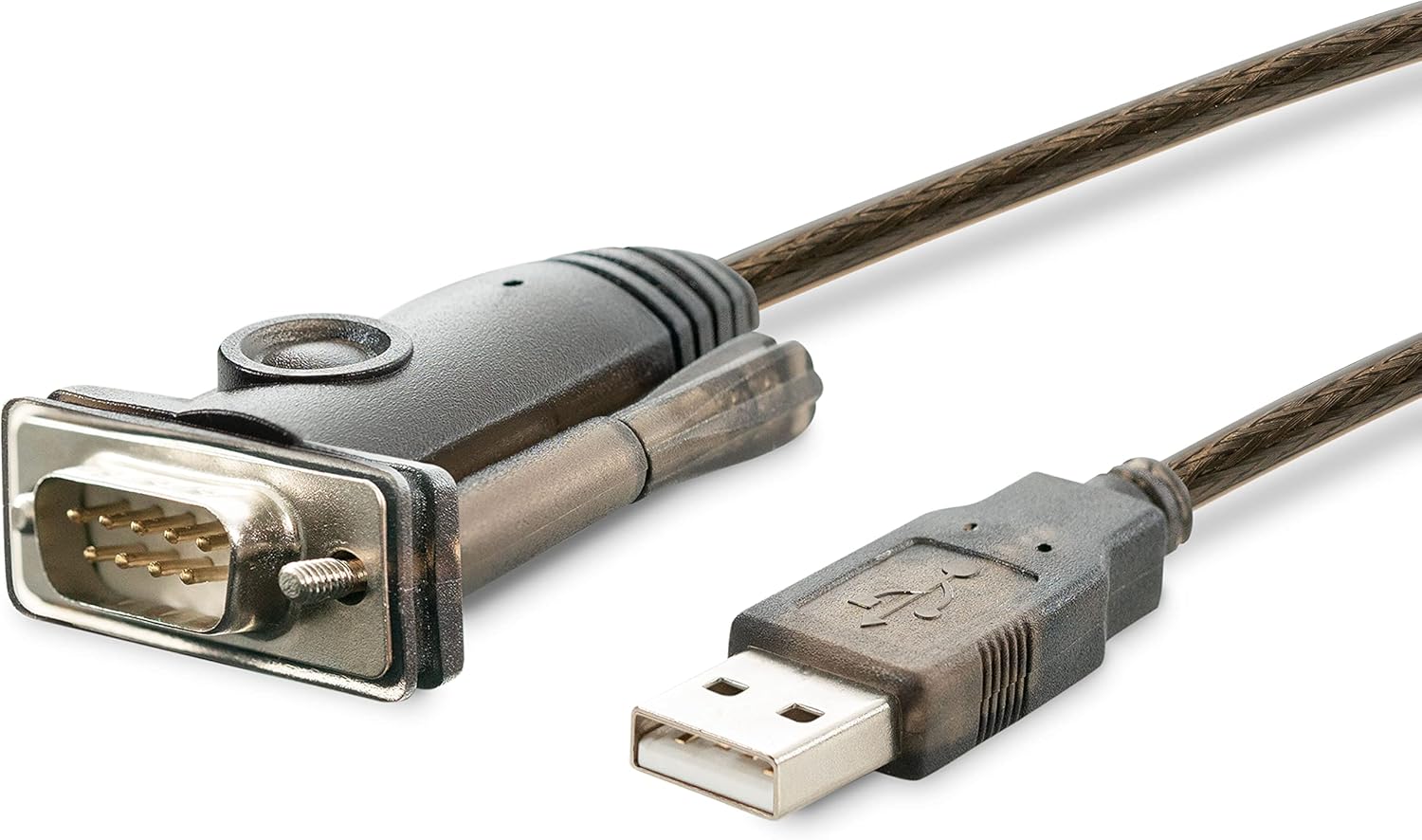
Image of the Plugable USB to Serial RS-232 Adapter, showing the USB-A connector on one end and the DB9 male serial connector on the other.

Close-up image of the Plugable USB to RS-232 DB9 Serial Adapter, highlighting the DB9 male connector and the USB-A connector. It also visually distinguishes a 9-pin serial connector from a 15-pin VGA connector.
2. Key Features
- USB to RS-232 Serial Adapter: Connects DB-9 serial devices to a computer via USB.
- USB Powered: No external power adapter required.
- Prolific PL2303GT Chipset: Ensures wide compatibility and stable performance.
- Broad Operating System Support: Compatible with Windows (11, 10, 8.x, 7, Vista), macOS, and Linux.
- Programmable Baud Rate: Supports data transfer rates from 75bps up to 1Mbps.
- COM Port Retention: Maintains the assigned COM port number and settings across system reboots.
- Plug-and-Play: Simplifies the creation of a COM port for serial communication.
3. Compatibility
This adapter is designed for extensive compatibility with various operating systems and serial devices. It is suitable for use with a wide range of equipment that utilizes a DB9 RS-232 serial port.
- Operating Systems: Windows (11, 10, 8.x, 7, Vista), macOS, Linux.
- Specific Uses: PC connectivity for serial devices.
- Common Devices: Network gear, telescopes, amateur radio equipment, GPS units, modems, point-of-sale systems, industrial control equipment, and other serial peripherals.

Diagram illustrating various devices compatible with the adapter, including network gear, telescopes, amateur radio equipment, and GPS units.
4. Setup Instructions
4.1. Driver Installation
The Plugable USB to Serial RS-232 Adapter utilizes the Prolific PL2303GT chipset. For most modern operating systems (Windows 10/11, recent macOS, and Linux kernels), drivers are typically installed automatically upon connecting the device. If automatic installation does not occur, or if you are using an older operating system, manual driver installation may be required.
- Automatic Installation: Connect the adapter to an available USB port on your computer. The operating system should detect the new hardware and install the necessary drivers.
- Manual Installation: If drivers are not automatically installed, visit the Plugable support website for the PL2303-DB9 model to download and install the latest drivers.
4.2. Connecting the Adapter
- Ensure your computer is powered on.
- Connect the USB-A end of the Plugable PL2303-DB9 adapter to an available USB port on your computer.
- Connect the DB9 male serial connector of the adapter to the DB9 female port of your serial device or serial cable. Ensure a secure connection.
- Once connected, your operating system should recognize the adapter and assign a COM port number. You can verify this in your system's Device Manager (Windows) or System Information (macOS/Linux).
For detailed setup guides and troubleshooting, please refer to the official Plugable support page:
5. Operating the Adapter
After successful installation, the adapter functions as a standard serial COM port on your system. Applications that require serial communication can be configured to use this newly created COM port.
- COM Port Identification: The operating system assigns a COM port number (e.g., COM1, COM2, etc.). This number can be found in your system's device manager.
- COM Port Retention: The adapter features COM port retention, meaning the assigned COM port number will typically remain the same even after reboots or reconnecting the adapter to the same USB port.
- Baud Rate Configuration: The adapter supports a programmable baud rate from 75bps to 1Mbps. This setting is typically configured within the serial communication software you are using, matching the requirements of your connected serial device.
- Data Flow: Data will flow between your computer's USB port and the connected serial device through the adapter. Ensure your serial communication software is correctly configured with the appropriate COM port, baud rate, data bits, parity, and stop bits.
6. Maintenance
The Plugable USB to Serial RS-232 Adapter is designed for durability and requires minimal maintenance.
- Cleaning: Keep the adapter clean and free from dust. Use a soft, dry cloth for cleaning. Avoid liquid cleaners.
- Storage: Store the adapter in a cool, dry place when not in use.
- Handling: Avoid bending or twisting the cable excessively, which can damage internal wires. Do not expose the adapter to extreme temperatures or moisture.
7. Troubleshooting
If you encounter issues with your Plugable USB to Serial RS-232 Adapter, consider the following troubleshooting steps:
- Device Not Recognized:
- Try connecting the adapter to a different USB port on your computer.
- Test the adapter on another computer to rule out a system-specific issue.
- Ensure the drivers are correctly installed. Check Device Manager (Windows) or System Information (macOS/Linux) for any error indicators.
- No COM Port Appears:
- Verify driver installation. Reinstall drivers if necessary.
- Check for conflicting devices in Device Manager.
- Communication Errors:
- Ensure the baud rate, data bits, parity, and stop bits settings in your serial communication software match those of your serial device.
- Confirm that the correct COM port is selected in your application.
- Test with a different serial cable or device if possible to isolate the issue.
- Intermittent Connection:
- Ensure all connections are secure.
- Avoid using unpowered USB hubs; connect directly to the computer's USB port if possible.
If these steps do not resolve the issue, please contact Plugable support for further assistance.
8. Technical Specifications
| Feature | Specification |
|---|---|
| Model Number | PL2303-DB9 |
| Chipset | Prolific PL2303GT |
| Connector Type | USB Type A (Male) to DB9 RS-232 (Male) |
| Cable Length | 5 feet (approximately 1.5 meters) |
| Baud Rate | 75bps to 1Mbps (programmable) |
| Compatible Devices | Windows (11, 10, 8.x, 7, Vista), macOS, Linux |
| Power Source | USB Bus-Powered |
| Color | Grey |
| Item Dimensions (L x W x H) | 26.5 x 1.5 x 0.6 inches (approximate, including cable) |
9. Warranty and Support
Every Plugable product is backed by a 2-year limited parts and labor warranty after purchase. Plugable also provides North American-based support from their engineering team, available even before purchase.
For technical assistance, driver downloads, or warranty claims, please visit the Plugable support website or contact their support team directly. When contacting support, providing your product model (PL2303-DB9) and a detailed description of your issue will help expedite the process.

Image of the back of the product packaging, showing product details, QR code for support, and contact information.
