
Introduction
The Logitech Z623 THX 2.1 Speaker System is designed to deliver powerful and immersive audio for your entertainment. This system includes two satellite speakers and a subwoofer, optimized to provide rich, detailed sound with deep bass. With THX certification, the Z623 ensures a high-fidelity audio experience, bringing your movies, music, and games to life.
Key Features:
- THX Certified Audio: Engineered to meet strict performance standards for an authentic audio experience.
- 400 Watts Peak Power (200 Watts RMS): Delivers amplified audio with powerful bass.
- Multiple Connectivity Options: Connect up to three devices simultaneously via 3.5mm and RCA inputs.
- Integrated Controls: Convenient access to power, volume, bass, headphone jack, and auxiliary input on the right satellite speaker.
- Versatile Compatibility: Compatible with PCs, game consoles (PS4, Xbox), TVs, mobile devices, and tablets.
What's in the Box
Verify that all components are present in the package:
- Logitech Z623 THX 2.1 Speaker System (Subwoofer and two Satellite Speakers)
- 3.5mm Audio Cable
- Power Cable
- User Documentation
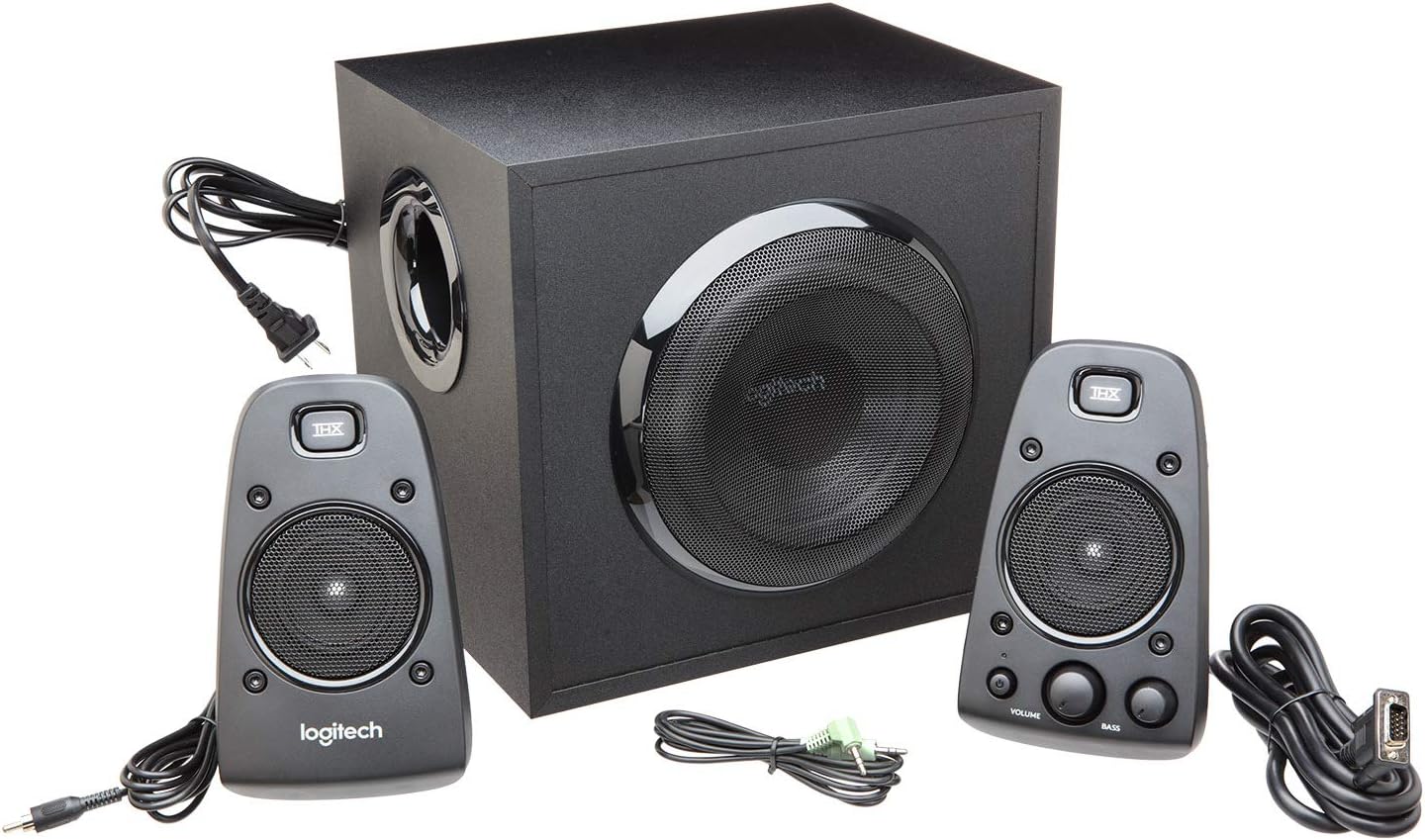
This image displays all components of the Logitech Z623 system laid out, including the subwoofer, two satellite speakers, and the necessary audio and power cables.
Setup
1. Placement
For optimal sound quality, place the subwoofer on the floor, preferably in a corner or near a wall to enhance bass response. Position the two satellite speakers on either side of your listening area, facing you. Ensure they are at an equal distance from your listening position for balanced stereo sound.

The Logitech Z623 satellite speakers positioned on a media console, flanking a television, demonstrating a typical setup for home entertainment.
2. Connecting the Speakers
- Connect the right satellite speaker cable to the 'RIGHT SPEAKER' port on the back of the subwoofer.
- Connect the left satellite speaker cable to the 'LEFT SPEAKER' port on the back of the subwoofer.
- Plug the power cable into the subwoofer's power input, then into a wall outlet.
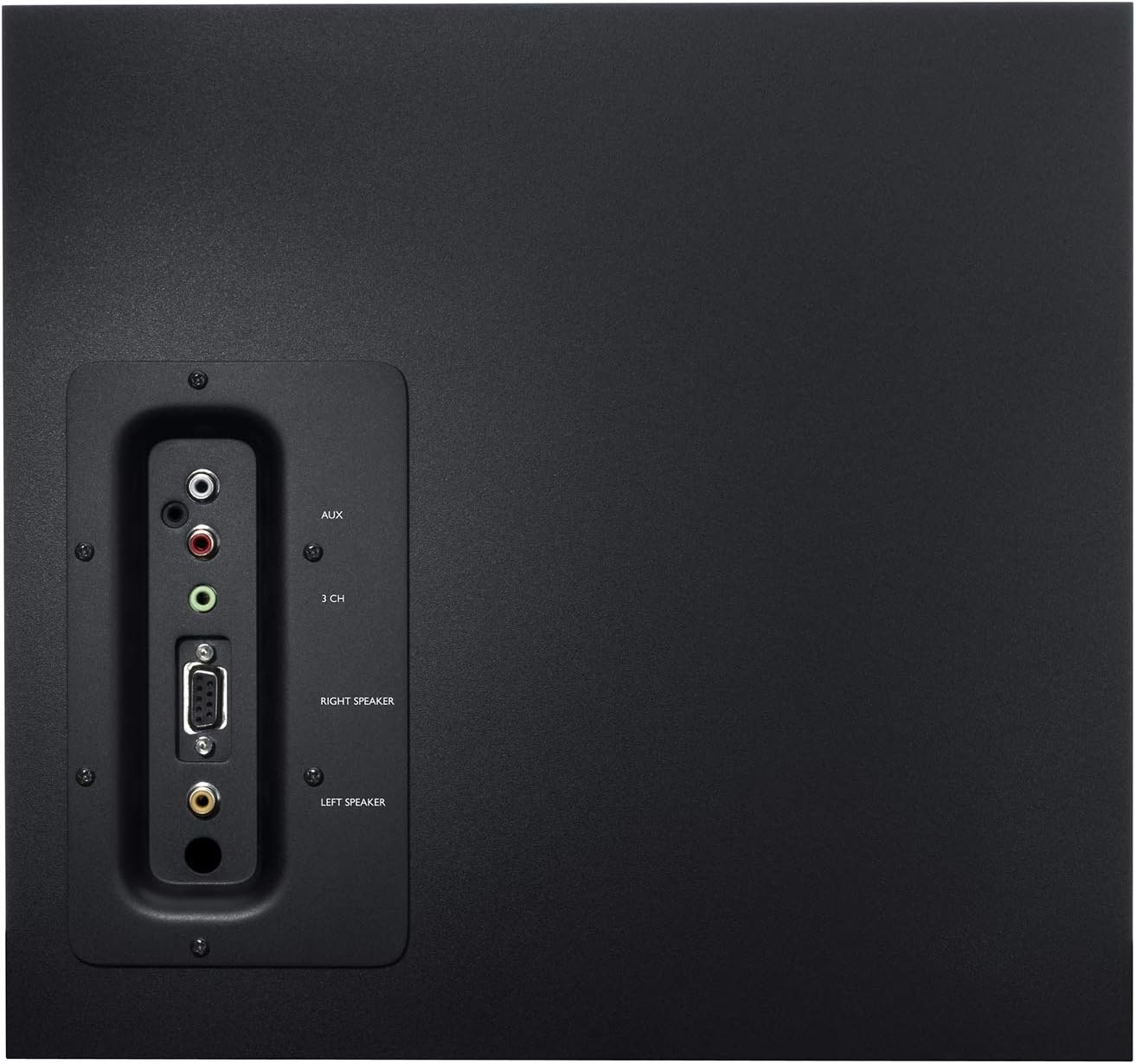
The back panel of the subwoofer, illustrating the various input ports including 3.5mm and RCA, and the speaker output connections for the satellite speakers.
Connections
The Logitech Z623 system offers versatile connectivity for various audio sources:
- 3.5mm Input: Use the included 3.5mm audio cable to connect to devices like computers, smartphones, tablets, or gaming consoles with a 3.5mm audio output. Connect this cable to the green 3.5mm input on the subwoofer's rear panel or the auxiliary input on the right satellite speaker.
- RCA Inputs: For devices with RCA audio outputs (e.g., TVs, DVD players, older gaming consoles), use an RCA cable (not included) to connect to the red and white RCA inputs on the subwoofer's rear panel.
- Auxiliary Input (3.5mm): A convenient 3.5mm auxiliary input is located on the right satellite speaker for quick connection of portable devices.
- Headphone Jack: A 3.5mm headphone jack is available on the right satellite speaker for private listening. Plugging in headphones will mute the speakers.
The back panel of the subwoofer, illustrating the various input ports including 3.5mm and RCA, and the speaker output connections for the satellite speakers.
Operating Instructions
Power On/Off
Press the power button located on the right satellite speaker to turn the system on or off. An indicator light will illuminate when the system is powered on.
Adjusting Volume and Bass
Use the large 'VOLUME' dial on the right satellite speaker to adjust the overall sound level. The 'BASS' dial allows you to control the subwoofer's output, letting you customize the intensity of the low frequencies.
Using the Headphone Jack and Auxiliary Input
The 3.5mm headphone jack and auxiliary input on the right satellite speaker provide convenient access for personal listening or connecting additional audio sources without needing to reach the subwoofer's rear panel.

A detailed view of the right satellite speaker, highlighting the power button, volume dial, and bass control dial for easy access.
Maintenance
To ensure the longevity and optimal performance of your Logitech Z623 speaker system, follow these maintenance guidelines:
- Cleaning: Use a soft, dry cloth to clean the surfaces of the speakers and subwoofer. Avoid using abrasive cleaners, solvents, or aerosol sprays, as these can damage the finish.
- Ventilation: Ensure the subwoofer's vents are not obstructed to prevent overheating. Do not place the subwoofer in an enclosed space without adequate airflow.
- Environment: Keep the speakers away from direct sunlight, heat sources, and excessive moisture.
- Cable Management: Route cables carefully to avoid kinks or damage, which can affect sound quality or cause connection issues.
Troubleshooting
If you encounter issues with your Z623 speaker system, refer to the following common troubleshooting steps:
| Problem | Solution |
|---|---|
| No sound |
|
| Distorted or unclear sound |
|
| No bass from subwoofer |
|
| Only one satellite speaker works |
|
Specifications
| Feature | Detail |
|---|---|
| Model Number | 980-000404 |
| Speaker Type | 2.1 System (Satellite, Subwoofer) |
| Total Peak Power | 400 Watts |
| Total RMS Power | 200 Watts |
| Connectivity Technology | Wired (3.5mm, RCA) |
| Audio Output Mode | Surround |
| Input Voltage | 230 Volts (AC) |
| Subwoofer Diameter | 305 mm |
| Controls | Integrated (Power, Volume, Bass) |
| Product Dimensions | 26.6 x 30.5 x 28.4 cm (Subwoofer) |
| Product Weight | 7 Kilograms |
| Compatible Devices | Desktop PC, Laptop, MP3 Player, Smartphone, Tablet, Television, Game Console |
Official Product Video
This video provides a visual overview of the Logitech Z623 THX 2.1 Speaker System, showcasing its design and key features.
Warranty and Support
The Logitech Z623 THX 2.1 Speaker System comes with a 24-month limited warranty from the date of purchase. This warranty covers defects in materials and workmanship under normal use.
For detailed warranty information, technical support, or to register your product, please visit the official Logitech support website. You can typically find support resources, FAQs, and contact information for customer service there.
Manufacturer: Logitech


