
Panasonic NN-CD989S Genius Prestige 4-in-1 Sensor Convection Microwave Oven User Manual
Model: NN-CD989S
Product Overview
This manual provides instructions for the Panasonic NN-CD989S Genius Prestige 4-in-1 Sensor Convection Microwave Oven. This appliance offers a 1.5 cubic foot capacity and 1100 Watts of cooking power. It integrates microwave, broiling, baking, and combination cooking functions. The unit features a stainless steel exterior and interior, and is designed for countertop installation.
Key Features
- 1.5 cuft Capacity & 1100 Watts: Provides ample space and power for various cooking needs.
- Genius One-Touch Sensor Cook and Reheat: Automatically adjusts power levels and cooking/defrosting times for optimal results.
- Inverter Technology: Delivers consistent microwave energy for even cooking and defrosting, preventing burnt edges and cold spots. Includes Inverter Turbo Defrost.
- 4-in-1 Cooking: Combines Microwave, Broiling, Baking, and Combination cooking modes.
- Control Panel: Features a silver button control panel with dual dials for programming.
- Turntable: Equipped with a 15-inch turntable for even heating.
- Design Note: The upper left-corner of the door has a small indentation, which is a factory design feature to ensure smooth door operation.
- Dimensions: 23 7/8" (W) x 19 5/16" (D) x 14 13/16" (H), weighing 46 lbs.
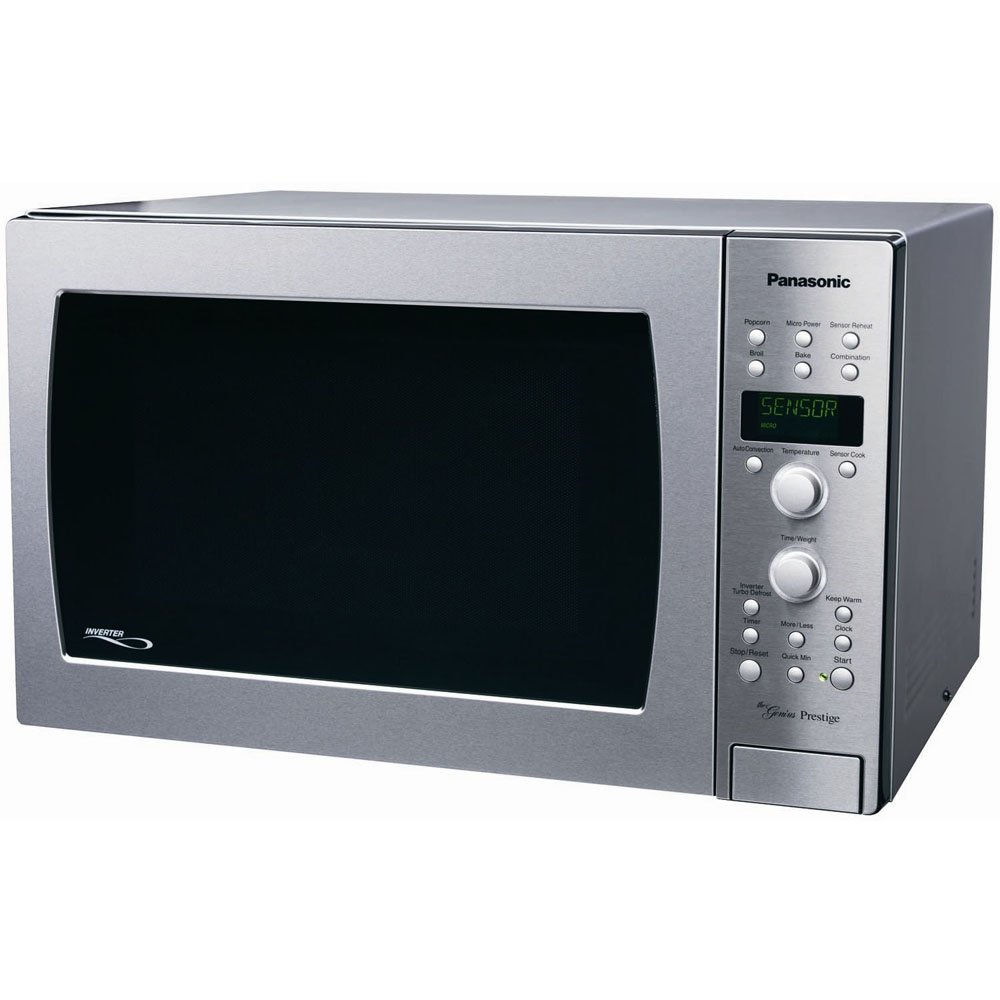
Figure 1: Front view of the Panasonic NN-CD989S Genius Prestige Microwave Oven.
Inverter Technology
The Panasonic NN-CD989S utilizes Inverter Technology, which differs from traditional microwave ovens. Traditional microwaves approximate lower heat settings by cycling full power on and off, potentially leading to uneven cooking with hot and cold spots. In contrast, Inverter Technology delivers a continuous, consistent stream of microwave energy at any power level. This ensures food cooks evenly and completely, without burnt edges or cold spots.
This technology also contributes to faster cooking times, helping to retain more nutrition and flavor in food. Additionally, Inverter Technology allows for a smaller and lighter power supply, freeing up internal cavity space for larger dishes without increasing the overall appliance footprint.
Video 1: Explanation of Panasonic Inverter Technology and its benefits for even cooking and faster results.
Setup and Installation
The Panasonic NN-CD989S is designed for countertop installation. Ensure the microwave is placed on a flat, stable surface capable of supporting its weight (approximately 46 lbs) and the weight of food being cooked. Allow adequate clearance around the unit for proper ventilation. Do not block air vents. Connect the microwave to a grounded 120 Volt (AC) electrical outlet.
Before first use, remove all packing materials from inside the oven cavity and from the turntable. Clean the interior with a damp cloth.
Operation
Control Panel
The microwave features a silver button control panel with dual dials. One dial is typically used for setting time/weight, and the other for selecting menu options or power levels. Refer to the specific button labels for their functions.
Cooking Modes
This appliance offers four primary cooking methods:
- Microwave: For standard microwave cooking and reheating.
- Broil: Utilizes a heating element for browning and crisping.
- Bake: Uses convection heat for oven-style baking.
- Combination: Combines microwave energy with broiling or baking for faster and more thorough cooking.
Genius One-Touch Sensor Cook and Reheat
The Sensor Cook and Reheat functions automatically detect the humidity level of the food and adjust cooking time and power accordingly. To use, place food in the oven, select the desired sensor function (e.g., Sensor Cook, Sensor Reheat), and press Start. The oven will determine the optimal cooking duration.
Inverter Turbo Defrost
This feature provides efficient and even defrosting. Select the Inverter Turbo Defrost option, input the food weight, and press Start. The Inverter Technology ensures continuous, low-power microwave energy to defrost food thoroughly without cooking the edges.
Child Safety Lock
To prevent unintended operation, the microwave is equipped with a child safety lock. Consult the control panel or the full manual for instructions on how to activate and deactivate this feature.
Maintenance
Cleaning the Interior
Regularly clean the stainless steel interior of the oven with a mild detergent and a soft cloth. Avoid abrasive cleaners or scouring pads that could scratch the surface. For stubborn food spills, place a bowl of water with lemon slices inside and microwave on high for a few minutes to loosen residue, then wipe clean.
Cleaning the Exterior
Wipe the stainless steel exterior with a soft cloth and a stainless steel cleaner, following the cleaner's instructions. Ensure the control panel is kept clean and dry.
Turntable Care
The 15-inch glass turntable can be removed for cleaning. Wash it with warm, soapy water or in a dishwasher. Ensure it is completely dry before placing it back in the oven.
Specifications
| Feature | Detail |
|---|---|
| Brand | Panasonic |
| Model Name | NN CD989S |
| Model Number | NN-CD989S |
| Color | Stainless Steel |
| Capacity | 1.5 Cubic Feet |
| Installation Type | Countertop |
| Wattage | 1100 Watts |
| Voltage | 120 Volts (AC) |
| Material | Stainless Steel (Exterior & Interior) |
| Included Components | Turntable |
| Controller Type | Button, Dual Dials |
| Number of Power Levels | 10 |
| Timer Function | Available |
| Heating Method | Microwave Radiation, Grill, Convection Heat |
| Defrost System Type | Auto Defrost (Inverter Turbo Defrost) |
| Cooking Programs | Bake, Broil, Combination, Defrost, Microwave |
| Number of Programs | 8 |
| Item Weight | 46 lbs (20865 Grams) |
| Turntable Diameter | 15 Inches |
| Special Feature | Child Safety Lock |
Troubleshooting
If the microwave oven is not operating correctly, review the following common issues before contacting customer support:
- No Power: Ensure the power cord is securely plugged into a grounded outlet. Check the household circuit breaker or fuse box.
- Oven Not Heating: Verify that the door is fully closed and latched. Ensure a cooking time has been set and the Start button has been pressed.
- Uneven Cooking: Ensure food is placed centrally on the turntable and that the turntable is rotating freely. Stir or rotate food halfway through cooking if possible.
- Display Issues: If the display is blank or showing an error code, try unplugging the unit for a few minutes and then plugging it back in to reset.
For more detailed troubleshooting steps or persistent issues, refer to the comprehensive troubleshooting guide in the full product manual or contact Panasonic customer support.
Warranty and Support
For warranty information, please refer to the documentation included with your Panasonic NN-CD989S microwave oven. Panasonic provides customer support for product inquiries, technical assistance, and service requests.
Customer Support: For assistance, please visit the official Panasonic support website or contact their customer service line. Details can typically be found on the manufacturer's website or in the product packaging.