
1. Introduction
This manual provides detailed instructions for the proper use and care of your GUESS W10245G1 Analog Multi-Color Dial Men's Watch. Please read this manual thoroughly to ensure optimal performance and longevity of your timepiece. Keep this manual for future reference.
2. Product Overview
The GUESS W10245G1 is a men's analog chronograph watch featuring a multi-color dial and a durable stainless steel bracelet. It is designed for everyday wear with a focus on style and functionality.
2.1 Key Features
- Quartz Movement for accurate timekeeping.
- Chronograph Display for stopwatch functionality.
- Water Resistance up to 30 meters (3 ATM).
- Stainless Steel Case and Band for durability.
- Mineral Crystal for scratch resistance.
2.2 Watch Components
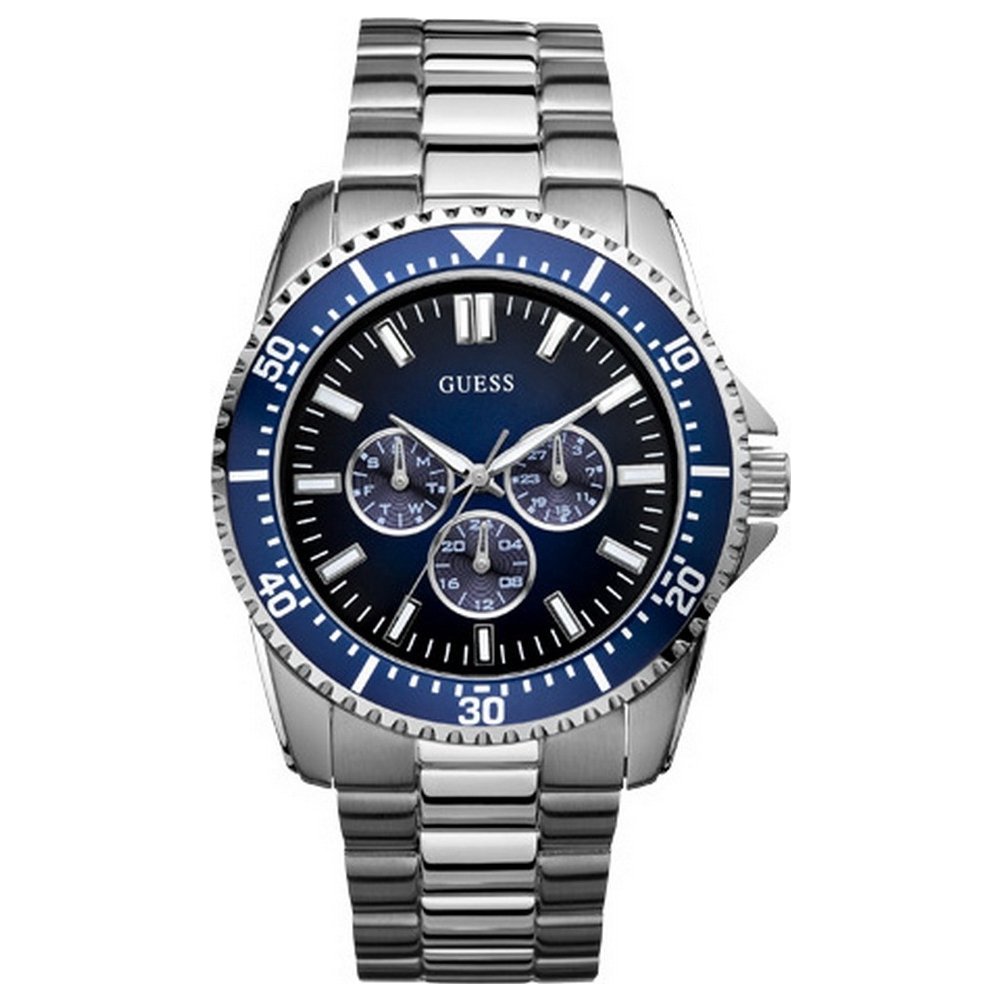
Figure 1: Front view of the GUESS W10245G1 watch, showing the multi-color dial, three sub-dials, and the stainless steel bracelet. The crown and pushers are visible on the right side of the case.
- Crown: Used for setting the time. Located on the right side of the watch case.
- Pushers: Buttons located above and below the crown, used to operate the chronograph functions.
- Dial: The watch face displaying hours, minutes, seconds, and chronograph sub-dials.
- Hands: Hour, minute, and second hands for time indication, plus chronograph hands.
- Bracelet: Stainless steel band for securing the watch to the wrist.
- Clasp: Deployment clasp with push-buttons for secure fastening and easy removal.
3. Setup
3.1 Setting the Time
- Pull the crown out to the first click position.
- Turn the crown clockwise or counter-clockwise to set the hour and minute hands to the desired time.
- Once the time is set, push the crown back into its normal position to start the watch.
3.2 Adjusting the Bracelet
The stainless steel bracelet may require adjustment to fit your wrist comfortably. It is recommended to have this adjustment performed by a professional jeweler or watch technician to avoid damage to the bracelet or clasp.
4. Operating the Watch
4.1 Timekeeping
Your GUESS W10245G1 watch uses a precise quartz movement to display the current time with hour, minute, and second hands.
4.2 Using the Chronograph (Stopwatch)
The chronograph function allows you to measure elapsed time.
- Start: Press the upper pusher (A) to start the chronograph. The chronograph second hand will begin to move.
- Stop: Press the upper pusher (A) again to stop the chronograph. The elapsed time will be indicated by the chronograph hands.
- Reset: After stopping the chronograph, press the lower pusher (B) to reset all chronograph hands to their zero positions.
- Split Time (if applicable): Some chronographs allow for split time measurement. Refer to specific movement instructions if your model supports this. For basic operation, use start/stop/reset.
4.3 Water Resistance
This watch is water resistant up to 30 meters (3 ATM). This means it is suitable for everyday use and can withstand splashes or brief immersion in water. It is NOT suitable for swimming, showering, diving, or any water sports. Avoid operating the crown or pushers when the watch is wet to prevent water intrusion.
5. Maintenance
5.1 Cleaning Your Watch
To maintain the appearance of your watch:
- Wipe the case and crystal with a soft, dry cloth regularly.
- For the stainless steel bracelet, a soft brush and mild soapy water can be used, followed by thorough rinsing with clean water and drying with a soft cloth. Ensure the crown is pushed in completely before cleaning with water.
- Avoid using harsh chemicals, solvents, or abrasive cleaners, as these can damage the watch's finish.
5.2 Battery Replacement
The watch is powered by a quartz battery. When the battery runs low, the watch may stop or the second hand may move erratically. Battery replacement should be performed by a qualified watch technician to ensure the watch's water resistance and proper functioning are maintained.
5.3 Storage
When not wearing your watch, store it in a cool, dry place away from direct sunlight, extreme temperatures, and strong magnetic fields. The original watch box is ideal for storage.
6. Troubleshooting
6.1 Watch Not Running
- Ensure the crown is fully pushed in to the normal operating position.
- The battery may be depleted. Contact a professional watch technician for battery replacement.
6.2 Incorrect Time Display
- Re-set the time following the instructions in Section 3.1.
- If the time continues to be inaccurate, the watch may require servicing.
6.3 Chronograph Hands Not Resetting to Zero
- Ensure you are pressing the lower pusher (B) after stopping the chronograph.
- If the issue persists, the chronograph hands may need calibration or the movement may require servicing.
7. Specifications
| Model Number | W10245G1 |
| Brand | GUESS |
| Movement Type | Quartz |
| Display Type | Chronograph, Analog |
| Case Material | Stainless Steel |
| Case Diameter | 44 Millimetres |
| Case Thickness | 13 Millimetres |
| Band Material | Stainless Steel |
| Band Colour | Silver |
| Band Width | 20 Millimetres |
| Dial Colour | Blue (Multi-Color Dial) |
| Crystal Material | Mineral |
| Water Resistance Depth | 30 Metres (3 ATM) |
| Clasp Type | Deployment Clasp with Push-Button |
| Item Weight | 0.28 g |
| Product Dimensions | 13 x 13 x 13 cm |
8. Warranty and Support
8.1 Manufacturer's Warranty
Your GUESS W10245G1 watch is covered by a manufacturer's warranty. The terms and conditions of this warranty are typically provided with your purchase documentation. Please retain your proof of purchase for warranty claims.
The warranty generally covers manufacturing defects in materials and workmanship under normal use. It typically does not cover damage resulting from improper handling, accidents, unauthorized repairs, or normal wear and tear (e.g., battery, crystal, strap).
8.2 Customer Support
For further assistance, service, or warranty inquiries, please contact GUESS customer service or an authorized GUESS service center. Contact information can usually be found on the official GUESS website or in your watch's packaging.
When contacting support, please have your watch model number (W10245G1) and proof of purchase readily available.


