
Duracell DR5700G-EU
Duracell DR5700G-EU Digital Camera Battery Charger User Manual
Model: DR5700G-EU
Introduction
This manual provides instructions for the safe and efficient use of your Duracell DR5700G-EU Digital Camera Battery Charger. Please read this manual thoroughly before using the product and retain it for future reference.
The Duracell DR5700G-EU is designed to charge rechargeable batteries for digital cameras, featuring a European plug and built-in short-circuit protection. An LED indicator displays the charging status.
Important Safety Instructions
- Read all instructions before use.
- Do not expose the charger to rain or moisture.
- Do not operate the charger if it has received a sharp blow, been dropped, or damaged in any way.
- Do not disassemble the charger. Refer servicing to qualified service personnel.
- Use only with specified rechargeable battery types. Using other batteries may cause explosion, rupture, or leakage.
- Keep out of reach of children.
- Unplug from outlet when not in use.
Setup
- Unpack the Charger: Carefully remove the Duracell DR5700G-EU charger from its packaging. Ensure all components are present.
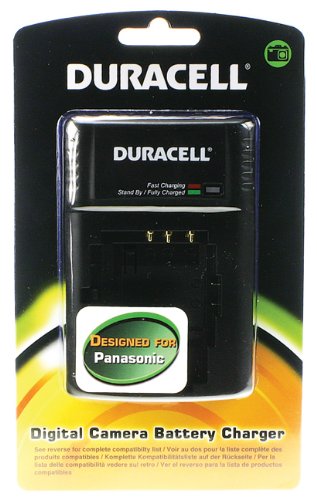
Image: The Duracell DR5700G-EU digital camera battery charger, showing its compact design and European plug.
- Inspect for Damage: Before first use, inspect the charger and its cable for any signs of damage. Do not use if damaged.
- Power Connection: Plug the charger into a standard European wall outlet (220-240V AC). The charger is designed for European power sockets.
Operating Instructions
- Insert Battery: Carefully insert the compatible rechargeable digital camera battery into the charger's battery slot. Ensure the battery is correctly oriented according to the polarity markings on the charger.
- Charging Indication: Once the battery is correctly inserted and the charger is plugged into a power outlet, the LED indicator on the charger will illuminate.
- Red LED: Indicates the battery is currently charging.
- Green LED: Indicates the battery is fully charged.
- Charging Time: Charging times vary depending on the battery capacity and its current charge level. Refer to your camera battery's specifications for typical charging durations.
- Remove Battery: Once the LED indicator turns green, the battery is fully charged. Unplug the charger from the wall outlet, then carefully remove the charged battery.
Maintenance and Care
- Cleaning: Disconnect the charger from the power outlet before cleaning. Use a soft, dry cloth to wipe the exterior of the charger. Do not use liquid cleaners or solvents.
- Storage: Store the charger in a cool, dry place away from direct sunlight and extreme temperatures.
- Handling: Avoid dropping the charger or subjecting it to strong impacts.
Troubleshooting
| Problem | Possible Cause | Solution |
|---|---|---|
| LED indicator does not light up. |
|
|
| Battery does not charge fully. |
|
|
Specifications
- Model: DR5700G-EU
- Input Voltage: AC 220-240V (European standard)
- Compatibility: Designed for rechargeable digital camera batteries, including Panasonic CGA-S001E, CGA-S101B, CGA-S301E, DMW-BCF10E, DMW-BCG10E.
- Features: LED charging indicator, short-circuit protection.
- Dimensions: Approximately 20 x 12.4 x 8 cm
- Weight: Approximately 117.93 grams
Warranty and Support
For warranty information and customer support, please refer to the documentation included with your purchase or visit the official Duracell website. Keep your proof of purchase for warranty claims.
Manufacturer: DURACELL ITALY S.R.L.
Related documentsDR5700G-EU


Ask a question about this manual
Ask about setup, troubleshooting, compatibility, parts, safety, or missing instructions. Manuals+ will review the question and use this page’s manual context to help answer it.