Introduction
The Metz Mecablitz 50 AF-1 digital is a high-performance flashgun designed for Canon digital cameras. It offers advanced features, including a high guide number of 50, versatile flash modes, and a flexible reflector system. This manual provides essential information for the proper setup, operation, and maintenance of your Mecablitz 50 AF-1.
Product Features
- High Performance: Guide number 50 for powerful illumination.
- Versatile Reflector System: Vertical (-7/+90 degrees) and horizontal (300 degrees) swivel reflector with integrated flip-out reflector card and diffuser.
- Multiple Flash Modes: TTL flash mode, manual flash mode with 8 partial lighting levels, and High-Speed Synchronization (HSS).
- Wireless Functionality: Supports camera-specific wireless TTL mode as a slave device and servo mode for wireless applications with built-in camera flash.
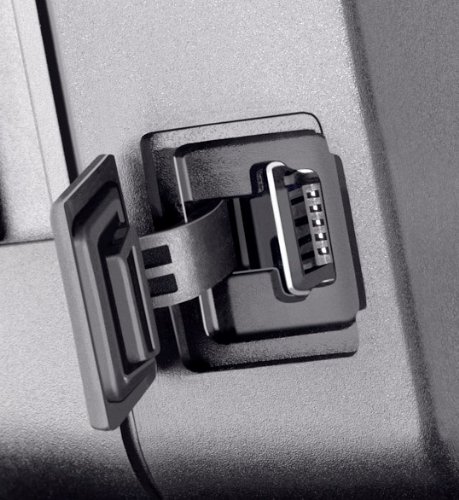
- USB Interface: For future firmware updates.
- Illuminated LCD Display: For clear settings visibility.
Setup
1. Battery Installation
The Mecablitz 50 AF-1 requires four (4) AA batteries for operation. Ensure batteries are inserted with correct polarity as indicated inside the battery compartment.
2. Mounting to Camera
Attach the flashgun to your Canon camera's hot shoe mount. Secure it firmly using the locking mechanism provided on the flash unit's metal base. Ensure a proper connection for full functionality.

Operating Instructions
1. Power On/Off and Display
Locate the ON/OFF switch on the flash unit. Once powered on, the illuminated LCD display will show current settings and operational status.

2. Flash Modes
- TTL Flash Mode: This mode automatically adjusts flash output for correct exposure. It is the default and most common mode for general photography.
- Manual Flash Mode: Allows you to manually set the flash output in 8 partial lighting levels. Use the "MODE" and "SELECT" buttons to navigate and adjust settings.
- High-Speed Synchronization (HSS): Enables flash photography at shutter speeds faster than the camera's native flash sync speed, useful for freezing fast action or using flash in bright ambient light.
3. Reflector System
The flash head can be swiveled vertically from -7 to +90 degrees and horizontally up to 300 degrees. This flexibility allows for bounce flash techniques, directing light off ceilings or walls for softer, more natural illumination. A built-in flip-out reflector card and diffuser are also available for further light modification.

4. Wireless Operation (Slave Function)
- Wireless TTL Mode: The 50 AF-1 can function as a slave unit in camera-specific wireless TTL systems, allowing off-camera flash control.
- Servo Mode: For cameras without a dedicated wireless TTL system, the servo mode allows the 50 AF-1 to be triggered by the camera's built-in flash.
5. Firmware Updates
The flashgun is equipped with a USB interface for future firmware updates. Visit the official Metz website for information on available updates and instructions on how to perform them.
Maintenance
- Cleaning: Use a soft, dry cloth to clean the flash unit. Do not use liquid cleaners or solvents.
- Storage: When not in use for extended periods, remove the batteries to prevent leakage. Store the flashgun in a cool, dry place.
- Handling: Avoid dropping or subjecting the flashgun to strong impacts. Protect the flash tube and LCD display from scratches.
Troubleshooting
| Problem | Possible Cause | Solution |
|---|---|---|
| Flash does not fire. |
|
|
| Flash output is too weak/strong. |
|
|
| Wireless slave function not working. |
|
|
Specifications
| Brand | Metz |
| Model | 5031191 (Mecablitz 50 AF-1) |
| Compatible Mountings | Canon (specific version) |
| Guide Number | 50 (at ISO 100, 105mm) |
| Flash Modes | TTL, Manual (8 partial levels), HSS |
| Reflector Swivel | Vertical: -7/+90 degrees, Horizontal: 300 degrees |
| Wireless Function | Slave (Wireless TTL, Servo) |
| Connectivity | Wired (Hot Shoe), USB (for firmware updates) |
| Power Source | 4 x AA batteries |
| Dimensions (LxWxH) | 9.9 x 7.1 x 13.7 cm |
| Item Weight | 343 g |
Warranty and Support
For warranty information and technical support, please refer to the documentation included with your purchase or visit the official Metz website. Keep your proof of purchase for warranty claims.
Metz Official Website: www.metz-ce.de/en/


