1. Introduction
This manual provides detailed instructions for the installation, operation, and maintenance of your Pentair FNS Plus Internal Air Bleed Assembly. This assembly is a crucial component for the efficient functioning of your DE filter system, ensuring proper air release and filtration performance. The assembly replaces part numbers 59023600 and 190092.
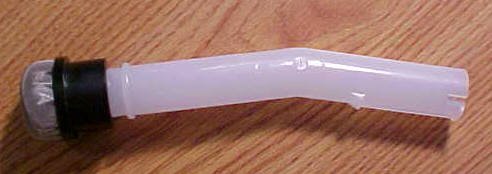
Figure 1: Pentair FNS Plus Internal Air Bleed Assembly
2. Product Features
- Designed for DE Filter systems.
- Ensures efficient air bleeding for optimal filter operation.
- Direct replacement for Pentair part numbers 59023600 and 190092.
3. Specifications
| Attribute | Value |
|---|---|
| Item Package Dimensions (L x W x H) | 8 x 2.5 x 0.7 inches |
| Package Weight | 1.6 ounces |
| Item Dimensions (L x W x H) | 2 x 1 x 10 inches |
| Brand | Pentair |
| Color | Black |
| Manufacturer | Pentair |
| Part Number | 59023600/190092 |
| Date First Available | October 5, 2010 |
4. Installation
The internal air bleed assembly (labeled as #7 in the diagram below) is critical for releasing trapped air from your DE filter system. Follow these general steps for replacement:
- Safety First: Turn off the pool pump and any automatic controls. Close all valves to isolate the filter.
- Relieve Pressure: Open the air relief valve on top of the filter to release any trapped air and pressure.
- Drain Filter: Open the drain plug at the bottom of the filter to drain the water.
- Open Filter: Carefully remove the filter clamp and separate the filter tank halves.
- Remove Old Assembly: Locate the internal air bleed assembly (part #7 in the diagram). It is typically attached to the manifold. Carefully detach and remove the old assembly.
- Install New Assembly: Securely attach the new Pentair FNS Plus Internal Air Bleed Assembly (59023600/190092) to the filter manifold. Ensure all connections are tight.
- Reassemble Filter: Clean the filter tank O-ring, lubricate it with a silicone-based lubricant, and place it correctly. Reassemble the filter tank halves and secure the clamp according to your filter's specific instructions.
- Restart System: Open all valves, ensure the air relief valve is open, and slowly turn on the pool pump. Once a steady stream of water emerges from the air relief valve, close it. Check for any leaks.

Figure 2: Exploded view of a DE filter system. The internal air bleed assembly is indicated by #7.
Installation Videos
Video 1: Installation of 190092 Internal Air Bleeds Assembly for Vertical Grid Filter. This video demonstrates the process of installing the air bleed assembly in a vertical grid filter.
Video 2: Grid & Air Bleed Assembly Replacement. This video illustrates the replacement procedure for a grid and air bleed assembly.
Video 3: Installation of 190092 Internal Air Bleeds Assembly. This video provides a visual guide for installing the 190092 air bleed assembly.
Video 4: 172855 Air Bleeder Screen Cap. This video shows the air bleeder screen cap, a component of the air bleed assembly.
Video 5: Air Bleeder Screen Cap (Vsttar). This video demonstrates the air bleeder screen cap.
Video 6: Air Bleeder Screen Cap (DECOHS). This video shows the air bleeder screen cap.
5. Operating Instructions
The Pentair FNS Plus Internal Air Bleed Assembly operates automatically within your DE filter system. Its primary function is to allow trapped air to escape from the filter tank during startup and normal operation. This prevents air pockets that can reduce filtration efficiency and potentially damage the pump.
- Ensure the air relief valve on the filter is opened during initial startup or after backwashing to purge air from the system.
- Close the air relief valve once a steady stream of water, free of air bubbles, is observed.
- The internal air bleed assembly will continue to facilitate air removal during normal operation.
6. Maintenance
Regular maintenance of your filter system, including the air bleed assembly, is essential for longevity and optimal performance.
- Periodic Inspection: During routine filter cleaning or disassembly, inspect the air bleed assembly for any signs of wear, cracks, or damage.
- Cleaning: Gently clean the screen of the air bleed assembly to remove any accumulated debris or DE powder. A soft brush and water can be used. Avoid harsh chemicals that could damage the material.
- Replacement: If the assembly shows significant wear, is cracked, or the screen is torn, replace it immediately to prevent filter issues.
7. Troubleshooting
If you experience issues with your pool filter system that may be related to the air bleed assembly, consider the following:
- Air in Pool/Filter: If you notice air bubbles returning to the pool or excessive air accumulating in the filter, the air bleed assembly might be clogged or damaged, preventing proper air release. Inspect and clean or replace as needed.
- Reduced Water Flow: A clogged air bleed assembly can contribute to reduced water flow and poor filtration by trapping air in the filter.
- Filter Pressure Issues: Inconsistent or unusually high filter pressure could indicate an issue with air bleeding.
Always ensure the pool pump is off and pressure is relieved before inspecting or servicing any filter components.
8. Warranty and Support
For specific warranty information regarding your Pentair FNS Plus Internal Air Bleed Assembly, please refer to the documentation provided with your original filter system or contact Pentair customer support directly. Keep your purchase receipt as proof of purchase.
For technical assistance or further inquiries, please visit the official Pentair website or contact their customer service department.


