
1. Introduction
This manual provides comprehensive instructions for the safe and effective use of your Nikon AF-S DX NIKKOR 55-300mm f/4.5-5.6G ED VR zoom lens. Designed for Nikon DX-format cameras, this lens offers a versatile 55-300mm focal length range, making it suitable for a wide variety of photographic situations, from portraits to distant subjects. It incorporates Nikon's advanced Vibration Reduction (VR) technology to minimize blur caused by camera shake.
2. Product Overview
The Nikon AF-S DX NIKKOR 55-300mm f/4.5-5.6G ED VR lens is a telephoto zoom lens featuring a compact design and built-in Vibration Reduction. Key features include:
- DX-Format Compatibility: Optimized for Nikon DX-format digital SLR cameras.
- Versatile Zoom Range: Covers 55mm to 300mm, equivalent to 82.5-450mm in 35mm format.
- Vibration Reduction (VR): Provides approximately 4 stops of shake compensation for sharper images in challenging conditions.
- Silent Wave Motor (SWM): Ensures fast, accurate, and quiet autofocus operation.
- ED Glass Elements: Two Extra-low Dispersion glass elements minimize chromatic aberration for superior sharpness and color correction.
- HRI Lens Element: One High Refractive Index lens element contributes to a compact design and corrects various aberrations.
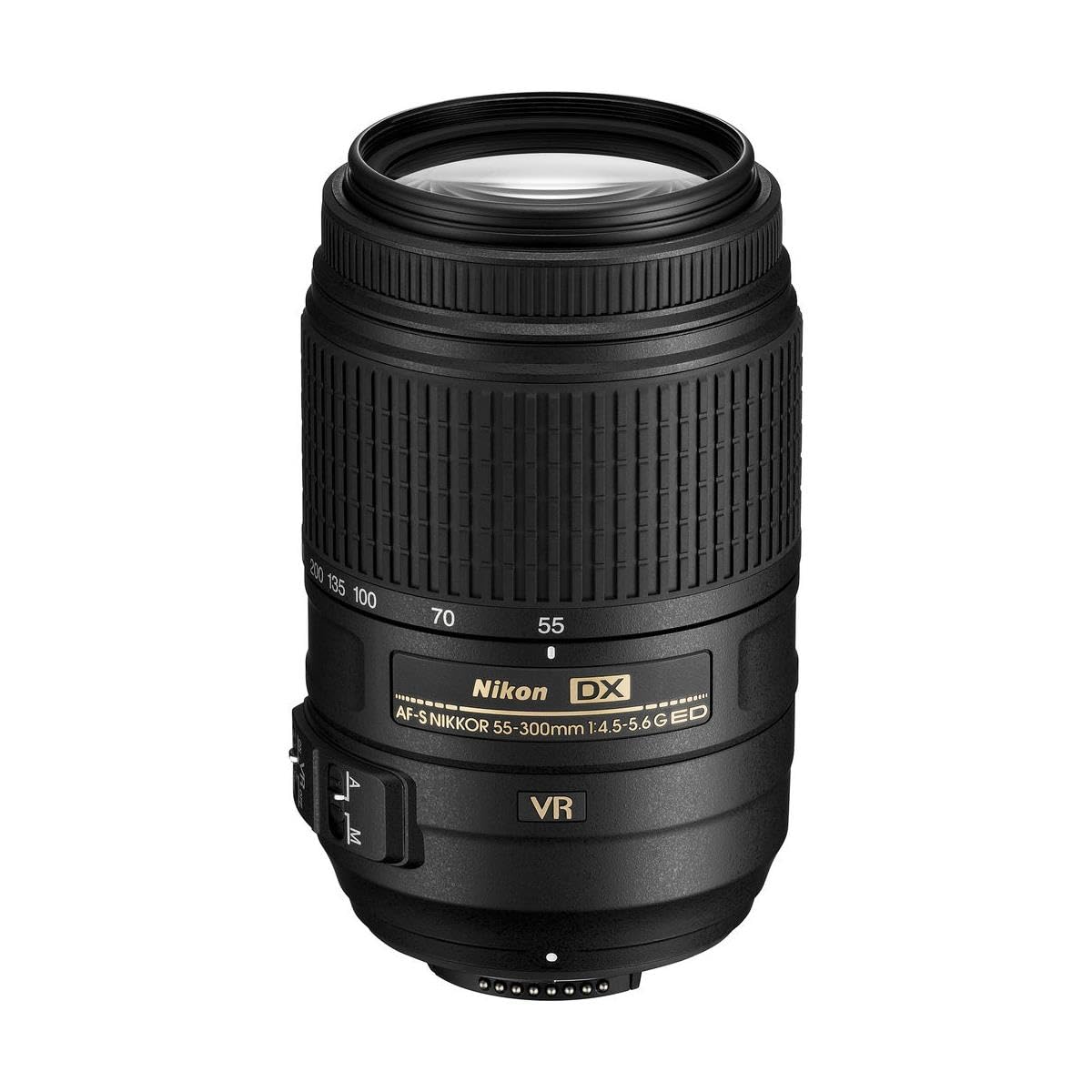
Lens Components
Familiarize yourself with the various parts of your lens:


3. Setup
Attaching the Lens
- Ensure the camera is turned off.
- Remove the rear lens cap from the lens and the body cap from the camera.
- Align the mounting mark on the lens with the mounting mark on the camera body.
- Rotate the lens counter-clockwise until it clicks into place.
Attaching the Lens Hood (HB-57)
The bayonet hood HB-57 is included to reduce stray light and protect the front element. Align the hood's mounting mark with the hood alignment mark on the lens, then rotate the hood until it clicks into place.
Attaching the Soft Case (CL-1020)
Use the provided soft case CL-1020 for protecting your lens during storage or transport.

4. Operating Instructions
Focus Mode Switch (A/M)
This switch controls the lens's focus mode:
- A (Autofocus): For automatic focusing. You can still manually adjust focus by rotating the focus ring after the camera has focused.
- M (Manual Focus): For manual focusing only. Rotate the focus ring to adjust focus.
Vibration Reduction (VR) Switch
The VR function reduces blur caused by camera shake. It is recommended to turn VR ON for handheld shooting, especially in low light or at longer focal lengths. Turn VR OFF when using a tripod or when shooting at very fast shutter speeds.
- ON: Activates Vibration Reduction.
- OFF: Deactivates Vibration Reduction.
Zooming
To change the focal length, rotate the zoom ring on the lens. The focal length markings (55, 70, 100, 135, 200, 300) indicate the current setting.
5. Maintenance
Cleaning the Lens
- Lens Surfaces: Use a blower brush to remove dust and lint. For stubborn smudges, use a soft, clean cotton cloth or lens tissue lightly moistened with lens cleaner. Wipe gently from the center outwards in a circular motion.
- Lens Body: Wipe with a soft, dry cloth. Do not use organic solvents like paint thinner or benzene.
Storage
- Always attach the front and rear lens caps when the lens is not in use.
- Store the lens in a cool, dry place away from direct sunlight and extreme temperatures.
- Avoid storing the lens with mothballs or camphor, as these can damage the lens elements.
6. Troubleshooting
If you encounter issues with your lens, refer to the following common problems and solutions:
| Problem | Possible Cause / Solution |
|---|---|
| Images are blurry or out of focus. |
|
| Autofocus is slow or unresponsive. |
|
| VR does not seem to be working. |
|
7. Specifications
| Feature | Detail |
|---|---|
| Model Name | AF-S DX NIKKOR 55-300mm f/4.5-5.6G ED VR |
| Focal Length | 55-300mm |
| Maximum Aperture | f/4.5-5.6 |
| Minimum Aperture | f/22-32 |
| Lens Construction | 17 elements in 11 groups (2 ED lens elements, 1 HRI lens element) |
| Angle of View | 28°50' - 5°20' (DX-format) |
| Minimum Focus Distance | 1.4 m (4.6 ft) from focal plane at all zoom positions |
| Maximum Reproduction Ratio | 0.27x |
| Diaphragm Blades | 9 (rounded) |
| Filter-Attachment Size | 58 mm |
| Dimensions (Diameter x Length) | Approx. 76.5 mm x 123 mm (3.0 in. x 4.8 in.) |
| Weight | Approx. 580 g (1.28 lbs) |
| Autofocus | Yes (Silent Wave Motor) |
| Vibration Reduction (VR) | Yes |
| Included Accessories | 58mm Snap-on Front Lens Cap (LC-58), Rear Lens Cap (LF-4), Bayonet Hood (HB-57), Soft Case (CL-1020) |
8. Warranty and Support
For inquiries regarding initial defects, warranty information, or detailed specifications of this product, please contact the Nikon Customer Support Center directly.
Nikon Customer Support Center:
- Telephone: 0570-02-8000
- Operating Hours: 9:30 AM - 6:00 PM daily, excluding New Year holidays and summer holidays.
Please have your product model and serial number ready when contacting support.