
1. Introduction
The Woods 59408WD Outdoor Hard-Wired Post Eye Light Control is designed to automatically turn your outdoor lighting on at dusk and off at dawn. This photocell light sensor provides reliable, energy-efficient control for various outdoor light fixtures, ensuring your property is illuminated when needed without manual intervention. It is suitable for hard-wired installations in appropriate enclosures.
2. Safety Information
- WARNING: Risk of electric shock. Disconnect power at the circuit breaker or fuse box before installation or servicing.
- This device is intended for installation in accordance with the National Electrical Code and local regulations. If you are unsure about wiring, consult a qualified electrician.
- Ensure the device is installed in a dry location or within a weather-resistant enclosure to prevent water damage and ensure safe operation.
- Do not exceed the specified electrical ratings.
3. Package Contents
- Woods 59408WD Photocell Light Control
- Hardwire Black (integrated wiring)
4. Specifications
| Brand | Woods |
| Model Number | 59408WD |
| Voltage | 120 Volts |
| Wattage | 1800 watts (Maximum) |
| Control Method | Photocell (Dusk-to-Dawn) |
| Switch Type | Hardwired |
| Indoor/Outdoor Usage | Indoor, Outdoor (in dry location/enclosure) |
| Light Source Compatibility | Fluorescent, Halogen, Incandescent, LED |
| Dimensions (L x W x H) | 1.8"L x 1.1"W x 2.1"H |
| Weight | 0.11 Pounds |
5. Installation
5.1 Tools Required
- Screwdriver
- Wire strippers
- Wire nuts (appropriate size)
- Electrical tape
- Voltage tester
- Weather-resistant electrical enclosure (if installing outdoors in an exposed location)
5.2 Wiring Instructions
IMPORTANT: Ensure power is OFF at the circuit breaker before beginning installation.
- Prepare Wires: Strip approximately 1/2 inch of insulation from the ends of all wires (photocell, incoming power, and light fixture wires).
- Connect Neutral Wires: Connect the white wire from the photocell to the incoming white (neutral) wire from your power source and the white (neutral) wire of your light fixture. Secure with a wire nut.
- Connect Line (Hot) Wire: Connect the black wire from the photocell to the incoming black (hot/line) wire from your power source. Secure with a wire nut.
- Connect Load Wire: Connect the red wire from the photocell to the black (hot/load) wire of your light fixture. Secure with a wire nut.
- Secure Connections: Ensure all wire nuts are tight and connections are secure. Wrap each wire nut with electrical tape for added insulation and protection.
- Mount Photocell: Mount the photocell in a location where it will receive natural daylight and is not obstructed by shadows or artificial light sources (e.g., other lights, car headlights) that could interfere with its operation. If installing outdoors, ensure it is within a suitable weather-resistant enclosure.
- Restore Power: Once all connections are secure and the photocell is mounted, restore power at the circuit breaker.
Note: The photocell may have a built-in delay (typically a few seconds to a few minutes) before activating or deactivating to prevent false triggers from transient light changes.
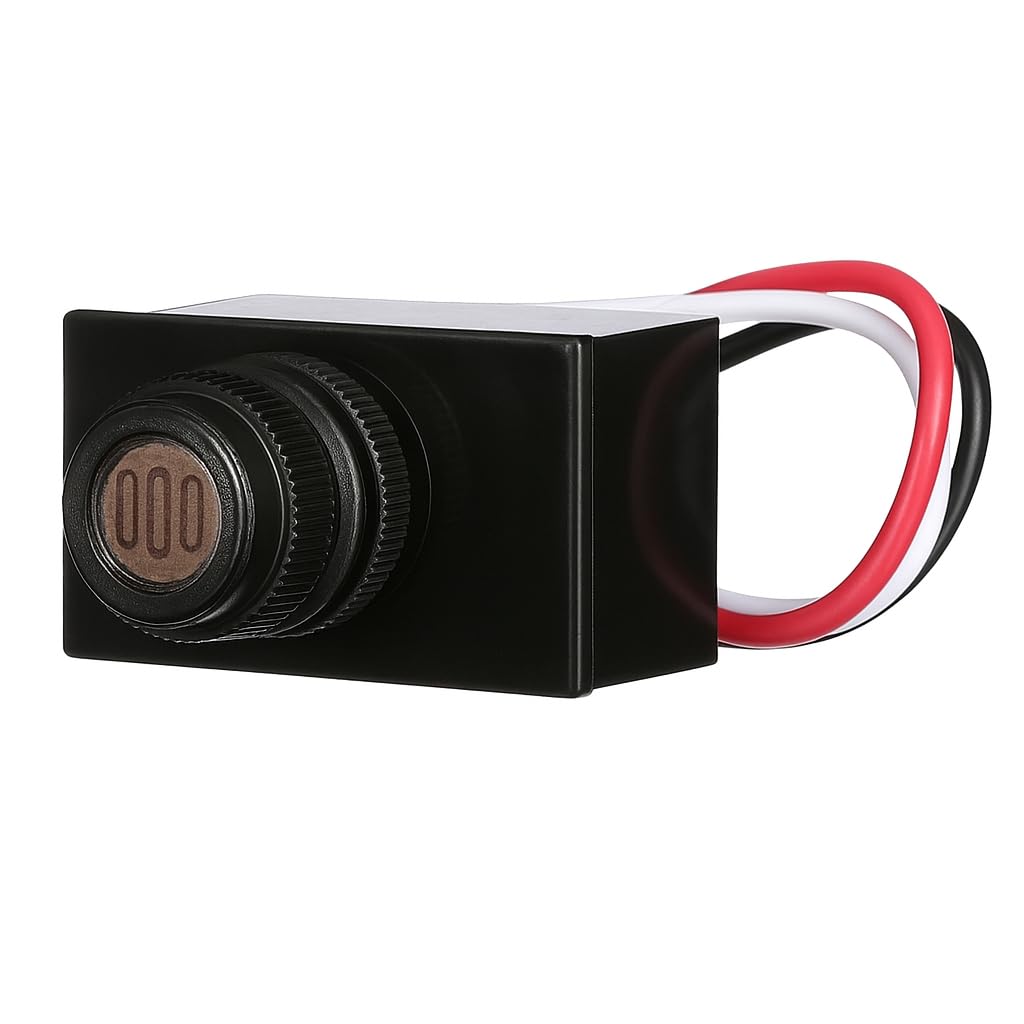
Image: The Woods 59408WD Post Eye Light Control, a compact black unit with a visible light sensor on the front.

Image: A close-up view of the photocell sensor on the Woods 59408WD unit, showing the light-sensitive element.
6. Operation
The Woods 59408WD Post Eye Light Control operates automatically based on ambient light levels:
- At Dusk: When natural light levels fall below a certain threshold, the photocell will detect darkness and activate the connected light fixture.
- At Dawn: When natural light levels rise above a certain threshold, the photocell will detect sufficient light and deactivate the connected light fixture.
There is an intentional delay in the switching mechanism (typically a few seconds to a few minutes) to prevent the light from cycling on and off due to temporary shadows, car headlights, or lightning flashes.
7. Maintenance
The Woods 59408WD Post Eye Light Control requires minimal maintenance:
- Periodically inspect the photocell sensor for any dirt, dust, or debris that might obstruct its view of ambient light. Gently clean the sensor with a soft, damp cloth if necessary.
- Ensure the area around the sensor remains clear of obstructions (e.g., growing foliage, new decorations) that could block natural light.
- Check wiring connections annually for any signs of wear or corrosion, especially in outdoor installations.
8. Troubleshooting
| Problem | Possible Cause | Solution |
|---|---|---|
| Light stays on continuously. | Sensor is not receiving enough light (e.g., obstructed, installed in a dark area). Wiring error (e.g., load wire connected to line). Defective photocell. | Relocate or clear obstructions from the sensor. Verify wiring connections according to Section 5.2. Consult an electrician if unsure. Replace the photocell if other solutions fail. |
| Light does not turn on at dusk. | No power to the unit. Sensor is receiving too much light (e.g., from another light source). Wiring error. Defective photocell or light fixture bulb. | Check circuit breaker and power supply. Relocate the sensor or shield it from artificial light sources. Verify wiring connections according to Section 5.2. Test the light fixture with a different power source or replace the bulb. Replace photocell if necessary. |
| Light cycles on/off rapidly. | Interference from flickering light sources or transient shadows. Sensor is partially obstructed or dirty. | Ensure the sensor has a clear, consistent view of ambient light. Clean the sensor. Note that a short delay is normal to prevent rapid cycling. |
| Light turns on/off with a delay. | This is normal operation. | The photocell is designed with a built-in time delay to prevent false triggers. This is not a malfunction. |
9. Warranty and Support
For warranty information or technical support, please refer to the product packaging or contact Woods customer service directly. Keep your purchase receipt as proof of purchase.

