
Westinghouse 28075
Westinghouse 2-Outlet Outdoor Wireless Remote Control User Manual
Model: 28075
Introduction
The Westinghouse 2-Outlet Outdoor Wireless Remote Control provides convenient remote operation for two separate grounded electrical outlets. This system is designed for outdoor use, making it ideal for controlling holiday decorations, security lighting, or other outdoor electrical devices from a distance.
Product Features
- Two Grounded Outlets: Provides two independently controlled grounded outlets.
- Wireless Remote Control: Operates devices from up to 100 feet away using the included key chain remote.
- Photocell Option: Features a photocell sensor that can automatically turn connected devices on at dusk and off at dawn.
- Manual On/Off Button: The receiver unit includes a manual button for direct control.
- Expandable System: Compatible with additional Command1 remote and receiver units for controlling different channels around the home.
- LED Active Indicator: Visual confirmation of power status.
- Indoor/Outdoor Use: Designed for versatile application in various environments.
- 8 Amp Capacity: Supports devices up to 8 amps.
Package Contents
- 1 x 2-Outlet Outdoor Wireless Receiver Unit
- 1 x Wireless Key Chain Remote Control (with pre-installed 3-volt lithium battery)
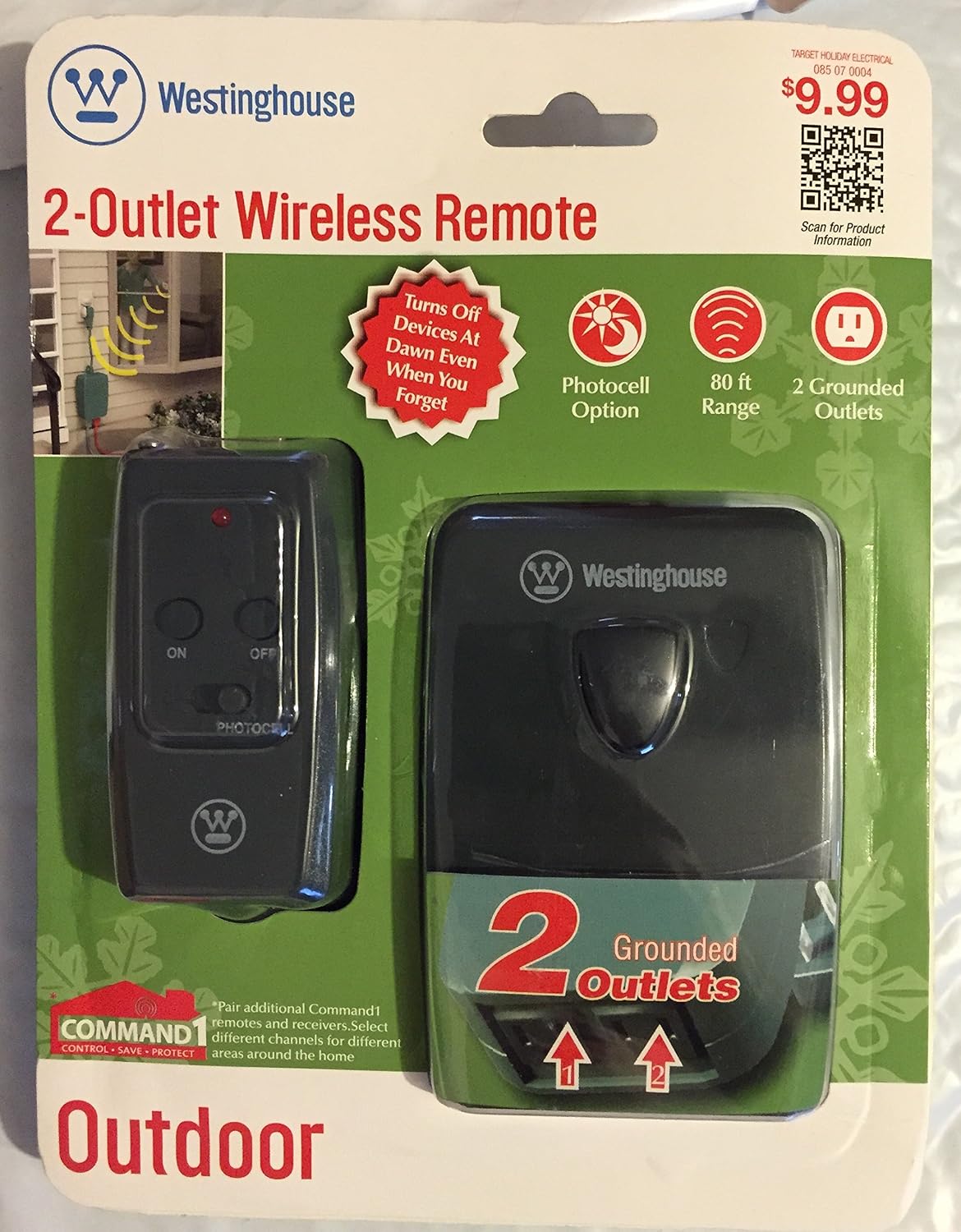
Image: Front view of the Westinghouse 2-Outlet Wireless Remote Control, showing the remote and the receiver unit in their retail packaging. The packaging highlights features such as "Photocell Option", "80 ft Range", and "2 Grounded Outlets".
Safety Information
Please read and understand all safety instructions before using this product. Failure to follow these instructions may result in electric shock, fire, or serious injury.
- Do not immerse the receiver unit or remote control in water.
- Ensure the receiver unit is plugged into a Ground Fault Circuit Interrupter (GFCI) protected outlet when used outdoors.
- Do not exceed the maximum electrical rating of 8 amps (125VAC/60Hz/8A/1000W Resistive, 5A/1000W Tungsten).
- Keep the remote control and receiver unit away from children.
- Do not open or attempt to repair the units. There are no user-serviceable parts inside.
- Unplug the receiver unit from the power source before cleaning or when not in use for extended periods.
- This product is intended for outdoor use, but should be protected from direct heavy rain or snow if possible to prolong its lifespan.
Setup
1. Remote Control Battery Installation
The key chain remote control typically comes with a 3-volt lithium battery pre-installed. If the remote does not respond, or if you are replacing the battery:
- Locate the battery compartment on the back of the remote control.
- Open the compartment using a small screwdriver or by sliding the cover.
- Insert a new 3-volt lithium battery (CR2032 or equivalent), ensuring the correct polarity (+/-).
- Close the battery compartment securely.
2. Receiver Unit Placement and Connection
- Select a suitable outdoor location for the receiver unit, ensuring it is near a grounded electrical outlet. For optimal performance of the photocell, choose a location that receives natural light but is not directly exposed to artificial light sources (e.g., streetlights, porch lights) at night, as this may prevent the photocell from activating correctly.
- Plug the receiver unit directly into a grounded 125VAC, 60Hz electrical outlet.
- Plug the devices you wish to control into the two grounded outlets on the receiver unit. Ensure the total current draw does not exceed 8 amps.
3. Channel Setting (for multiple units)
If you are using multiple Westinghouse wireless remote control units, you may need to adjust their channels to prevent interference or to control them independently. Refer to the specific instructions provided with additional units for channel selection. Units with the same channel will be controlled simultaneously by a single remote.

Image: Back view of the Westinghouse 2-Outlet Wireless Remote Control packaging, detailing features like "Two grounded outlets", "Manual On/Off button", "Photocell option", "80ft Range", and "Expandable" system information. It also shows the product's electrical ratings and manufacturer details.
Operating Instructions
Using the Remote Control
- Press the "ON" button on the remote control to turn on the devices connected to the receiver unit.
- Press the "OFF" button on the remote control to turn off the devices connected to the receiver unit.
- The remote has a range of up to 100 feet, though actual operational distance may vary based on environmental factors such as walls, other wireless devices, and obstructions.
Using the Photocell Option
The receiver unit is equipped with a photocell sensor that can automate operation based on ambient light levels.
- To activate the photocell option, press the "PHOTOCELL" button on the remote control. The devices will then automatically turn on at dusk and turn off at dawn.
- To deactivate the photocell option and return to manual control, press the "ON" or "OFF" button on the remote control.
- Ensure the photocell sensor on the receiver unit is not obstructed and is not exposed to artificial light sources at night, which could prevent it from activating correctly.
Manual On/Off Button on Receiver Unit
The receiver unit also features a manual On/Off button. Press this button to toggle the power to the connected devices directly at the unit.
Maintenance
- Cleaning: Disconnect the receiver unit from the power outlet before cleaning. Wipe the unit and remote with a soft, dry cloth. Do not use abrasive cleaners or solvents.
- Battery Replacement: Replace the remote control battery (CR2032) when the remote's range decreases or it stops responding. Follow the battery installation steps in the Setup section.
- Storage: When not in use for extended periods, store the unit and remote in a cool, dry place away from direct sunlight and extreme temperatures.
Troubleshooting
| Problem | Possible Cause | Solution |
|---|---|---|
| Devices do not turn on/off with remote. |
|
|
| Photocell option not working correctly. |
|
|
| Limited range. |
|
|
Specifications
| Model Number | 28075 |
| Brand | Westinghouse |
| Power Input | 125VAC, 60Hz |
| Max. Load (Resistive) | 8A / 1000W |
| Max. Load (Tungsten) | 5A / 1000W |
| Wireless Frequency | 433.92 MHz |
| Remote Battery | 3-volt Lithium (CR2032) |
| Operating Range | Up to 100 feet (approx. 30 meters) |
| Product Dimensions | 6 x 8 x 2 inches (approximate, for packaging) |
| Item Weight | 5.6 ounces |
| Manufacturer | Holiday Living |
| Date First Available | August 9, 2010 |
| UPC | 767753053201, 686140280757 |
Warranty and Support
For product support, inquiries, or warranty information, please contact the manufacturer or distributor directly.
- Manufactured and Distributed by: The NCC Corporation
- Address: Brooklyn, NY 11220
- Phone: 1-800-730-3717
- Website: www.thencc.com
- Product Information Link: http://www.thenccusa.com/pi/T28075
- Copyright: © 2011 The NCC
Please retain your proof of purchase for any warranty claims.
Related documents28075


Ask a question about this manual
Ask about setup, troubleshooting, compatibility, parts, safety, or missing instructions. Manuals+ will review the question and use this page’s manual context to help answer it.