
1. Product Overview
The Corbin Russwin PL5070 is a robust steel shackle padlock designed for high-security applications. This model is specifically designed to accept an Interchangeable Core (IC Core), which is sold separately. Its durable construction ensures reliable protection for various securing needs.
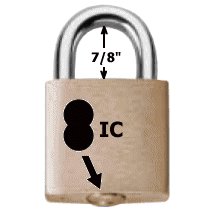
Image of the Corbin Russwin PL5070 Steel Shackle Padlock, showing its robust steel construction and design for an IC core.
2. Safety Information
- Ensure the padlock is correctly installed and secured to prevent unauthorized removal.
- Keep keys in a secure location and do not share them with unauthorized individuals.
- Regularly inspect the padlock for any signs of wear or damage. Do not use if damaged.
- This product is not a toy. Keep out of reach of children.
3. Package Contents
Please verify that all components are present in your package:
- Corbin Russwin PL5070 Padlock Body (less IC Core)
- Note: The Interchangeable Core (IC Core) and its corresponding key are sold separately and are required for the padlock to function.
4. Setup and IC Core Installation
This padlock requires a compatible Interchangeable Core (IC Core) for operation. Follow these steps to install the IC Core:
- Acquire IC Core: Obtain a Corbin Russwin compatible IC Core and its operating key.
- Prepare Padlock: Ensure the padlock body is clean and free of debris.
- Insert IC Core: With the operating key inserted into the IC Core, align the core with the keyway in the padlock body. Gently push the core into the padlock until it clicks securely into place.
- Test Operation: Insert the operating key and turn it to ensure the shackle opens and closes smoothly. Remove the key.
5. Operating Instructions
Once the IC Core is installed, operate the padlock as follows:
- To Unlock: Insert the operating key fully into the IC Core. Turn the key clockwise (or counter-clockwise, depending on core type) until the shackle releases. Pull the shackle open.
- To Lock: Close the shackle by pushing it down into the padlock body until it clicks. Insert the operating key and turn it to the locked position. Remove the key.
- Ensure Security: Always ensure the shackle is fully engaged and the key is removed after locking.
6. Maintenance
- Cleaning: Wipe the padlock body and shackle with a clean, dry cloth periodically to remove dirt and grime. Avoid abrasive cleaners.
- Lubrication: Apply a small amount of graphite-based lubricant or a silicone-based spray specifically designed for locks into the keyway of the IC Core once or twice a year, or if operation becomes stiff. Do not use oil-based lubricants as they can attract dirt.
- Inspection: Regularly check the shackle and padlock body for any signs of corrosion, bending, or other damage.
7. Troubleshooting
| Problem | Possible Cause | Solution |
|---|---|---|
| Key is stiff or difficult to turn. | Dirt or debris in keyway; lack of lubrication. | Apply lock lubricant to the keyway. Clean the key. |
| Shackle does not open/close smoothly. | Corrosion or debris on shackle; internal mechanism issue. | Clean and lubricate the shackle. If issue persists, the IC Core may need inspection or replacement. |
| IC Core cannot be inserted or removed. | Incorrect key or core type; misalignment. | Ensure you are using the correct operating key for the IC Core. Verify core compatibility and alignment. |
8. Specifications
- Brand: Corbin Russwin
- Model: PL5070
- Series: PL5000 Series
- Material: Alloy Steel
- Weight: Approximately 1 lbs
- Recommended Uses: General security, securing items or areas
- UPC: 724086186747
9. Warranty and Support
For warranty information, please refer to the documentation provided with your purchase or contact Corbin Russwin directly. For technical support or further assistance, please reach out to the retailer where the product was purchased or visit the official Corbin Russwin website for customer service contact details.