
Introduction
The Mackie HD1221 is a 12-inch 2-way compact high-definition powered loudspeaker designed for professional audio applications. It features 1200W of Class-D Fast Recovery amplification, high-definition audio processing, and custom-designed transducers by EAW. This manual provides essential information for the safe and effective use of your HD1221 loudspeaker, including setup, operation, maintenance, and troubleshooting.
Safety Information
Before operating the Mackie HD1221 loudspeaker, please read and understand all safety instructions. Failure to do so may result in electric shock, fire, or other injuries. Keep these instructions for future reference.
- Power Source: Connect the unit only to a power supply of the type described in the operating instructions or as marked on the appliance.
- Grounding: Ensure the loudspeaker is properly grounded to prevent electric shock.
- Ventilation: Do not block any ventilation openings. Install in accordance with the manufacturer's instructions.
- Water and Moisture: Do not use this apparatus near water or expose it to dripping or splashing.
- Cleaning: Clean only with a dry cloth.
- Servicing: Refer all servicing to qualified service personnel. Servicing is required when the apparatus has been damaged in any way, such as power-supply cord or plug is damaged, liquid has been spilled or objects have fallen into the apparatus, the apparatus has been exposed to rain or moisture, does not operate normally, or has been dropped.
- Mounting: Use only with the cart, stand, tripod, bracket, or table specified by the manufacturer, or sold with the apparatus. When a cart is used, use caution when moving the cart/apparatus combination to avoid injury from tip-over.
Package Contents
Verify that the following items are included in your Mackie HD1221 package:
- Mackie HD1221 Powered Loudspeaker
- Power Cable
- Quick Start Guide (if applicable)
- Warranty Information
If any items are missing or damaged, please contact your dealer immediately.
Product Overview
The Mackie HD1221 is a versatile loudspeaker designed for various applications, including main PA, stage monitor, and flown installations. It features a robust construction and advanced audio processing.
Front and Side Views
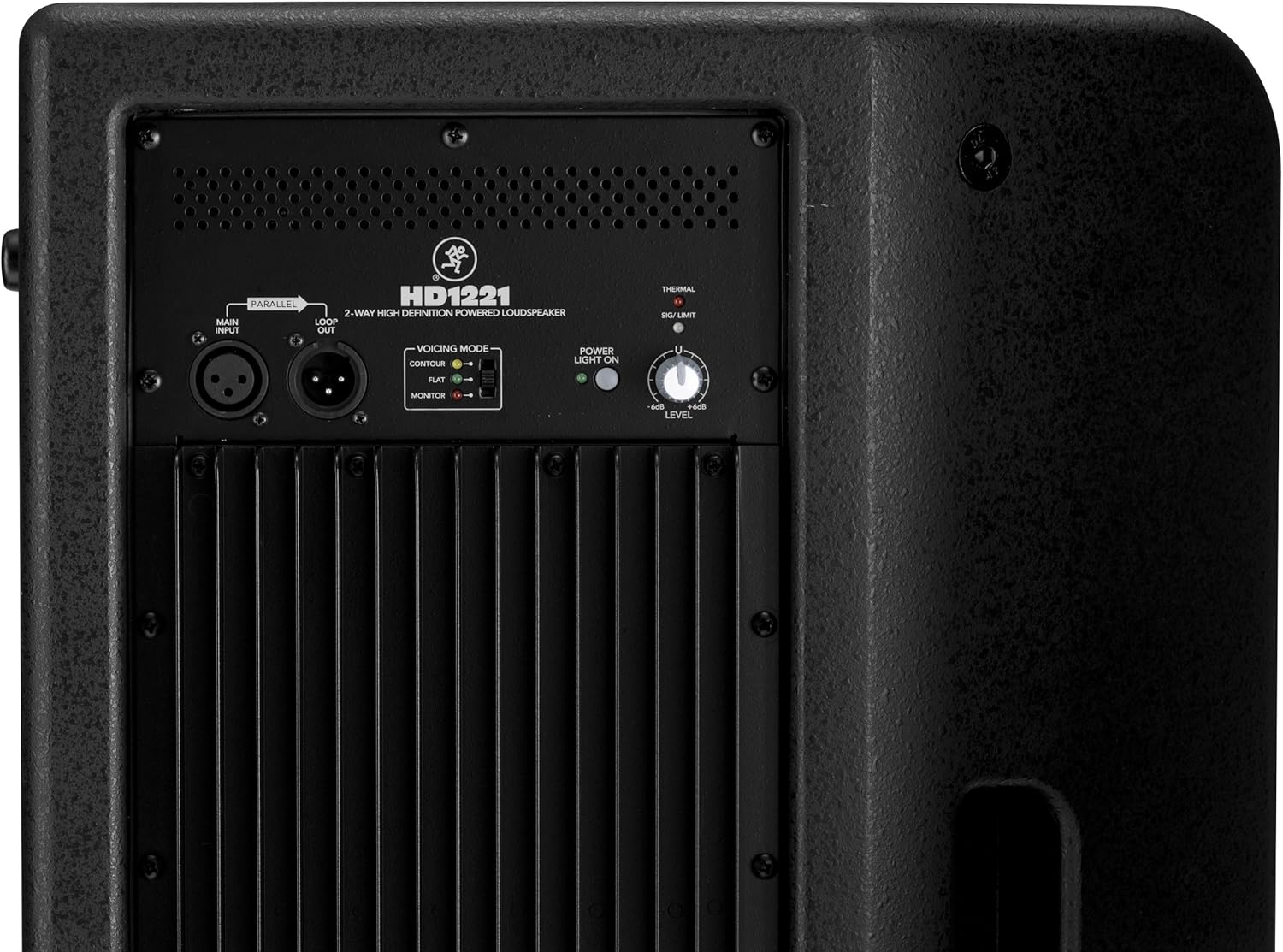
Figure 1: Front and side view of the HD1221 loudspeaker, highlighting the durable grille and integrated handles for portability.

Figure 2: Left side view of the HD1221 loudspeaker.
Rear Panel Controls and Connections

Figure 3: Rear panel of the HD1221, detailing the input/output section, voicing mode switch, power indicator, and level control knob.
- Main Input (XLR): Connect your audio source here.
- Loop Out (XLR): Provides a parallel output of the main input signal for connecting to additional loudspeakers or other audio equipment.
- Voicing Mode Switch: Selects between Contour, Flat, and Monitor modes to optimize the loudspeaker's frequency response for different applications.
- Power Light On: Indicates the power status of the unit.
- Thermal/Sig/Limit Indicators: Provide visual feedback on the loudspeaker's operational status, including thermal protection, signal presence, and limiting.
- Level Control: Adjusts the overall output volume of the loudspeaker.
- AC Power Input: Connects the power cable to the mains supply.
Internal Components
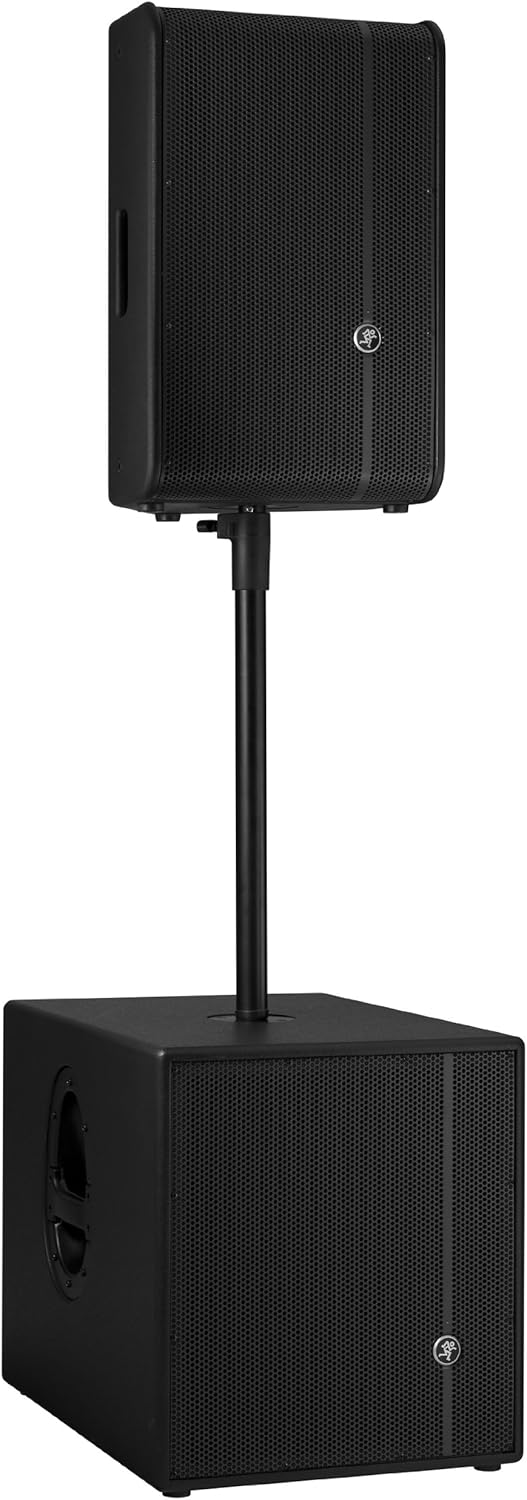
Figure 4: Internal view of the HD1221, showcasing the 12-inch neodymium woofer and 1.75-inch titanium compression driver, designed by EAW.
Setup
Proper setup ensures optimal performance and safety. Follow these steps for initial setup:
Power Connection
- Ensure the Level control on the rear panel is set to its minimum position.
- Connect the supplied AC power cable to the AC Power Input on the rear panel of the HD1221.
- Plug the other end of the power cable into a grounded electrical outlet.
Audio Connections
- Connect your audio source (e.g., mixer, instrument) to the Main Input (XLR) on the rear panel.
- If connecting multiple loudspeakers, use the Loop Out (XLR) to send the signal to the next loudspeaker.
Mounting Options
The HD1221 offers several mounting options for flexibility:
Pole Mounting

Figure 5: The HD1221 mounted on a pole, typically above a subwoofer like the HD1501 for a full-range PA system.
The HD1221 can be mounted on a standard speaker pole stand. Ensure the stand is stable and rated for the weight of the loudspeaker (approximately 58 lbs).
Stage Monitor Placement
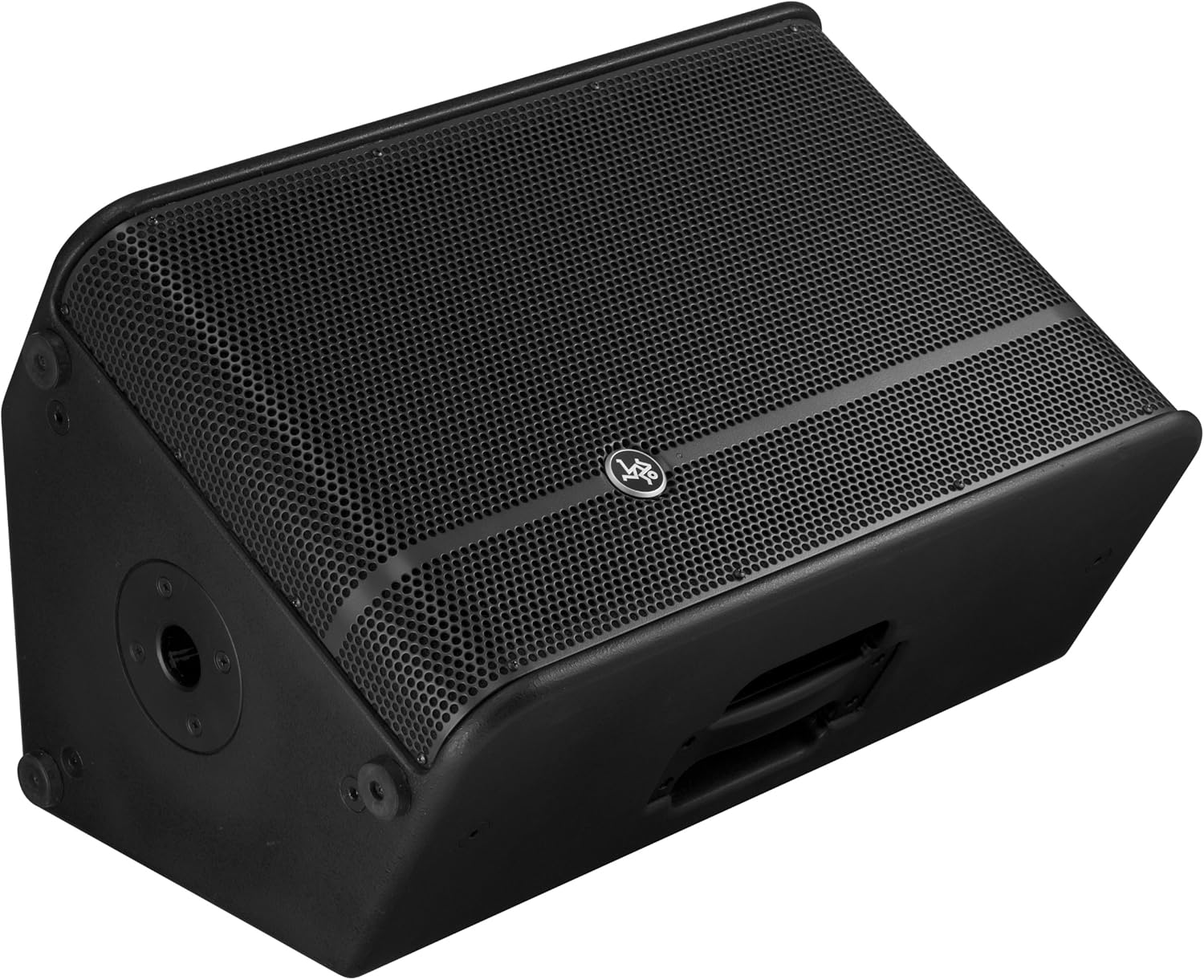
Figure 6: The HD1221 configured as a stage monitor, utilizing its 60-degree angle for optimal sound projection towards the performer.
The cabinet design allows for use as a stage monitor with a 60-degree angle. Place the loudspeaker directly on the stage floor, angled towards the performer.
Flying/Suspension

Figure 7: The HD1221 suspended vertically using appropriate rigging hardware.

Figure 8: The HD1221 suspended horizontally using appropriate rigging hardware.
The HD1221 can be flown both vertically and horizontally. Always use certified rigging hardware and consult with a qualified professional for safe installation. The user-rotatable horn allows for precise sound placement in either orientation.
Operating Instructions
Once the loudspeaker is set up, follow these steps for operation:
- Power On: Turn on your audio source (mixer, etc.) first, then turn on the HD1221 loudspeaker. The 'Power Light On' indicator should illuminate.
- Set Voicing Mode: Use the Voicing Mode switch on the rear panel to select the appropriate setting for your application:
- Contour: Provides a sculpted frequency response, often suitable for music playback.
- Flat: Offers a neutral frequency response, ideal for critical listening or when external EQ is used.
- Monitor: Optimizes the frequency response for use as a stage monitor, reducing low-end rumble and enhancing clarity.
- Adjust Level: Slowly increase the Level control on the rear panel to achieve the desired volume. Monitor the 'Sig/Limit' indicator; if it flashes frequently or stays lit, reduce the input level from your source or the HD1221's level to prevent distortion and potential damage.
- Power Off: When finished, turn off the HD1221 loudspeaker first, then turn off your audio source.
Official Product Video
Video 1: An overview of the Mackie HD1221 12-inch 2-Way High-Definition Powered Loudspeaker, demonstrating its features and applications.
Maintenance
Regular maintenance helps prolong the life and performance of your HD1221 loudspeaker.
- Cleaning: Use a dry, lint-free cloth to clean the exterior of the loudspeaker. Do not use liquid cleaners or solvents.
- Grille: Periodically check the steel grille for any damage or debris. Clean gently if necessary.
- Connections: Ensure all cables are securely connected and free from damage.
- Storage: When not in use, store the loudspeaker in a dry, temperate environment, protected from dust and extreme temperatures.
Troubleshooting
If you encounter issues with your HD1221, refer to the following common problems and solutions:
| Problem | Possible Cause | Solution |
|---|---|---|
| No sound output | No power; incorrect connections; low level setting; faulty cable. | Check power cable and outlet. Verify audio cable connections. Increase Level control. Test with a different cable. |
| Distorted sound | Input level too high; faulty cable; damaged speaker component. | Reduce input level from source or HD1221. Check 'Sig/Limit' indicator. Test with a different cable. If distortion persists, contact support. |
| No power light | No power; power switch off; internal fuse blown. | Ensure power cable is connected and outlet is active. Check power switch. If still no light, contact support. |
| Overheating (Thermal indicator lit) | Insufficient ventilation; prolonged high-volume operation. | Ensure adequate airflow around the unit. Reduce volume. Allow unit to cool down. |
Specifications
Detailed technical specifications for the Mackie HD1221 powered loudspeaker:
- Power Output: 1200W Peak
- Speaker Type: 2-Way High-Definition Powered Loudspeaker
- Woofer: 12-inch Neodymium Woofer
- Compression Driver: 1.75-inch Titanium Compression Driver
- Horn: User-rotatable 90° x 50° horn
- Cabinet Material: 15mm Birch Plywood
- Grille: Cold-rolled Steel
- Monitor Angle: 60 degrees
- Voicing Modes: Contour, Flat, Monitor
- Amplification: Class-D Fast Recovery
- Impedance: 8 Ohms
- Item Weight: 58 Pounds
- Connectivity Protocol: Wi-Fi (Note: This specification might refer to internal processing or future features, as direct Wi-Fi audio input is not typical for this type of speaker.)
- Model Number: HD1221
- UPC: 663961030495
Warranty
The Mackie HD1221 loudspeaker comes with a comprehensive warranty:
- Electronics: 3-year warranty
- Drivers: 2-year warranty
Please retain your proof of purchase for warranty claims. For full terms and conditions, refer to the warranty card included with your product or visit the official Mackie website.
Support
For additional assistance, technical support, or service inquiries, please contact Mackie Customer Support. You can find contact information and frequently asked questions on the official Mackie website.
Online Resources: Visit the Mackie Store on Amazon for product information and updates.


