
Ninja NJ600
Ninja Professional Blender NJ600 Instruction Manual
Model: NJ600 | Brand: Ninja
1. Introduction
The Ninja Professional Blender NJ600 is engineered for outstanding performance with 1000 watts of professional power. Featuring Ninja Total Crushing Technology, it excels at ice crushing, blending, pureeing, and controlled processing. This appliance is designed to efficiently crush ice, whole fruits, and vegetables in seconds. The extra-large 72 oz. professional blender jar is ideal for preparing drinks and smoothies for the entire family. All components are BPA-free and dishwasher safe for your convenience.
2. Important Safety Information
Please read all instructions carefully before using your Ninja Professional Blender. Failure to follow these instructions may result in injury or damage to the appliance.
- Always ensure the blender is unplugged before assembling, disassembling, or cleaning.
- Blades are sharp. Handle the Total Crushing Blades with extreme care to avoid injury. Always hold the blade assembly by the top of the shaft.
- Do not operate the blender with a damaged cord or plug. If the appliance malfunctions or is damaged in any way, discontinue use and contact customer service.
- Ensure the pitcher lid is securely locked in place before operating the blender. Never remove the lid while the appliance is running.
- Do not immerse the motor base in water or other liquids. Clean with a damp cloth only.
- Keep hands and utensils out of the pitcher while blending to reduce the risk of severe injury to persons or damage to the blender. A scraper may be used only when the blender is not running.
- Do not blend hot liquids, as this may result in pressure buildup and cause the lid to detach, leading to burns or scalding.
- This appliance is intended for household use only. Do not use outdoors.
3. What's in the Box
Your Ninja Professional Blender NJ600 package includes the following components:
- 1000 Watt Motor Base
- 72 oz. Blender Pitcher
- Blender Pitcher Lid
- Total Crushing Blades
- Instruction Book
- Quick Start Guide
- Inspiration Guide

Figure 3.1: The Ninja Professional Blender NJ600, showcasing the motor base, 72 oz. pitcher, and lid.
4. Setup and Assembly
Follow these steps to properly set up your Ninja Professional Blender:
- Place the motor base on a clean, dry, and level surface.
- Carefully place the Total Crushing Blades assembly onto the drive gear inside the 72 oz. blender pitcher. Ensure it is seated correctly.
- Place the pitcher onto the motor base. Align the pitcher's handle with the right side of the motor base. Twist the pitcher clockwise until it clicks securely into place.
- Add your desired ingredients to the pitcher. Do not exceed the MAX LIQUID fill line.
- Place the Blender Pitcher Lid onto the pitcher. Press down firmly on the handle until it clicks into the locked position. The blender will not operate unless the lid is securely locked.
- Plug the power cord into a standard electrical outlet.

Figure 4.1: The 72 oz. blender pitcher with the Total Crushing Blades inserted, ready for ingredients.
5. Operating Instructions
Your Ninja Professional Blender NJ600 features intuitive controls for various blending tasks:
- Power Button (O): Press to turn the blender on or off. The indicator light will illuminate when powered on.
- Speed Settings (LOW, MED, HIGH): Select the desired speed for continuous blending.
- PULSE Button: Press and hold for short bursts of power. This is ideal for controlled chopping, processing, or breaking down tough ingredients. Release the button to stop.
Blending Tips:
- For best results when crushing ice or blending frozen ingredients, use the PULSE function in short bursts until desired consistency is achieved.
- When blending thicker mixtures, start with a lower speed and gradually increase to a higher speed as needed.
- If ingredients are not circulating, turn off the blender, remove the lid, and use a spatula to scrape down the sides of the pitcher. Secure the lid before resuming blending.
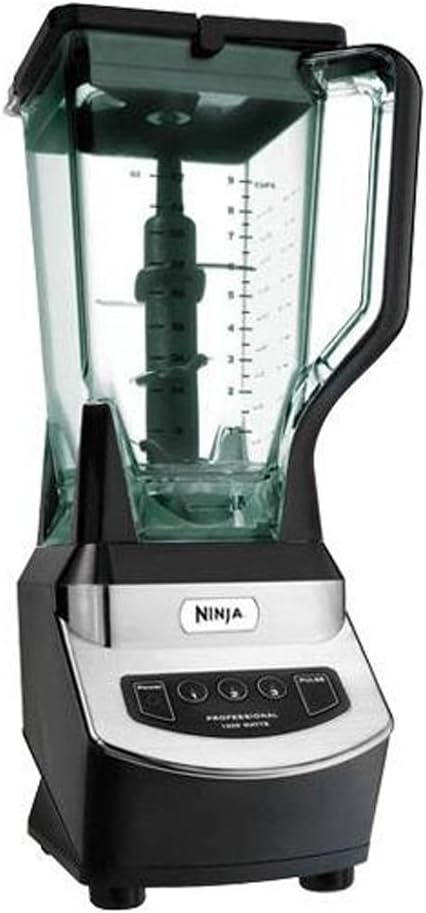
Figure 5.1: The control panel of the Ninja Professional Blender NJ600, showing the power, low, medium, high, and pulse settings.
6. Cleaning and Maintenance
Proper cleaning and maintenance will ensure the longevity and optimal performance of your Ninja Professional Blender.
- Unplug the Blender: Always ensure the motor base is unplugged from the power outlet before cleaning.
- Disassemble Components: Remove the pitcher from the motor base, then carefully remove the lid and the Total Crushing Blades assembly.
- Hand Washing: Wash the pitcher, lid, and blade assembly in warm, soapy water. Use a dish brush to clean the blade assembly, taking extreme caution as the blades are very sharp. Rinse thoroughly.
- Dishwasher Safe: All removable parts (pitcher, lid, and blade assembly) are dishwasher safe. Place them on the top rack of your dishwasher.
- Cleaning the Motor Base: Wipe the motor base with a damp cloth. Do not immerse the motor base in water or any other liquid.
- Storage: Store the blender assembled or with components neatly stored to prevent damage.
7. Troubleshooting
If you encounter any issues with your Ninja Professional Blender, refer to the following common troubleshooting tips:
- Blender Does Not Turn On: Ensure the power cord is securely plugged into a working electrical outlet. Verify that the pitcher is correctly seated on the motor base and twisted clockwise until it clicks. Confirm the lid is securely locked onto the pitcher.
- Ingredients Not Blending Properly: The pitcher may be overfilled, or there might not be enough liquid. Reduce the amount of ingredients or add more liquid. Use the PULSE function to break down larger or tougher ingredients.
- Motor Overheating: If the motor stops unexpectedly, it may be due to overheating. Unplug the unit and allow it to cool down for at least 15 minutes before attempting to use it again. Ensure you are not overloading the blender.
- Loud Noise/Vibration: Check that the pitcher and blade assembly are correctly installed and securely locked. Ensure the blender is on a stable, level surface.
If problems persist after trying these steps, please contact Ninja Customer Service for further assistance.
8. Specifications
| Feature | Detail |
|---|---|
| Brand | Ninja |
| Model Number | NJ600 |
| Power | 1000 Watts |
| Speeds | 3 Speeds + Pulse |
| Blender Pitcher Capacity | 72 oz. (9 cups) |
| Blade Technology | Total Crushing Technology |
| Material Type Free | BPA Free |
| Dishwasher Safe | Yes (removable parts) |
| Voltage | 110 Volts |
| Product Dimensions | 8 x 7 x 17 inches |
| Item Weight | 7.2 pounds |
9. Warranty and Support
Your Ninja Professional Blender NJ600 comes with a Limited Warranty. For detailed information regarding the warranty period, coverage, and terms, please refer to the warranty card included in your product packaging or visit the official Ninja website.
For customer support, replacement parts, or service inquiries, please contact Ninja Customer Service through their official website or the contact information provided in your product documentation. Please have your model number (NJ600) and purchase date available when contacting support.
Related documentsNJ600


Ask a question about this manual
Ask about setup, troubleshooting, compatibility, parts, safety, or missing instructions. Manuals+ will review the question and use this page’s manual context to help answer it.