
Introduction
This manual provides detailed instructions for the proper setup, operation, and maintenance of your Benro BV8H 75mm Bowl Fluid Video Head. Designed for professional studio and field production, this video head offers precise control and robust support for camera setups up to 17.6 lbs (8 kg). Please read this manual thoroughly before using the product to ensure optimal performance and longevity.
Product Overview
The Benro BV8H is a high-performance fluid video head featuring a 75mm bowl base for quick leveling. It is engineered to provide smooth and controlled camera movements for professional video production.
Key Features:
- High Payload Support: Supports camera rigs up to 17.6 lbs (8 kg), suitable for mid-sized cinema cameras, professional mirrorless systems, and accessorized video setups.
- 5-Step Counterbalance: Allows precise adjustment of the head's resistance to match your rig's weight, ensuring controlled tilt movement.
- Fluid Pan & Tilt with Stepped Drag: Features stepped drag settings for both pan and tilt, delivering smooth, repeatable motion.
- Independent Pan and Tilt Locks: Enables quick repositioning and secure lock-off for efficient workflow.
- 75mm Bowl Base: Designed for rapid leveling and compatibility with professional tripods.
- Accessory Mount: Includes a 3/8"-16 accessory mount for attaching external devices like monitors or microphones.
- Sliding Quick Release Plate (QR13): Compatible with 501/504PL systems, allowing for easy mounting, removal, and balancing of the camera.
- Tilt Range: +90° to -70°.
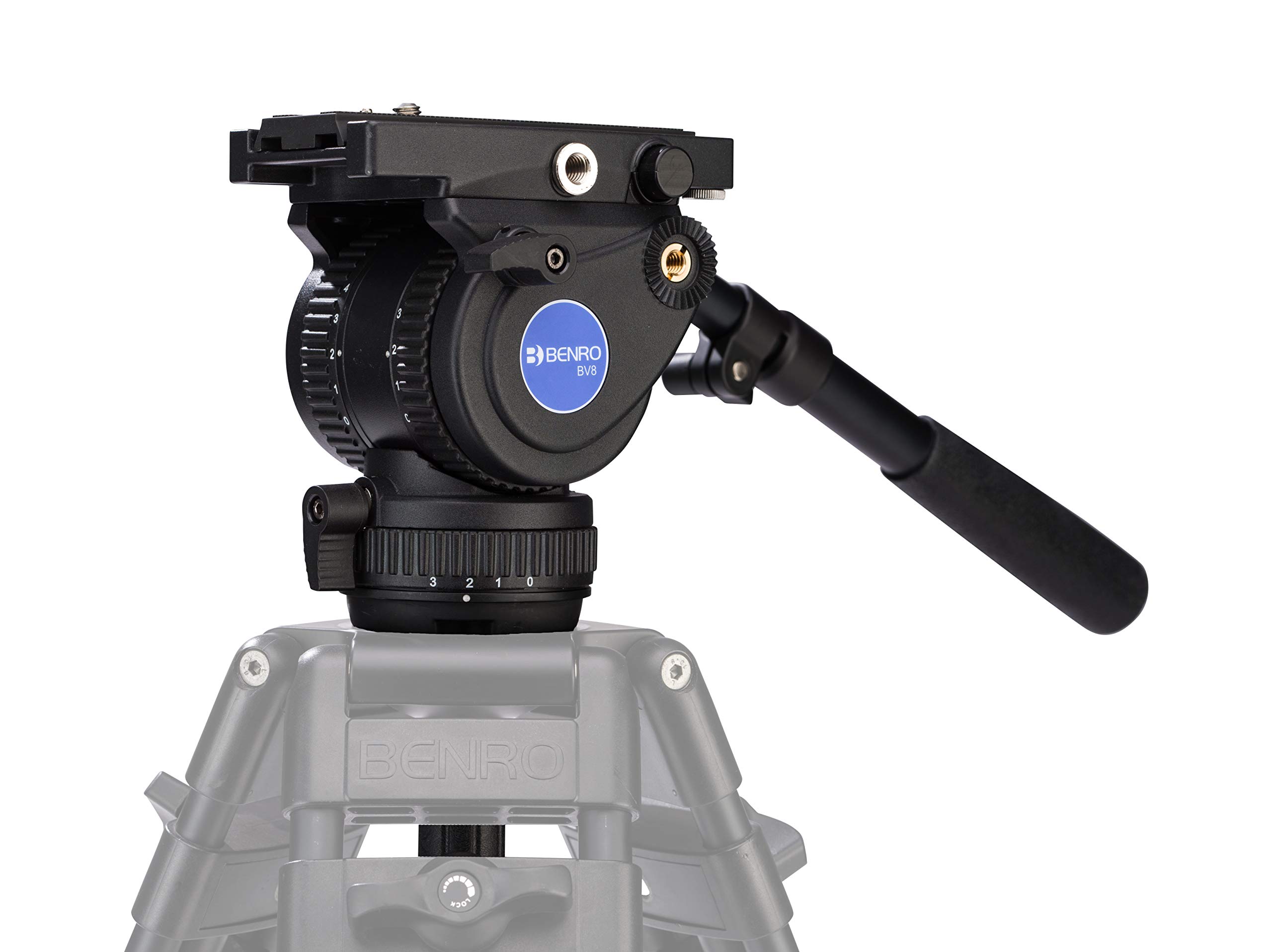
What's in the Box
Upon unpacking, please ensure all the following items are present:
- Benro BV8 75mm Video Head
- Tie Down Handle
- QR13 Camera Plate
Setup
1. Attaching the Video Head to a Tripod
- Ensure your tripod has a 75mm bowl receiver.
- Place the BV8H video head into the tripod's bowl.
- Secure the head using the tripod's tie-down handle, ensuring it is firmly seated and stable.
- Use the built-in bubble level on the video head to ensure the head is perfectly level before mounting your camera. Adjust the tripod legs or the bowl leveling mechanism as needed.
2. Mounting the Camera
- Attach the QR13 camera plate to the bottom of your camera rig. Ensure the plate is securely fastened to prevent any movement.
- Unlock the quick release plate system on the video head.
- Slide the camera with the attached QR13 plate into the receiver on the video head. The sliding mechanism allows for fore-aft adjustment to compensate for varying centers of gravity.
- Once the camera is positioned for optimal balance, engage the safety lock and then fully secure the quick release plate lever.
3. Attaching the Pan Arm
The removable telescoping pan arm can be mounted on either the left or right side of the video head for user preference. Insert the pan arm into the designated receiver and tighten the locking knob until secure.
4. Using the Accessory Mount
The BV8H features a 3/8"-16 accessory mount on the side of the head. This allows for direct attachment of accessories such as external monitors, audio recorders, or articulating arms. Ensure any attached accessories do not exceed the head's maximum payload capacity or interfere with camera movement.
Operating Instructions
1. Adjusting Counterbalance
The BV8H features a 5-step counterbalance system (steps 0-4). Rotate the counterbalance knob to select the appropriate setting that matches the weight and center of gravity of your camera rig. This ensures the camera remains stable at any tilt angle without requiring constant manual support.
2. Adjusting Pan and Tilt Drag
The video head offers 4-step drag controls for both pan and tilt movements. Rotate the respective pan and tilt drag knobs to increase or decrease the resistance. Higher drag settings provide smoother, more controlled movements, while lower settings allow for faster adjustments. Adjust these settings to achieve your desired fluidity for specific shots.
3. Using Pan and Tilt Locks
Independent locking levers are provided for both pan and tilt axes. To lock a movement, firmly engage the corresponding lever. To unlock and allow free movement, disengage the lever. Always ensure the locks are engaged when the camera is unattended or when precise positioning is required.
Maintenance
- Cleaning: Wipe the video head with a soft, dry cloth after each use to remove dust and debris. For stubborn dirt, use a slightly damp cloth and mild soap, then dry thoroughly. Avoid harsh chemicals or abrasive materials.
- Storage: Store the video head in a clean, dry environment, preferably in its protective bag or case, away from extreme temperatures and humidity.
- Inspection: Periodically check all knobs, levers, and screws for tightness. Do not overtighten.
- Lubrication: The fluid damping system is factory-sealed and does not require user lubrication. Attempting to lubricate internal components may damage the head and void the warranty.
Troubleshooting
- Camera not balancing: Ensure the QR13 plate is correctly attached to the camera and properly slid into the head's receiver. Adjust the camera's position on the sliding plate to find its center of gravity. Verify the counterbalance setting is appropriate for your camera's weight.
- Jerky movements: Check that the pan and tilt drag settings are not set too low. Increase the drag for smoother operation. Ensure all locking levers are fully disengaged when attempting to pan or tilt.
- Head not level: Re-check the bubble level and adjust the tripod legs or the bowl leveling mechanism until the bubble is centered.
- Pan arm loose: Ensure the pan arm's locking knob is fully tightened.
If you encounter issues not covered here, please refer to the Warranty and Support section for assistance.
Specifications
| Feature | Specification |
|---|---|
| Model Number | BV8H |
| Bowl Size | 75mm |
| Maximum Payload | 17.6 lbs (8 kg) |
| Counterbalance Steps | 5 (0-4) |
| Pan Drag Steps | 4 |
| Tilt Drag Steps | 4 |
| Tilt Range | +90° / -70° |
| Accessory Mount | 3/8"-16 |
| Quick Release Plate | QR13 (501/504PL compatible) |
| Product Dimensions | 18.11 x 9.84 x 7.87 inches (46 x 25 x 20 cm) |
| Item Weight | 5.73 lbs (2.6 kg) |
Warranty and Support
Warranty Coverage:
The Benro BV8H Fluid Video Head comes with a standard limited warranty of 3 years from the date of purchase for the original owner. If you register the product online, the warranty is extended by an additional 2 years, totaling 5 years of coverage in applicable regions. Please retain your proof of purchase for warranty claims.
Customer Support:
For technical assistance, warranty claims, or further inquiries, please visit the official Benro website or contact their customer service department. You can find contact information and support resources on the Benro Store on Amazon or through the Benro global website.
