
1. Introduction
The Broan-NuTone 355SOBR Surface Mount Solar Powered Attic Ventilator is designed to remove hot, moist air from your attic, contributing to a cooler home and potentially reducing energy costs. This solar-powered unit operates independently, utilizing sunlight to ventilate your attic effectively.
This manual provides essential information for the safe installation, operation, and maintenance of your Broan-NuTone 355SOBR attic ventilator. Please read it thoroughly before installation and retain it for future reference.
2. Safety Information
WARNING: Installation of this product involves working on a roof and with electrical components. Always exercise extreme caution.
- Always wear appropriate personal protective equipment, including safety glasses, gloves, and fall protection when working on a roof.
- Ensure the roof surface is dry and stable before beginning installation.
- Do not attempt to modify the ventilator or its components. Use only genuine Broan-NuTone replacement parts.
- Keep children and pets away from the work area during installation and operation.
- Consult local building codes and regulations for proper installation requirements.
3. Product Overview
3.1 Features
- High Profile Flush Mount Design: Suitable for attics up to 1600 square feet.
- Hurricane Rated: Certified to withstand winds up to 140 mph and Florida Building Code compliant.
- 20-Watt Solar Panel: Efficiently captures sunlight, even on overcast days. Constructed of tempered glass for durability against hail and extreme weather.
- Whisper-Quiet Operation: Direct current, variable voltage, sealed ball bearing, and hardened shaft motor for quiet performance.
- Optimized Fan: Specially designed one-piece, 12-inch aluminum 5-blade fan pitched for maximum airflow without harmonic noise.
- Protective Screen: Heavy gauge, stainless steel bird and rodent screen with 1/8-inch openings for protection without impeding airflow.
- Durable Construction: Dome and base molded with UV-stabilized ABC color-dyed plastic to prevent sun damage and ensure stability.
3.2 Components
The Broan-NuTone 355SOBR ventilator consists of the following main components:
- Solar Panel: Integrated into the top housing, converts sunlight into electricity.
- Ventilator Housing: The main structure, including the dome and base, made from UV-stabilized plastic.
- Fan Motor Assembly: Contains the whisper-quiet motor and the 12-inch aluminum fan blades.
- Bird/Rodent Screen: Located beneath the fan, preventing entry of pests.
- Mounting Hardware: Includes 16AWG stainless steel brackets, bolts, nuts, and self-tapping screws for secure installation.

Image 1: Top view of the ventilator showing the integrated solar panel.
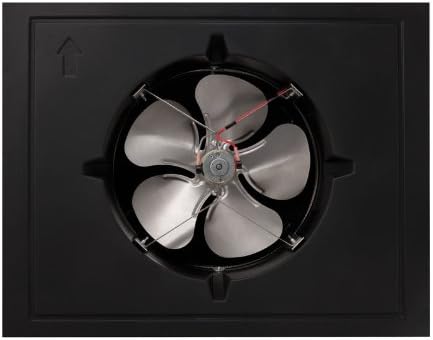
Image 2: Bottom view of the ventilator, illustrating the fan blades and motor assembly.
4. Setup and Installation
The Broan-NuTone 355SOBR is designed for surface mounting on your roof. No electrician is required for installation, as the unit is entirely solar-powered.
4.1 Pre-Installation Checklist
- Verify that the attic space requires ventilation and that the unit's capacity (up to 1600 sq ft) is appropriate.
- Choose a location on the roof that receives maximum direct sunlight throughout the day.
- Ensure the chosen location allows for proper airflow into and out of the attic.
- Gather necessary tools: measuring tape, utility knife, caulk gun, roofing cement, drill, appropriate fasteners.
4.2 Installation Steps
- Mark and Cut Opening: Carefully mark the desired location on the roof. Cut an opening in the roof decking and shingles according to the template provided in the full installation guide (refer to the PDF document link in product information for detailed instructions).
- Prepare Opening: Ensure the opening is clean and free of debris. Apply roofing cement around the perimeter of the opening.
- Position Ventilator: Place the ventilator over the opening, ensuring the base sits flush with the roof surface. The solar panel should face the direction that receives the most sunlight.
- Secure Ventilator: Use the provided stainless steel brackets and screws to securely fasten the ventilator to the roof structure. Ensure all fasteners are tight to prevent leaks and movement.
- Seal Edges: Apply additional roofing cement or sealant around the base of the ventilator where it meets the shingles to create a watertight seal.

Image 3: The Broan-NuTone 355SOBR ventilator installed on a shingled roof, demonstrating its low-profile integration.
5. Operating Instructions
The Broan-NuTone 355SOBR is an automatic, solar-powered device. It requires no manual intervention for operation.
- Automatic Operation: The ventilator will automatically begin operating at dawn when sufficient sunlight strikes the solar panel. It will continue to run as long as there is adequate solar energy.
- Solar Energy Dependent: The fan speed will vary depending on the intensity of sunlight. On cloudy days or during nighttime, the fan will operate at a reduced speed or stop entirely.
- Quiet Performance: The unit is designed for whisper-quiet operation, ensuring minimal disturbance.
6. Maintenance
The Broan-NuTone 355SOBR is designed for minimal maintenance due to its durable construction and solar operation.
- Annual Inspection: Periodically inspect the solar panel for any accumulation of dirt, leaves, or debris. Clean the surface gently with a soft cloth and water to ensure optimal sunlight absorption.
- Check for Obstructions: Ensure the bird and rodent screen remains clear of any blockages that could impede airflow.
- Inspect Seals: Annually check the sealant around the base of the ventilator for cracks or deterioration. Reapply roofing cement or sealant as needed to maintain a watertight seal.
- Structural Integrity: Verify that the ventilator remains securely fastened to the roof and that there are no signs of damage to the housing or fan blades.
7. Troubleshooting
If your Broan-NuTone 355SOBR ventilator is not operating as expected, consider the following:
- Fan Not Running:
- Lack of Sunlight: Ensure the solar panel is receiving direct sunlight. The fan will not operate at night or during heavily overcast conditions.
- Obstructed Solar Panel: Check for dirt, leaves, snow, or other debris covering the solar panel. Clean as necessary.
- Internal Fault: If the fan does not run under direct sunlight and the panel is clean, there may be an internal component fault. Contact customer support.
- Reduced Airflow:
- Blocked Screen: Inspect the bird/rodent screen for debris accumulation. Clean if necessary.
- Attic Intake Vents: Ensure adequate intake ventilation in the attic. Insufficient intake can restrict the ventilator's effectiveness.
- Noise:
- Debris in Fan: Turn off the unit (if possible, by covering the solar panel) and inspect the fan blades for any foreign objects.
- Loose Mounting: Check if the unit is securely mounted to the roof. Tighten fasteners if loose.
8. Specifications
| Specification | Value |
|---|---|
| Model Number | 355SOBR |
| Manufacturer | Broan |
| Item Weight | 20.6 pounds |
| Product Dimensions | 3 x 2 x 1 inches |
| Color | Brown |
| Material | Alloy Steel, Aluminum, Plastic, Stainless Steel |
| Power Source | Solar Powered |
| Item Package Quantity | 1 |
| Mounting Type | Flush Mount |
| Certification | Energy Star |
| Hurricane Rating | 140 mph winds |
| Attic Coverage | Up to 1600 square feet |
9. Warranty and Support
9.1 Warranty Information
The Broan-NuTone 355SOBR Surface Mount Solar Powered Attic Ventilator comes with a 5-year limited warranty on defective parts. Please retain your proof of purchase for warranty claims.
9.2 Customer Support
For technical assistance, warranty claims, or to inquire about replacement parts, please contact Broan-NuTone customer service. Refer to the official Broan-NuTone website for the most current contact information.
You can visit the Broan-NuTone Store for more product information: Broan-NuTone Store

