
Introduction
Welcome to the world of THQ WWE All Stars for Xbox 360. This game delivers an all-new take on WWE with fast, fun, fluid, and furious arcade-style gameplay. Featuring your favorite colorful WWE Legends of the past and larger-than-life WWE Superstars of today, WWE All Stars offers a unique wrestling experience. This manual provides essential information to help you get started and master the game.
Getting Started
Package Contents
- WWE All Stars Game Disc (Xbox 360)
- Instruction Manual (this document)
System Requirements
- Microsoft Xbox 360 console
- Compatible display device (TV/monitor)
- Xbox 360 Controller
Installation
- Insert the WWE All Stars game disc into your Xbox 360 console.
- Follow any on-screen prompts to install necessary game data or updates.
- Once installation is complete, the game will be ready to play.
Operating the Game
Basic Controls
WWE All Stars features responsive, arcade-style controls designed for immediate fun. Each WWE Legend and WWE Superstar has a variety of grapples, attacks, killer combos, and signature maneuvers.
- Weak Strike: Quick, low-damage attacks.
- Strong Strike: Slower, high-damage attacks.
- Weak Grapple: Initiates a quick grapple sequence.
- Strong Grapple: Initiates a powerful grapple sequence.
- Reversal: Timed button presses to counter opponent's moves.
- Signature Move: Special move that builds up during a match.
- Finisher: Devastating move that can only be performed when fully charged.
Gameplay Modes
Experience various ways to play and determine the greatest of all time:
- Exhibition: Quick matches with customizable rules.
- Fantasy Warfare: Play through epic matchups between WWE Legends and Superstars, each introduced by cinematic video packages featuring authentic WWE footage.
- Path of Champions: Guide your chosen Superstar or Legend through a series of challenges to become champion.
- Create-a-Superstar: Customize your own WWE Superstar and pit them against the game's roster.
Character Classes
The game features four distinct character classes, each with unique advantages, strengths, and techniques:
- Acrobat: Agile and high-flying, focusing on aerial attacks and quick maneuvers.
- Big Man: Powerful and resilient, excelling in heavy-hitting moves and absorbing damage.
- Brawler: Aggressive and hard-hitting, specializing in strikes and close-quarters combat.
- Grappler: Master of submissions and technical holds, capable of locking opponents into painful maneuvers.
Visuals and Action
The game features highly stylized visuals with exaggerated character models and over-the-top moves, enhancing the arcade-style experience.

Image: John Cena and The Rock in a face-off, showcasing the game's stylized character models.

Image: John Cena executing a powerful grapple move on The Rock, highlighting the dynamic action.
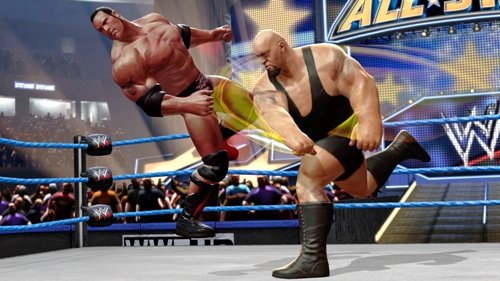
Image: John Cena mid-air, about to land a diving attack on a fallen opponent, demonstrating high-flying action.

Image: Hulk Hogan and John Cena in a stylized black and white match, emphasizing the clash of generations.
Official Product Videos
Video: WWE All Stars - Reveal Trailer. This video provides an overview of the game's features, showcasing various Legends and Superstars in action.
Video: WWE All-Stars - Macho Man Randy Savage. This video highlights the unique moves and character design of Macho Man Randy Savage within the game.
Specifications
| Feature | Detail |
|---|---|
| Number of Players | Multi-Player |
| Publication Date | March 29, 2011 |
| Computer Platform | Xbox 360 |
| UPC | 752919552483 |
| Compatible Video Game Console Models | Microsoft Xbox 360, Microsoft Xbox 360 E |
| ASIN | B003S2MXSY |
| Release date | March 29, 2011 |
| Rated | Teen |
| Item model number | 55248 |
| Item Weight | 1.6 ounces |
| Manufacturer | THQ |
Maintenance
To ensure the longevity and proper functioning of your WWE All Stars game disc, please follow these guidelines:
- Handle the disc by its edges to avoid fingerprints and smudges.
- Store the disc in its original case when not in use to protect it from dust and scratches.
- Clean the disc with a soft, lint-free cloth, wiping from the center outwards. Do not use abrasive materials or harsh chemicals.
- Avoid exposing the disc to extreme temperatures or direct sunlight.
Troubleshooting
If you encounter any issues while playing WWE All Stars, consider the following common solutions:
- Disc Read Error: Ensure the game disc is clean and free of scratches. Try cleaning the disc as described in the Maintenance section.
- Game Freezing/Crashing: Ensure your Xbox 360 console's system software is up to date. Clear the console's cache if the issue persists.
- Controller Issues: Verify your controller is properly connected and has sufficient battery life.
- Display Problems: Check your console's video output settings and ensure your display device is correctly configured.
For persistent issues, consult the official Xbox 360 support resources or the game publisher's support channels.
Warranty and Support
For information regarding product warranty, please refer to the warranty documentation included with your Xbox 360 console or contact the game publisher, THQ, directly. Support for technical issues or gameplay questions can typically be found through the publisher's official website or customer service channels.