
Celestron 91040-XLT
Celestron EdgeHD 925 9.25" Optical Tube Assembly Instruction Manual
Brand: Celestron | Model: 91040-XLT
1. Overview and Key Features
The Celestron EdgeHD 925 is a 9.25-inch aperture optical tube assembly (OTA) designed for advanced astronomical observation and astrophotography. It features an aplanatic Schmidt-Cassegrain optical design, providing aberration-free images across a wide visual and photographic field. This design ensures sharp stars across large CCD chips, making it suitable for high-resolution imaging.
Key Features:
- Superior Resolution: Aplanatic Schmidt-Cassegrain design delivers edge-to-edge clarity and eliminates field curvature.
- Maximized Light Transmission: Features StarBright XLT coatings on its 9.25" aperture for bright, high-contrast images.
- Versatile Eyepiece Options: Includes a 2" Luminos 23mm eyepiece and a 1.25" reducer adapter for various magnifications.
- Precision Alignment: Comes with a 9x50 finderscope for efficient object location.
- Easy Mounting: Equipped with a CGE dovetail plate for stable attachment to compatible mounts.
- Advanced Design: Flexible tension clutches reduce mirror shift, and cooling vents release hot air from behind the primary mirror.
2. Components of the Optical Tube Assembly
The EdgeHD 925 Optical Tube Assembly (OTA) consists of several key components that work together to provide high-quality astronomical views and images.

Figure 2.1: Front view of the Celestron EdgeHD 925 OTA, showing the corrector plate and the main optical tube.
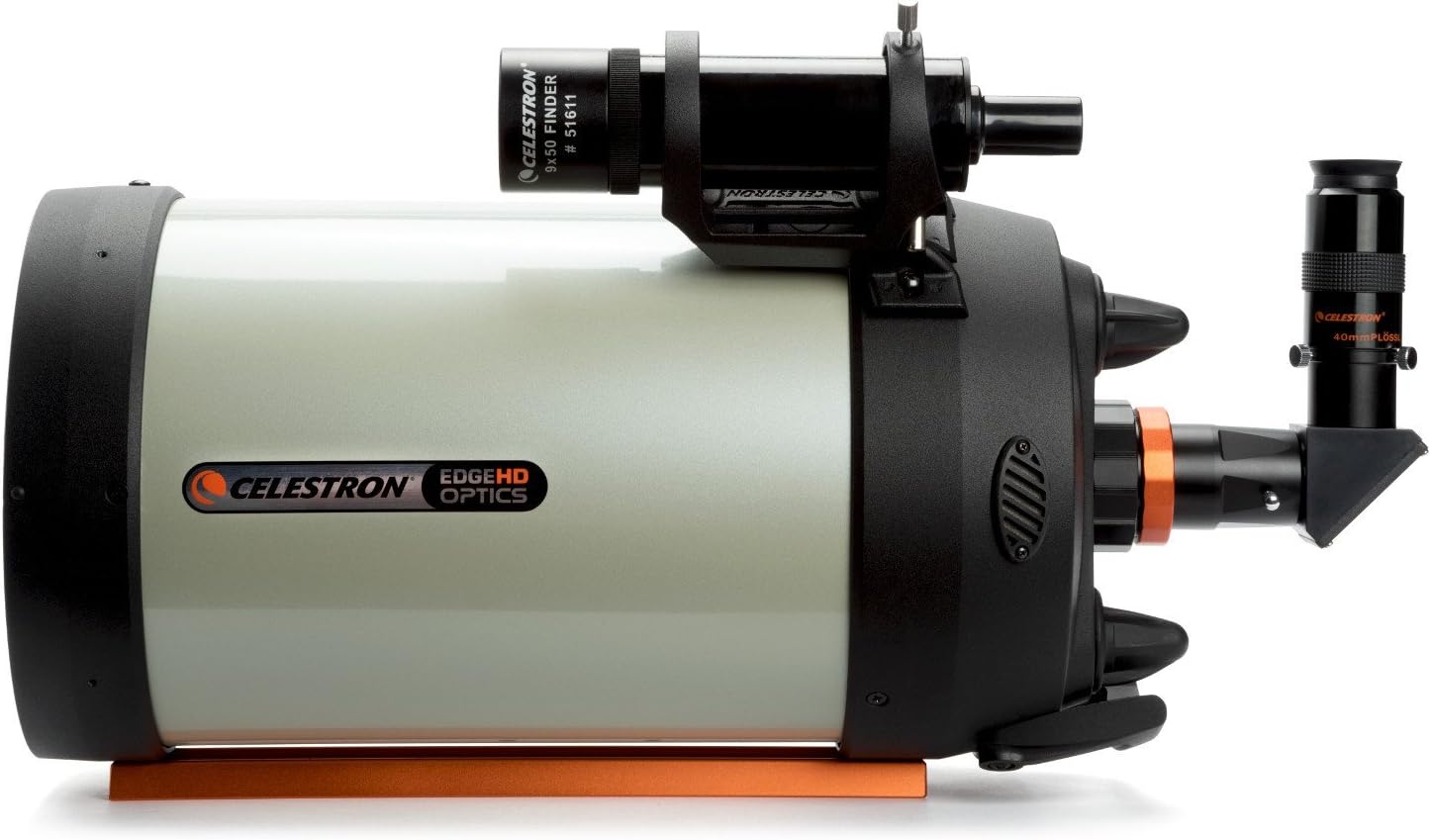
Figure 2.2: Side view illustrating the attached 9x50 finderscope and the focuser with an eyepiece and diagonal.
- Optical Tube: The main body housing the mirrors and corrector plate.
- Corrector Plate: The front glass element that corrects spherical aberration.
- Primary Mirror: Located at the rear of the tube, collects and focuses light.
- Secondary Mirror: Mounted on the inside of the corrector plate, reflects light to the focuser.
- Focuser: Mechanism for adjusting the focus of the image.
- Dovetail Plate (CGE): A rail on the bottom of the OTA for attaching it to a compatible telescope mount.
- Finderscope: A small, low-power telescope (9x50) used for locating objects in the sky.
- Eyepiece and Diagonal: Used for visual observation. The diagonal redirects the light path for comfortable viewing.
3. Setup and Initial Assembly
Proper setup of your EdgeHD 925 OTA is crucial for optimal performance. This section outlines the general steps for initial assembly.
- Unpacking: Carefully remove all components from their packaging. Retain the original packaging for storage or transport.
- Mounting the OTA:
- Ensure your telescope mount (not included with OTA) is stable and properly set up according to its own manual.
- Align the CGE dovetail plate on the bottom of the EdgeHD 925 OTA with the saddle on your mount.
- Securely tighten the mount's clamping screws to hold the OTA firmly in place. Ensure the OTA is balanced on the mount.
- Attaching the Finderscope:
- Slide the finderscope bracket into the dovetail base located on the main optical tube.
- Tighten the thumbscrew on the finderscope base to secure it.
- Later, you will need to align the finderscope with the main telescope.
- Installing the Diagonal and Eyepiece:
- Insert the star diagonal into the focuser. Secure it with the focuser's thumbscrews.
- Insert the desired eyepiece (e.g., the included 23mm Luminos) into the star diagonal. Secure it with the diagonal's thumbscrews.
4. Operating Your EdgeHD 925
Once assembled, your EdgeHD 925 is ready for observation. This section provides basic operational guidelines.
- Aligning the Finderscope:
- During daylight, point the main telescope at a distant, easily identifiable object (e.g., a telephone pole or chimney).
- Center the object in the main telescope's eyepiece.
- Adjust the alignment screws on the finderscope bracket until the same object is centered in the finderscope's crosshairs.
- Focusing:
- Turn the focuser knob slowly until the image in the eyepiece becomes sharp.
- For fine-tuning, turn the knob slightly past sharp focus in both directions, then return to the sharpest point.
- Observing:
- Use the finderscope to locate your desired celestial object.
- Once the object is in the finderscope's field of view, look through the main telescope's eyepiece and fine-tune its position and focus.
- Experiment with different eyepieces to change magnification.
- Collimation (Optical Alignment):
- While the EdgeHD optics are designed to hold collimation well, occasional adjustment may be necessary.
- Refer to advanced guides or Celestron's official resources for detailed collimation procedures, typically involving adjusting screws on the secondary mirror holder.
5. Maintenance and Care
Proper maintenance will ensure the longevity and performance of your EdgeHD 925 OTA.
- Cleaning Optics:
- Dust on the corrector plate is normal and rarely affects performance. Avoid frequent cleaning.
- For significant dust, use a soft camel hair brush or compressed air (designed for optics).
- For smudges or fingerprints, use only specialized optical cleaning fluid and lens tissue. Apply fluid to the tissue, not directly to the lens. Wipe gently from the center outwards in a circular motion.
- Never touch optical surfaces with your fingers.
- Storage:
- Store the OTA in a cool, dry place, away from direct sunlight and extreme temperature fluctuations.
- Keep dust caps on the front and rear openings when not in use.
- If storing for extended periods, consider using desiccant packets to absorb moisture.
- General Care:
- Avoid dropping or subjecting the OTA to sudden impacts.
- Do not overtighten screws, especially those on optical components.
- Allow the telescope to cool down to ambient temperature before observing for best image quality.
6. Troubleshooting Common Issues
This section addresses some common issues you might encounter and their potential solutions.
| Issue | Possible Cause | Solution |
|---|---|---|
| Blurry or Out-of-Focus Images | Incorrect focus, atmospheric turbulence, telescope not acclimated to temperature. | Adjust focuser slowly. Observe on nights with steady air. Allow telescope to cool down for 30-60 minutes. |
| Difficulty Locating Objects | Finderscope not aligned, unfamiliarity with sky. | Re-align finderscope during daylight. Use star charts or planetarium apps. Start with bright, easy-to-find objects. |
| Dew on Corrector Plate | High humidity and temperature drop. | Use a dew shield (accessory) or a dew heater strip (accessory). If dew forms, allow it to evaporate naturally or gently wipe with a clean, soft cloth after observation. |
| Stars Appear Elongated or Coma-like | Poor collimation (optical alignment). | Perform a collimation adjustment. Refer to advanced guides for detailed instructions. |
7. Specifications
Detailed specifications for the Celestron EdgeHD 925 Optical Tube Assembly (Model 91040-XLT).
| Specification | Value |
|---|---|
| Product Dimensions | 22.01 x 10.63 x 10.63 inches |
| Item Weight | 36.1 pounds |
| ASIN | B003P93YLK |
| Item model number | 91040-XLT |
| Brand | Celestron |
| Model Name | EdgeHD 9.25 |
| Optical Tube Length | 70 Millimeters (Note: This seems to be an error in source data, likely referring to a different spec or a misinterpretation. The aperture is 9.25 inches / 235mm) |
| Eye Piece Lens Description | Barlow (Note: The product description mentions a 2" Luminos 23mm eyepiece and a 1.25" reducer adapter, not just Barlow) |
| Objective Lens Diameter | 70 Millimeters (Note: This is inconsistent with 9.25" aperture. 9.25 inches is approximately 235mm. This value might refer to the finderscope objective.) |
| Telescope Mount Description | Equatorial Mount (Note: This OTA is compatible with various mounts, including equatorial) |
| Focus Type | Manual Focus |
| Power Source | Solar Powered (Note: This is highly unlikely for a telescope OTA. This might be an error in the source data or refer to an accessory.) |
| Finderscope | Reflex (Note: Product features mention 9x50 finderscope, which is an optical finderscope, not typically a reflex sight. There might be a discrepancy in the source data.) |
| Manufacturer | Celestron International |
| Date First Available | November 1, 2003 |
Note: Some specifications provided by the source may contain discrepancies or refer to general categories rather than specific product details. Always refer to the official manufacturer's documentation for the most accurate and up-to-date information.
8. Warranty and Support
For detailed warranty information, product registration, and technical support, please refer to the official Celestron website or contact their customer service department.
You can find more information and support resources by visiting the official Celestron store:
Visit the Celestron Store on Amazon
Always ensure you are consulting official Celestron channels for the most accurate and up-to-date support information.
Related documents91040-XLT


Ask a question about this manual
Ask about setup, troubleshooting, compatibility, parts, safety, or missing instructions. Manuals+ will review the question and use this page’s manual context to help answer it.