
KitchenAid K45SSOB
KitchenAid Classic Series 4.5 Quart Tilt-Head Stand Mixer Instruction Manual
Model: K45SSOB
Brand: KitchenAid
Product Overview
The KitchenAid Classic Series Tilt-Head Stand Mixer is designed for versatile kitchen tasks, featuring a 4.5-quart stainless steel mixing bowl and 10 speeds. Its robust construction and numerous touchpoints ensure thorough mixing results. The integrated power hub allows for the use of various optional attachments, expanding its functionality from food grinding to pasta making.
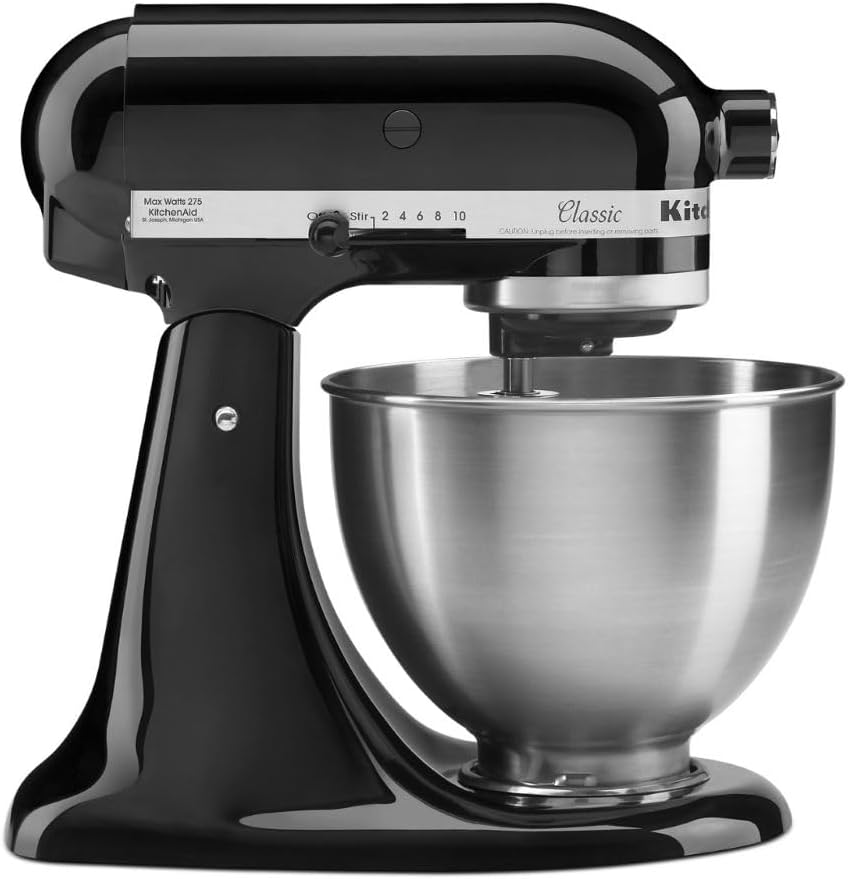
Figure 1: The KitchenAid Classic Series 4.5 Quart Tilt-Head Stand Mixer in Onyx Black, showcasing its sleek design and stainless steel bowl.
Key Features:
- Durable Metal Construction: Built to last with robust metal components and 59 touchpoints for efficient mixing.
- 4.5 Quart Stainless Steel Bowl: Capable of mixing up to 8 dozen cookies in a single batch. The bowl is dishwasher safe for easy cleaning.
- Tilt-Head Design: Provides easy access to the mixing bowl and allows for convenient addition of ingredients. The head locks securely in place during operation.
- 10 Speed Settings: Offers precise control for various tasks, from gentle stirring to high-speed whipping.
- Versatile Power Hub: Designed to accommodate over 10 optional attachments (sold separately), enabling a wide range of culinary applications.
- Included Accessories: Comes with a 4.5 Quart Stainless Steel Bowl, a Coated Flat Beater, a Coated Dough Hook, and a 6-Wire Whip.
Setup and Assembly
Before first use, ensure all packaging materials are removed. Wash the mixing bowl and included accessories (flat beater, dough hook, wire whip) in warm, soapy water, then rinse and dry thoroughly. The bowl is dishwasher safe.
Attaching the Bowl:
- Ensure the mixer is unplugged.
- Lift the motor head by pushing the release lever.
- Place the 4.5-quart stainless steel bowl onto the clamping plate, rotating it gently clockwise until it locks securely into place.
- Lower the motor head until it clicks into position.

Figure 2: The KitchenAid Stand Mixer with its stainless steel bowl and the three primary attachments: flat beater, dough hook, and wire whip.
Attaching Accessories:
- Ensure the mixer is unplugged and the motor head is tilted back.
- Slide the desired accessory (flat beater, dough hook, or wire whip) onto the beater shaft.
- Rotate the accessory until the pin on the shaft locks into the groove of the accessory.
- Lower the motor head.

Figure 3: A close-up view of the power hub located at the front of the mixer, where various optional attachments can be connected.
Operating Instructions
The KitchenAid Stand Mixer offers 10 distinct speeds for optimal mixing performance. Always ensure the mixer is stable on a flat surface before operation.
Speed Control:
- Stir (Speed 1): For slow stirring, combining, and mashing.
- Slow Mix (Speed 2): For slow mixing of heavy batters, mashing potatoes, or starting yeast dough.
- Medium-Slow (Speed 4): For mixing medium-heavy batters, creaming butter and sugar, or adding ingredients to mixtures.
- Medium (Speed 6): For medium-fast beating, mixing cakes, or creaming.
- Fast (Speed 8): For fast beating, whipping cream, or beating egg whites.
- Very Fast (Speed 10): For fast whipping of small quantities of cream or egg whites.

Figure 4: The speed control dial on the side of the mixer head, indicating settings from 'Stir' to '10' for precise control.
Using the Tilt-Head Feature:
The tilt-head design allows for easy access to the bowl and beater. To tilt the head, ensure the mixer is off and unplugged, then push the release lever located on the side of the mixer base. The head will tilt back, allowing you to add ingredients, scrape the bowl, or change attachments. Push the head back down until it clicks into place before resuming operation.

Figure 5: A detailed view of the tilt-head locking mechanism, which allows the mixer head to be raised for easy access to the bowl and attachments.
Using Optional Attachments:
The power hub at the front of the mixer allows for the connection of various KitchenAid attachments (sold separately). To attach, simply remove the hub cover, insert the attachment shaft into the hub, and tighten the attachment knob. Refer to the specific attachment's instruction manual for detailed usage.

Figure 6: The KitchenAid Stand Mixer demonstrating the use of an optional spiralizer attachment, showcasing its versatility beyond basic mixing.
Care and Maintenance
Proper care and maintenance will ensure the longevity and optimal performance of your KitchenAid Stand Mixer.
Cleaning:
- Mixing Bowl: The 4.5-quart stainless steel mixing bowl is dishwasher safe. For hand washing, use warm, soapy water and a non-abrasive sponge.
- Coated Flat Beater and Dough Hook: These accessories are coated and can be washed in the dishwasher (top rack recommended) or by hand with warm, soapy water.
- 6-Wire Whip: Hand wash the wire whip with warm, soapy water. Dry thoroughly to prevent rust.
- Mixer Body: Wipe the mixer body with a damp cloth. Do not immerse the mixer in water or spray it with liquids.

Figure 7: A close-up of the 4.5-quart stainless steel mixing bowl, highlighting its durable construction and ease of cleaning.
Storage:
Store the mixer in a dry place. Ensure all attachments are clean and dry before storing them with the mixer or separately.
Troubleshooting
This section addresses common issues you might encounter with your KitchenAid Stand Mixer. For problems not listed here, please contact customer support.
| Problem | Possible Cause | Solution |
|---|---|---|
| Mixer does not turn on. | Not plugged in; power outlet issue; incorrect voltage. | Ensure the power cord is securely plugged into a functional electrical outlet. Verify the outlet is providing power. Confirm the mixer is connected to the correct voltage supply for your region (e.g., 120V for North America). |
| Motor head does not lock down. | Head not fully lowered; obstruction. | Push the motor head firmly down until it clicks into place. Check for any obstructions preventing the head from fully lowering. |
| Attachments are difficult to install or remove. | Improper alignment; debris in shaft. | Ensure the mixer head is tilted back and the accessory is aligned correctly with the beater shaft pin. Clean the shaft and accessory opening if there is any debris. |
| Mixer seems to struggle with heavy dough. | Overloaded; incorrect speed. | Do not exceed the recommended capacity for the mixer (e.g., 8 dozen cookies). Use the appropriate speed setting for heavy dough (e.g., Speed 2 for yeast dough). |
Specifications
| Feature | Detail |
|---|---|
| Brand | KitchenAid |
| Model Name | Classic Series |
| Model Number | K45SSOB |
| Color | Onyx Black |
| Product Dimensions | 14.1"D x 8.7"W x 13.9"H |
| Item Weight | 22 pounds |
| Capacity | 4.5 Quarts (approx. 4.26 Liters) |
| Special Feature | Removable Bowl, Tilt-Head Design |
| Controls Type | Lever and Dial |
| Dishwasher Safe Parts | Bowl, Coated Flat Beater, Coated Dough Hook |
| UPC | 883049193861 |
Warranty and Support
KitchenAid products are built for durability and performance. For detailed warranty information, please refer to the warranty card included with your product or visit the official KitchenAid website.
Official Documentation:
- User Guide (PDF): Download User Guide
- User Manual (PDF): Download User Manual
Customer Support:
For further assistance, product registration, or to explore additional attachments, please visit the official KitchenAid website or contact their customer service department. You can find contact information on the KitchenAid website or in the provided user manual.
Explore more KitchenAid products and accessories: Visit the KitchenAid Store on Amazon
Related documentsK45SSOB


Ask a question about this manual
Ask about setup, troubleshooting, compatibility, parts, safety, or missing instructions. Manuals+ will review the question and use this page’s manual context to help answer it.