
Whynter ARC-12SD
Whynter ARC-12SD Portable Air Conditioner User Manual
Model: ARC-12SD | Brand: Whynter
1. Introduction and Overview
This manual provides comprehensive instructions for the safe and efficient operation, maintenance, and troubleshooting of your Whynter ARC-12SD 12,000 BTU (6,936 BTU SACC) Dual Hose Portable Air Conditioner. This versatile unit combines cooling, dehumidifying, and fan functions to effectively manage indoor air quality and temperature in spaces up to 400 square feet.

Figure 1.1: Whynter ARC-12SD Portable Air Conditioner and Remote Control.
The ARC-12SD is designed for ease of use and portability, featuring caster wheels for convenient movement. Its dual hose system is engineered to maximize cooling efficiency by minimizing negative air pressure, making it an energy-saving alternative to central air systems for cooling specific rooms.
Video 1.1: Whynter ARC-12SD Product Overview and Setup Guide. This video demonstrates key features and installation steps.
2. Safety Information
Please read all safety warnings and instructions carefully before operating this appliance to prevent personal injury or property damage. Keep this manual for future reference.
- Always connect the unit to a properly grounded electrical outlet.
- Do not operate the unit with a damaged cord or plug.
- Ensure proper ventilation and do not block air inlets or outlets.
- Keep children and pets away from the unit during operation.
- Unplug the unit before cleaning or performing any maintenance.
- Do not use the unit in wet or damp environments.
3. Package Contents
Verify that all components are present and in good condition upon unpacking. The package should include:
- Whynter ARC-12SD Portable Air Conditioner Unit
- Remote Control
- Extendable Exhaust Hose (up to 60 inches, 5.9 inches diameter)
- Window Kit (6.5 inches W x 20 inches min / 46 inches max L)
- Activated Carbon Air Filter
- Washable Pre-filter
- Storage Bag with pocket
- Window installation accessories
Note: Accessories and installation may vary by model or version. Please refer to the user manual for the most up-to-date setup instructions.
4. Setup & Installation
The Whynter ARC-12SD is designed for easy setup without permanent installation. Follow these steps for optimal performance.
4.1 Positioning the Unit
Place the unit on a flat, stable surface near a window and a grounded electrical outlet. Ensure there is at least 20 inches of space around the unit for proper airflow.

Figure 4.1: Product Dimensions (16.5"D x 20"W x 34"H).
4.2 Installing the Exhaust Hoses
The ARC-12SD features a dual hose system for enhanced efficiency. Hot air must be exhausted out of the room to complete the air exchange of the condenser.
- Extend each exhaust hose to about 6 inches.
- Attach the small slide-in connector and small cut-out connector to the small exhaust hose by turning counter-clockwise.
- Attach the large slide-in connector and large cut-out connector to the large intake hose by turning clockwise.
- Fix one end of the intake and exhaust connectors onto the rear ports of the unit by sliding the connectors into each slot.
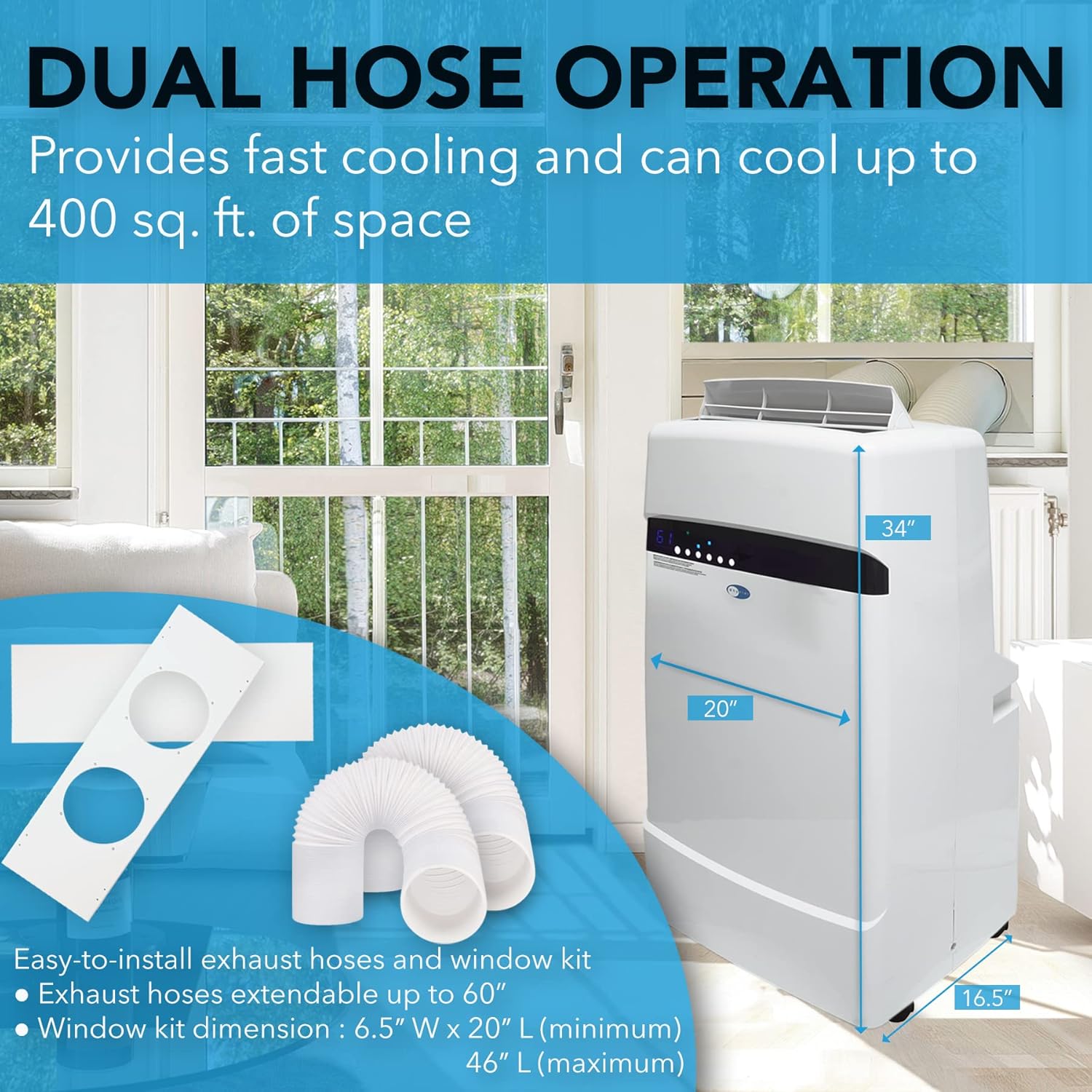
Figure 4.2: Dual Hose Operation and Window Kit. The dual hose system helps eliminate negative air pressure for more efficient cooling.
4.3 Window Kit Installation
The window slider kit is designed to fit most standard vertical and horizontal sliding windows.
- Insert the fixtures through the back grooved side of the window slider bars with the hole cutouts.
- Line up the four screw holes and tighten the fixtures with four screws from the front of the panel.
- Open the window approximately 5 inches.
- Adjust the length of the window slider bars to fit the length or width of the window opening. (Additional slider bars may be needed for oversized windows).
- Close the window onto the window slider kit.
- Move the PAC to the window, extend the hoses, and attach the other end of each hose to the window slider bar.
- Align the hose connector cutouts of the tabs to the fixtures and snap the hoses to the window slider kit.
5. Operating Modes & Controls
Your Whynter ARC-12SD offers three operational modes: Cool, Dehumidify, and Fan, along with full thermostatic control and a 24-hour on/off timer.
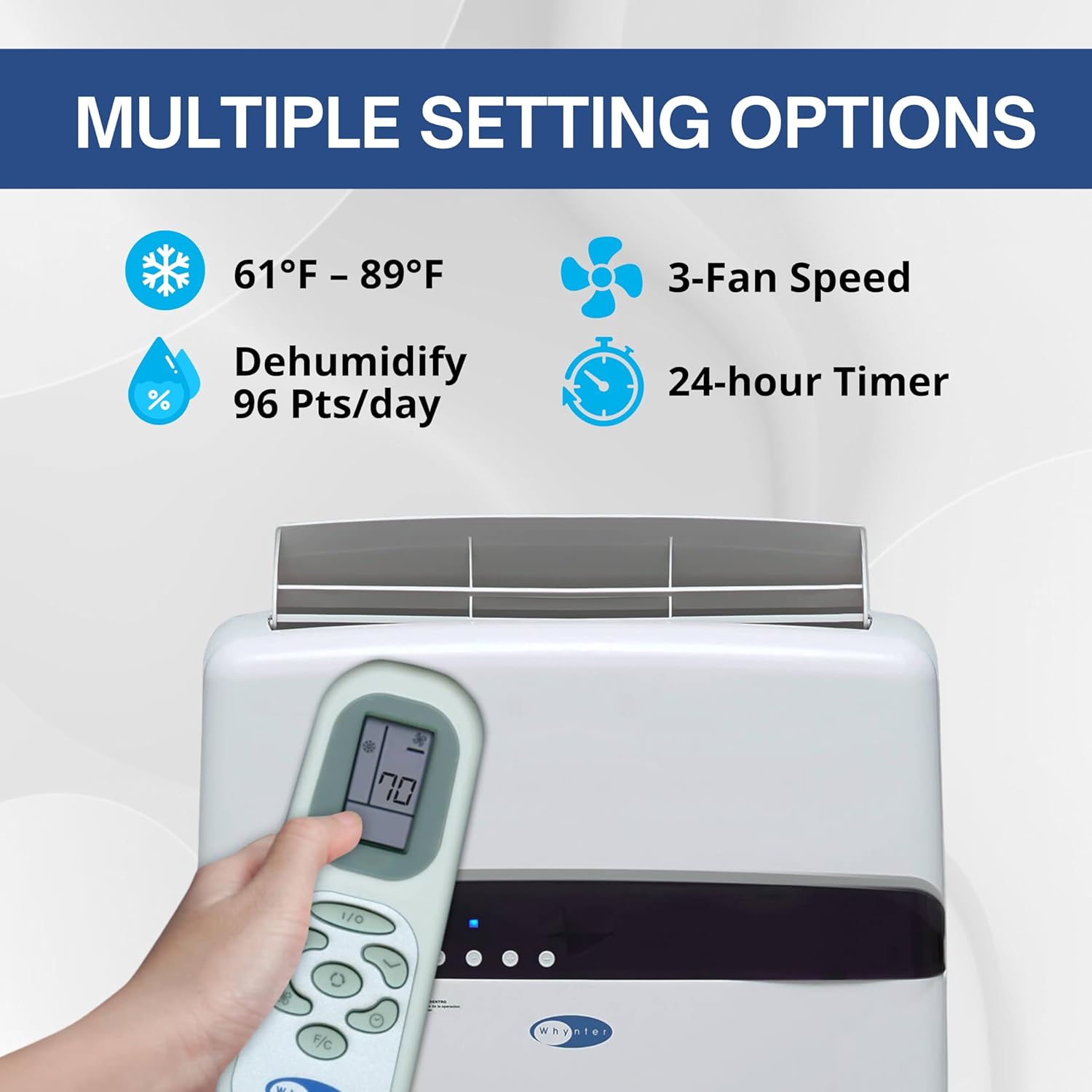
Figure 5.1: Control Panel and Remote Control. Adjust settings for cooling, dehumidifying, fan speed, and timer.
- Cool Mode: Provides powerful cooling with thermostatic control from 61°F to 89°F.
- Dehumidify Mode: Removes up to 96 pints of moisture per day.
- Fan Mode: Circulates air with three fan speeds (low, medium, high).
- 24-Hour Timer: Allows you to program the unit to turn on or off at specific times.
- Remote Control: A handy remote control allows you to easily adjust speed, temperature, timer, and dehumidifier settings from a distance.

Figure 5.2: Whisper-Silent Operation. The unit operates at 51.5 dBA in low speed, ideal for quiet environments.
6. Maintenance
Regular maintenance ensures the longevity and efficient operation of your portable air conditioner.
6.1 Filter Cleaning
The unit is equipped with an Activated Carbon Air Filter and a Washable Pre-filter. Clean the pre-filter regularly to maintain optimal airflow and air quality. The activated carbon filter helps remove smoke and odors.

Figure 6.1: Trouble-Free Maintenance. Easily access and clean filters for improved air quality.
6.2 Drainage
The patented auto drain function automatically exhausts all condensate in most environments. In high humidity or low temperature environments, the unit may need to be manually drained. It features both upper gravity and lower drain ports for continuous operation.

Figure 6.2: Unmatched Mobility. Caster wheels allow for easy movement of the unit for cleaning or repositioning.
7. Troubleshooting
If your Whynter ARC-12SD is not operating correctly, consult the following common issues before contacting customer support:
| Problem | Possible Cause | Solution |
|---|---|---|
| Unit does not turn on | No power, tripped circuit breaker, full water tank. | Check power connection, reset breaker, empty water tank if applicable. |
| Not cooling effectively | Dirty air filters, blocked air intake/exhaust, room too large, open doors/windows. | Clean filters, ensure clear airflow, confirm room size is within specifications, close all openings. |
| Noisy operation | Unit not level, fan obstruction. | Place unit on a flat surface, check for foreign objects in fan. |
| Water leakage | Drain plug not secured, unit not level, continuous drain hose kinked. | Secure drain plug, ensure unit is level, straighten drain hose. |
For more detailed troubleshooting or error codes, please refer to the full user manual (PDF) available on the product page or Whynter's website.
8. Specifications
| Feature | Detail |
|---|---|
| Model | ARC-12SD |
| Cooling Capacity | 12,000 BTU (6,936 BTU SACC) |
| Dehumidifying Capacity | 96 Pints/Day |
| Coverage Area | Up to 400 sq ft |
| Dimensions (W x D x H) | 20" x 16.5" x 34" |
| Item Weight | 78 pounds |
| Power Source | Corded Electric |
| Voltage | 115 Volts |
| Wattage | 1100 watts |
| Sound Level | 51.5 dB (low speed) |
| Air Flow Capacity | 188 Cubic Feet Per Minute |
| Material | Plastic |
| Color | White |
| SEER | 7.02 |
9. Warranty & Support
Whynter stands behind the quality of its products. Your Whynter ARC-12SD Portable Air Conditioner comes with the following warranty:
- 1-Year Limited Manufacturer's Warranty on parts and labor.
- 3-Year Compressor Warranty (parts only).
For detailed warranty terms, service requests, or technical support, please refer to the official user manual PDF or contact Whynter customer service:
- Phone: 866-WHYNTER
- Email: info@whynter.com
- Website: www.whynter.com
You can also access the full user manual in PDF format here.
Ask a question about this manual
Ask about setup, troubleshooting, compatibility, parts, safety, or missing instructions. Manuals+ will review the question and use this page’s manual context to help answer it.