
1. Introduction
This manual provides detailed instructions for the installation, programming, and operation of your Orbit 57896 6-Station Outdoor Sprinkler System Timer. This timer is designed for residential sprinkler systems, offering control for up to 6 zones. It is suitable for both indoor and outdoor installation.
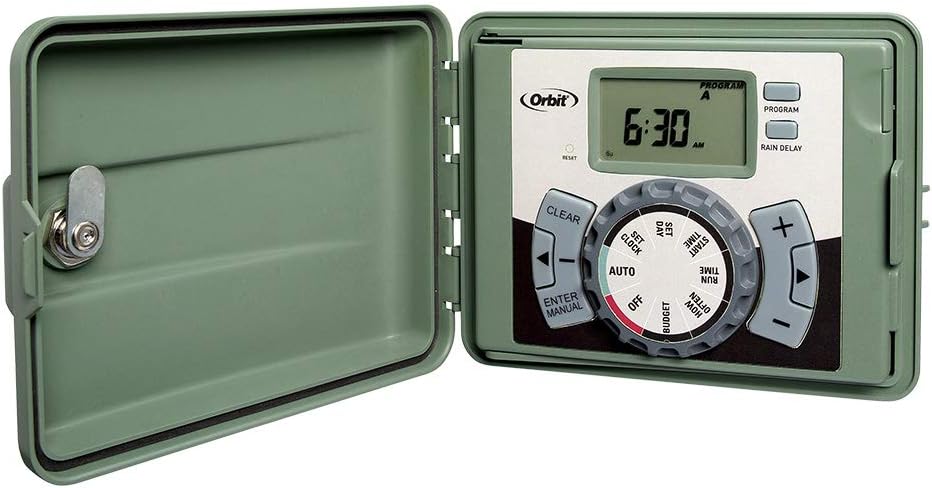
Figure 1.1: Orbit 57896 Sprinkler Timer with cover closed.
2. Features
- 6-Station Control: Manages up to six independent watering zones.
- Indoor/Outdoor Installation: Designed for versatile placement with a weather-resistant locking cabinet.
- Easy Set Logic: Intuitive programming interface for setting watering schedules.
- Multiple Programs: Supports up to three independent programs (A, B, C) with four start times each.
- Cycle and Soak: Allows for optimized water infiltration by scheduling watering and pause intervals.
- Automatic Runtime Stacking: Ensures only one zone operates at a time, even with overlapping schedules.
- Manual Operation: Provides flexibility for testing zones or supplemental watering.
- Rain Delay: Temporarily suspends watering to conserve water during wet weather.
- Sensor Compatibility: Includes a relay switch for connecting an automatic rain and freeze sensor (sold separately).
- Battery Backup: Utilizes a CR2032 battery to retain program memory during power outages.
3. Setup and Installation
Proper installation ensures optimal performance and longevity of your sprinkler timer. The unit can be mounted indoors or outdoors.
3.1 Mounting the Timer
Select a suitable location for mounting. The timer should be installed in a location that is easily accessible and protected from direct sunlight and extreme weather conditions if installed outdoors. Use the provided mounting hardware.

Figure 3.1: Timer mounted on an exterior wall.
3.2 Wiring the Timer
The timer features a swing panel for easy access to the wiring terminals. Connect the common wire from your sprinkler valves to the terminal labeled 'C'. Connect each zone wire to its corresponding numbered station terminal (1-6). The push wire terminals allow for tool-less insertion and removal of wires. Ensure all connections are secure.

Figure 3.2: Internal view of the timer with wiring terminals exposed.
The timer is compatible with standard 18-gauge sprinkler wire with 5 or 7 strands/wires.
3.3 Power Connection
Plug the timer's power cord into a standard 120V AC outlet. For outdoor installations, ensure the outlet is weather-protected.

Figure 3.3: Timer unit with power cord and included mounting accessories.
4. Operating Instructions
The Orbit 57896 timer features a rotary dial and push buttons for programming. The main display shows the current time and program status.

Figure 4.1: Control panel of the Orbit 57896 Timer.
4.1 Setting the Clock and Date
- Turn the dial to SET CLOCK.
- Use the + and - buttons to adjust the time. Press ENTER to confirm.
- Turn the dial to SET DATE.
- Use the + and - buttons to set the year, month, and day. Press ENTER after each setting.
4.2 Programming Watering Schedules
The timer allows for three independent programs (A, B, C). Each program can have up to four start times.
- Press the PROGRAM button to select Program A, B, or C.
- Turn the dial to START TIME. Use + and - to set the desired start time for the first cycle. Press ENTER. Repeat for up to four start times.
- Turn the dial to RUN TIME. Select the zone (1-6) using the PROGRAM button if necessary, then use + and - to set the duration for each zone. Press ENTER after each zone.
- Turn the dial to HOW OFTEN. Select the watering frequency (e.g., specific days of the week, every X days). Use + and - to adjust. Press ENTER.
- Once programming is complete, turn the dial to AUTO for automatic operation.
4.3 Manual Operation
To manually run a zone or all zones:
- Turn the dial to ENTER MANUAL.
- Use the + and - buttons to select the desired zone or 'ALL' zones.
- Press ENTER.
- Use + and - to set the manual run time.
- Press ENTER to start manual watering.
- To stop manual watering, turn the dial to OFF or AUTO.
4.4 Rain Delay Function
To temporarily pause watering due to rain:
- Press the RAIN DELAY button.
- Use the + and - buttons to select the delay duration (24, 48, or 72 hours).
- The timer will resume its programmed schedule after the delay period.
5. Maintenance
The Orbit 57896 timer requires minimal maintenance. Ensure the locking door is closed to protect the internal components from environmental elements. The timer uses a CR2032 battery for program memory backup. Replace this battery periodically to prevent loss of programming during power outages.
5.1 Battery Replacement
Locate the battery compartment, typically on the back or inside the swing panel. Replace the CR2032 battery, ensuring correct polarity. After replacement, verify that the clock and program settings are retained.
6. Troubleshooting
If you encounter issues with your Orbit 57896 timer, review the following common problems and solutions:
| Problem | Possible Cause | Solution |
|---|---|---|
| Timer display is blank | No power or faulty power supply. | Check power outlet. Ensure power cord is securely plugged in. |
| Sprinklers do not turn on | Incorrect programming, wiring issues, or valve problems. | Verify program settings (start times, run times, frequency). Check common and zone wire connections. Manually test valves if possible. |
| Timer loses settings after power outage | Dead or missing backup battery. | Replace the CR2032 backup battery. |
| Watering occurs at unexpected times | Multiple start times set or incorrect program selected. | Review all program (A, B, C) start times and frequencies. Ensure the dial is set to AUTO. |
If issues persist, contact Orbit customer support for further assistance.
7. Specifications
- Brand: Orbit
- Model Number: 57896
- Number of Stations: 6
- Material: Plastic
- Product Dimensions: 5"D x 9"W x 10"H
- Item Weight: 3.11 Pounds
- Screen Size: 2 Inches
- Power Source: 120V AC (US standard)
- Backup Battery: 1 CR2032 battery (required for memory retention)
- Compatibility: 24 VAC valves from Orbit, Hydro-Rain, and other major brands.

Figure 7.1: Approximate dimensions of the Orbit 57896 Timer.
8. Warranty Information
The Orbit 57896 Sprinkler System Timer comes with a 6-year parts warranty. For specific terms and conditions, please refer to the warranty documentation included with your product or contact Orbit customer support.
9. Customer Support
For technical assistance, troubleshooting, or warranty inquiries, please contact Orbit customer support:
- Phone: 1-800-488-6156 (Option 1, then Option 4)
- Hours: 7am-5pm MDT, Monday-Friday
- Website: www.orbitonline.com
10. Product Videos
No official product videos from the seller were provided in the product data for this manual.


