
1. Introduction
This manual provides essential information for the safe and efficient operation of your Hitachi CP-X3011 LCD Projector. Please read it thoroughly before using the projector and keep it for future reference.
The Hitachi CP-X3011 is a high-performance XGA LCD projector designed for various applications, offering 3200 ANSI Lumens of brightness and a 2000:1 contrast ratio for clear and vibrant images.
Key Features:
- 3,200 ANSI Lumens: Projects a clear image suitable for classrooms or conference rooms.
- 16 Watt Audio Output: Internal speaker eliminates the need for external speakers in many setups.
- Hybrid Filter: Designed for extended maintenance intervals, requiring cleaning only every 5,000 hours, reducing ownership costs.
2. Setup
2.1 Unpacking and Contents
Carefully remove the projector and all accessories from the packaging. Verify that all items listed below are present:
- Hitachi CP-X3011 LCD Projector
- Power Cord
- Remote Control
- User Manual (this document)
2.2 Projector Placement
Position the projector on a stable, flat surface. Ensure adequate ventilation around the unit. Avoid placing it in direct sunlight or near heat sources. For optimal image quality, position the projector perpendicular to the screen.
2.3 Connecting Devices
The CP-X3011 offers various connectivity options. Ensure the projector is powered off before making any connections.

Image: Rear view of the Hitachi CP-X3011 projector, highlighting the power input and various data ports for connection.
- Power Connection: Connect the supplied power cord to the 'AC IN' port on the projector and then to a grounded electrical outlet.
- Video Input: Connect your computer or video source using a VGA cable to the VGA input port. USB connectivity is also available for certain functions.
- Audio Input: If your source device provides audio, connect it to the appropriate audio input port on the projector.
2.4 Initial Power On
After connecting all necessary cables, press the Power button on the projector's control panel or the remote control to turn on the unit. The power indicator light will illuminate.
3. Operating
3.1 Control Panel Overview
The control panel on top of the projector allows for basic operation and menu navigation.
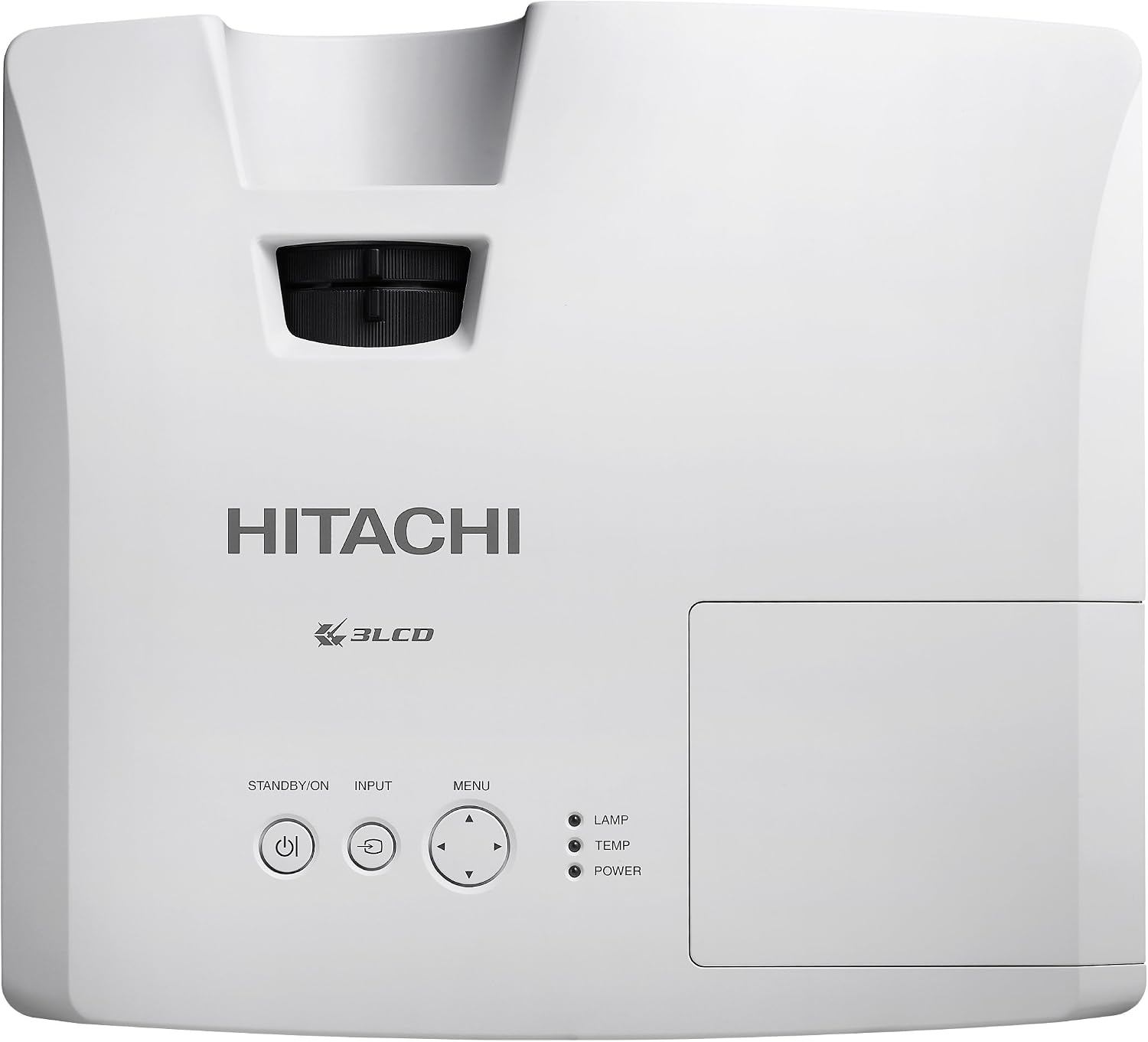
Image: Top view of the Hitachi CP-X3011 projector, displaying the control panel with power, input, menu, and navigation buttons, along with indicator lights.
- STANDBY/ON Button: Powers the projector on or off.
- INPUT Button: Cycles through available input sources (VGA, USB, etc.).
- MENU Button: Opens the On-Screen Display (OSD) menu.
- Arrow Buttons: Navigate through menu options.
- LAMP/TEMP/POWER Indicators: Provide status information about the projector's lamp, temperature, and power state.
3.2 Image Adjustment
- Focus Ring: Rotate the focus ring located around the lens to sharpen the projected image.
- Zoom Lever: Adjust the zoom lever (if present) to change the size of the projected image without moving the projector.
- Keystone Correction: Use the keystone correction function (accessible via the OSD menu or dedicated button) to correct trapezoidal distortion if the projector is not perfectly perpendicular to the screen.
3.3 On-Screen Display (OSD) Menu
Press the MENU button to access the OSD. Use the arrow buttons to navigate through categories such as Picture, Display, Setup, and Information. Press ENTER (or the right arrow) to select an option and adjust settings. Press MENU again to exit.
4. Maintenance
Regular maintenance ensures optimal performance and extends the lifespan of your projector.
4.1 Hybrid Filter Cleaning/Replacement
The CP-X3011 features a Hybrid Filter designed for long maintenance intervals. It is recommended to clean or replace the filter approximately every 5,000 hours of operation, or when the filter warning indicator appears.

Image: Side view of the Hitachi CP-X3011 projector, illustrating the ventilation grilles where the Hybrid Filter is located.
- Turn off the projector and unplug the power cord.
- Locate the filter cover (refer to the diagram in the full user manual).
- Remove the filter and gently clean it with a soft brush or vacuum cleaner. If heavily soiled or damaged, replace it with a new one.
- Reinsert the filter and close the cover securely.
4.2 Lamp Replacement
The projector lamp has a finite lifespan. When the lamp indicator light turns on or the image becomes dim, the lamp may need replacement. Refer to the full user manual for detailed lamp replacement instructions, as this process involves handling a hot component and specific safety precautions.
4.3 Cleaning the Projector
- Exterior: Wipe the projector's exterior with a soft, dry cloth. For stubborn dirt, use a cloth lightly dampened with water and a mild detergent, then wipe dry.
- Lens: Gently clean the projector lens with a lens cleaning cloth or lens paper. Avoid using abrasive materials or harsh chemicals.
5. Troubleshooting
If you encounter issues with your projector, refer to the following common problems and solutions before contacting support.
| Problem | Possible Cause | Solution |
|---|---|---|
| No image projected | Power cord disconnected; Input source not selected; Lamp issue | Check power connection; Press INPUT button to cycle sources; Check lamp indicator |
| Image is blurry | Lens out of focus; Projector too far/close to screen | Adjust focus ring; Adjust projector distance or zoom |
| Image is trapezoidal | Projector not perpendicular to screen | Use keystone correction function |
| Projector overheats and shuts down | Blocked ventilation; Dirty filter | Ensure clear airflow around vents; Clean or replace Hybrid Filter |
6. Specifications
Detailed technical specifications for the Hitachi CP-X3011 LCD Projector:
| Feature | Specification |
|---|---|
| Brand | Hitachi |
| Model Number | CP-X3011 |
| Display Resolution | 1024 x 768 (XGA) |
| Brightness | 3200 ANSI Lumens |
| Contrast Ratio | 2000:1 |
| Connectivity Technology | VGA, USB |
| Special Feature | Internal Speakers (16 Watt Audio Output) |
| Recommended Uses | Home Cinema, Classroom, Conference Room |
| Product Dimensions | 12.5 x 11.3 x 3.9 inches |
| Item Weight | 8.2 pounds |
| Date First Available | May 7, 2010 |
7. Warranty and Support
For information regarding the product warranty, please refer to the warranty card included with your projector or visit the official Hitachi website. For technical support, service, or inquiries about replacement parts (such as lamps or filters), please contact Hitachi customer service or an authorized service center.