
Beurer BM58
Contents
Beurer BM 58 Arm Blood Pressure Monitor
Model: BM58 - User Manual
Product Overview
The Beurer BM 58 Arm Blood Pressure Monitor is a fully automatic device designed for accurate and convenient measurement of blood pressure and pulse rate on the upper arm. It features a large, illuminated display, sensor touch buttons, and a USB interface for data transfer to the Beurer HealthManager software.
Key features include:
- Fully automatic blood pressure and pulse measurement on the upper arm.
- Extra-large, illuminated black display for easy readability.
- Sensor touch buttons for intuitive operation.
- USB interface for transferring measurement values to PC.
- Two user memories, each storing 60 measurement values.
- Calculation of average values (all stored, morning/evening for last 7 days).
- Arrhythmia detection and warning.
- Risk indicator based on WHO classification.
- Automatic pressure preselection and air release.
- Automatic switch-off function.
- Warning in case of application errors.
- Battery change indicator.
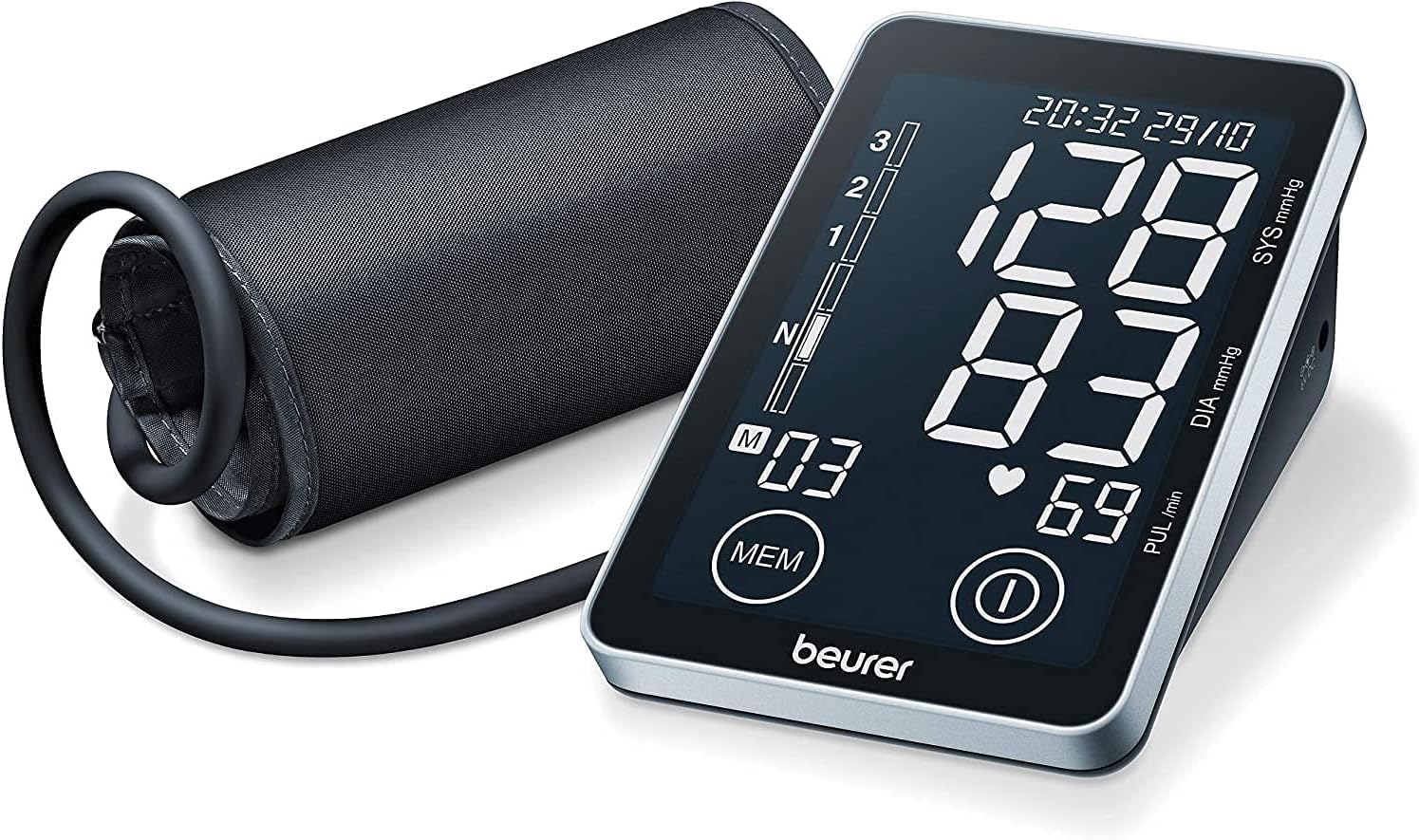
The Beurer BM 58 blood pressure monitor features a sleek black display unit and an attached arm cuff, ready for use.
Package Contents
Please check that all items are included in the delivery:
- Beurer BM 58 Blood Pressure Monitor
- Arm Cuff (for arm circumferences 22-30 cm)
- USB Cable
- 4 x 1.5V AA Batteries
- Protective Storage Case
- Instruction Manual
- Warranty Card
Setup
1. Inserting Batteries
- Open the battery compartment cover on the back of the device.
- Insert the four 1.5V AA batteries, ensuring correct polarity (+/-).
- Close the battery compartment cover securely.
2. Attaching the Arm Cuff
The cuff is designed for arm circumferences of 22-30 cm. Ensure the cuff fits snugly but not too tightly.
- Connect the air tube of the cuff to the air connector on the left side of the blood pressure monitor.
- Place the cuff on your bare upper left arm, approximately 2-3 cm above the elbow joint. The air tube should run along the inside of your arm towards your palm.
- Fasten the cuff with the hook-and-loop fastener so that it is snug but not constricting.
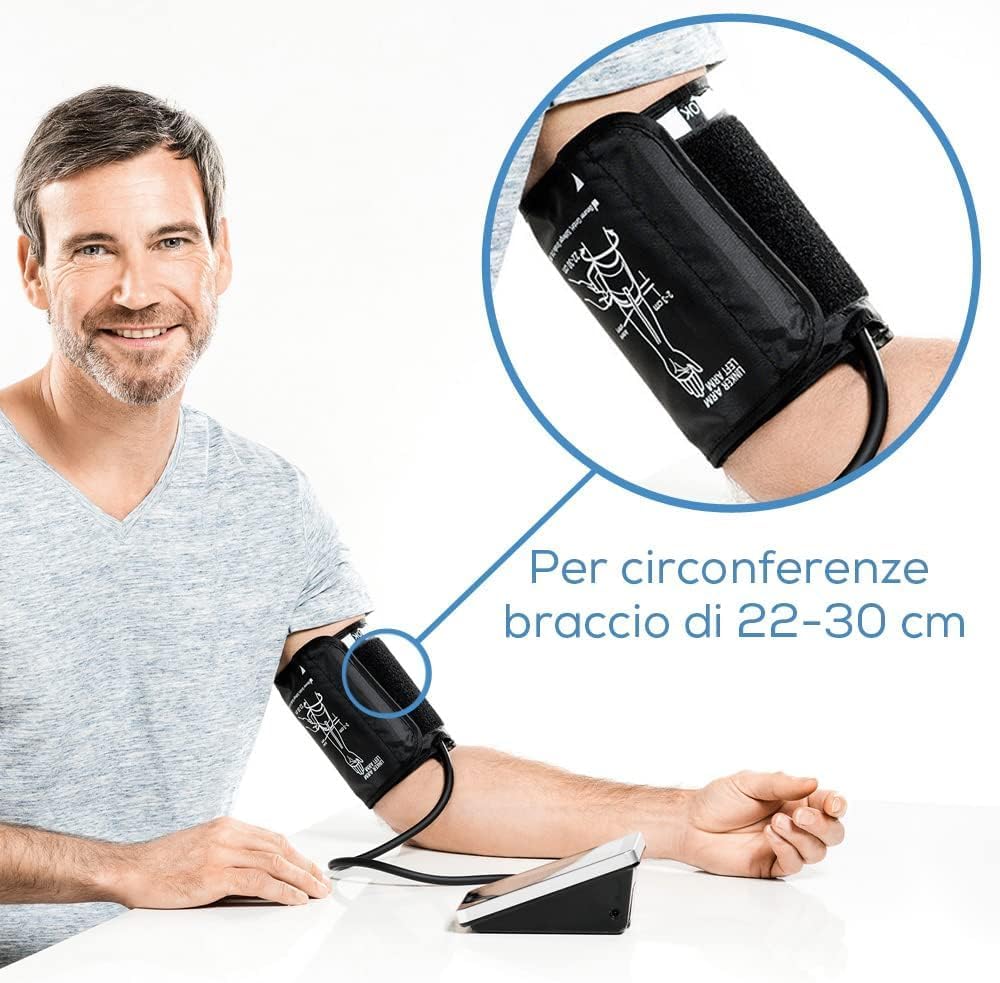
This image illustrates the correct placement of the arm cuff on the upper arm. The cuff is designed for arm circumferences between 22 and 30 cm, ensuring a proper fit for accurate measurements.
3. Initial Settings (Date, Time, User Profile)
Upon first use or after battery replacement, you may need to set the date and time. The device supports two user profiles (User 1 and User 2).
- With the device off, press and hold the MEM button for approximately 3 seconds to enter setting mode.
- The year will flash. Use the MEM button to adjust the value, and the ON/OFF button to confirm and move to the next setting (month, day, hour, minute).
- After setting the time, you can select the user profile (1 or 2) by pressing the MEM button. Confirm with the ON/OFF button.
Operating Instructions
1. Taking a Measurement
Before measuring, rest for at least 5 minutes. Avoid eating, smoking, or exercising immediately prior to measurement.
- Sit comfortably with your back supported and feet flat on the floor. Place your arm on a table so the cuff is at heart level.
- Press the ON/OFF button to start the measurement. The display will illuminate.
- The cuff will automatically inflate. Once inflation is complete, the air will slowly release, and your systolic, diastolic, and pulse values will be displayed.
- The measurement results, including date and time, will be automatically saved in the selected user memory.
- Press the ON/OFF button again to switch off the device, or it will automatically shut off after approximately 1 minute.
2. Understanding Results
The display shows your systolic pressure (SYS), diastolic pressure (DIA), and pulse rate (PUL). The device also provides a risk indicator and arrhythmia detection.
- Risk Indicator: A colored scale on the left side of the display indicates your blood pressure classification according to WHO (World Health Organization) guidelines.
- Arrhythmia Detection: If an irregular heartbeat is detected during measurement, the arrhythmia symbol (heart icon) will appear on the display. Consult your doctor if this symbol appears frequently.

The Beurer BM 58 blood pressure monitor includes an integrated risk indicator, classifying measurement results according to WHO guidelines. It also features automatic arrhythmia detection, alerting users to potential irregular heartbeats.
3. Memory Functions
The BM 58 stores up to 60 measurements for each of the two user profiles.
- Viewing Stored Values: With the device off, press the MEM button. The average of all stored values for the currently selected user will be displayed. Press MEM again to cycle through morning average, evening average, and individual measurements in reverse chronological order.
- Switching User Profiles: When the device is off, press the MEM button and then the ON/OFF button to switch between User 1 and User 2.

The Beurer BM 58 features an extra-large, illuminated display for easy readability. It supports two user profiles, each capable of storing up to 60 measurement values, making it suitable for couples or individuals tracking their readings over time.
4. Connecting to PC and HealthManager Software
The BM 58 can transfer measurement data to your computer using the included USB cable and the free Beurer HealthManager software.
- Download and install the "Beurer HealthManager" software from the official Beurer website.
- Connect the blood pressure monitor to your PC using the USB cable.
- Turn on the blood pressure monitor.
- Launch the HealthManager software on your PC and follow the on-screen instructions to import your data.

The back of the Beurer BM 58 monitor includes a USB interface, allowing users to connect the device to a PC. This enables data transfer to the free Beurer HealthManager software for comprehensive health data management and analysis.
Maintenance
Cleaning the Device
- Clean the device and cuff carefully using a slightly damp cloth.
- Do not use abrasive cleaning agents or solvents.
- Never immerse the device in water or other liquids.
Storage
- Store the device and cuff in the provided protective case when not in use.
- Store in a cool, dry place, away from direct sunlight and extreme temperatures.

For convenient storage and portability, the Beurer BM 58 blood pressure monitor comes with a practical protective carrying case, keeping the device and cuff safe.
Troubleshooting
| Problem | Possible Cause | Solution |
|---|---|---|
| Device does not turn on. | Batteries are low or incorrectly inserted. | Check battery polarity. Replace batteries if necessary. |
| Error message (e.g., "E1", "E2"). | Cuff not correctly applied, movement during measurement, or air leakage. | Re-apply cuff correctly. Remain still during measurement. Check cuff and tube for damage. |
| Inconsistent readings. | Improper measurement technique, stress, or recent activity. | Ensure proper posture and relaxation. Measure at the same time each day. Avoid caffeine, smoking, or exercise before measurement. |
| Cannot transfer data to PC. | USB cable not connected, software not installed, or device not in data transfer mode. | Ensure USB cable is securely connected. Install Beurer HealthManager software. Follow software instructions for data transfer. |
Specifications
- Model: BM58
- Measurement Method: Oscillometric, non-invasive blood pressure measurement on the upper arm
- Measurement Range:
- Systolic: 50 - 250 mmHg
- Diastolic: 30 - 200 mmHg
- Pulse: 30 - 180 beats/minute
- Accuracy:
- Pressure: +/- 3 mmHg
- Pulse: +/- 5% of displayed value
- Memory: 2 x 60 memory spaces
- Cuff Size: For arm circumferences of 22 - 30 cm
- Power Supply: 4 x 1.5V AA batteries (included)
- Dimensions: Approximately 10 x 15 x 5.8 cm
- Weight: Approximately 502 grams (without batteries)
- Interface: USB
- Operating Conditions: +10°C to +40°C, 30% to 85% relative humidity (non-condensing)
- Storage Conditions: -20°C to +50°C, 15% to 90% relative humidity (non-condensing)
Warranty and Support
The Beurer BM 58 Blood Pressure Monitor comes with a 3-year warranty from the date of purchase. This warranty covers defects in materials and workmanship under normal use.
The warranty does not cover:
- Damage due to improper use or handling.
- Damage caused by unauthorized repairs or modifications.
- Damage caused by external factors (e.g., drops, water damage).
- Normal wear and tear of consumables (e.g., batteries, cuff).
For warranty claims or technical support, please contact Beurer customer service. Keep your proof of purchase for warranty validation.
Additional information and software downloads can be found on the official Beurer website: www.beurer.com
Ask a question about this manual
Ask about setup, troubleshooting, compatibility, parts, safety, or missing instructions. Manuals+ will review the question and use this page’s manual context to help answer it.