1. Product Overview
The Kodak EasyShare M320 is a compact digital camera designed for ease of use and high-quality imaging. It features a 9.2-megapixel resolution sensor, a 3x optical zoom lens, and a 2.7-inch color LCD screen for clear viewing and navigation.
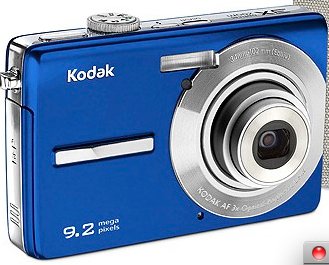
Figure 1: Front view of the Kodak EasyShare M320 Digital Camera, showcasing its compact design and blue casing.
Key Features:
- 9.2-megapixel resolution for detailed images.
- 3x optical zoom lens for capturing distant subjects.
- 2.7-inch color LCD screen for easy framing and review.
- Face detection technology for optimized portraits.
- Blur reduction for sharper photos.
- Kodak Perfect Touch technology for enhanced image quality.
- ISO settings up to 1600 for low-light conditions.
- HD picture capability.
- VGA video recording at 24 frames per second.
2. Setup and First Use
Before using your Kodak EasyShare M320 camera, follow these steps to prepare it for operation.
2.1. Battery Installation
- Locate the battery compartment door on the bottom of the camera.
- Slide the latch to open the compartment door.
- Insert the rechargeable battery, ensuring the correct polarity (+/-) as indicated inside the compartment.
- Close the battery compartment door securely until it clicks into place.
2.2. Memory Card Insertion
The camera supports SD/SDHC memory cards (not included). A memory card is required to store photos and videos.
- Open the memory card slot cover, usually located near the battery compartment.
- Insert the SD/SDHC card with the metal contacts facing the front of the camera until it clicks into place.
- Close the memory card slot cover.
2.3. Initial Power On
- Press the Power button to turn on the camera.
- The first time you power on, you may be prompted to set the date, time, and language. Follow the on-screen instructions using the navigation buttons and the OK button.
3. Operating the Camera
This section covers basic operations for capturing photos and videos.
3.1. Taking Photos
- Turn on the camera.
- Select the desired shooting mode (e.g., Auto, Scene modes) using the mode dial or menu.
- Frame your shot using the LCD screen.
- Press the Shutter button halfway down to focus. The focus indicator will illuminate when focus is achieved.
- Press the Shutter button all the way down to capture the photo.
3.2. Recording Videos
- Turn on the camera.
- Switch to video recording mode (if available via a dedicated button or mode dial).
- Press the Record button to start recording. A red indicator or timer will appear on the screen.
- Press the Record button again to stop recording.
3.3. Reviewing Images and Videos
- Press the Playback button (often indicated by a triangle icon).
- Use the navigation buttons to scroll through your captured photos and videos.
- To view a video, select it and press the OK button to start playback.
- Press the Playback button again or the Shutter button to return to shooting mode.
4. Maintenance and Care
Proper care ensures the longevity and optimal performance of your camera.
4.1. Cleaning the Camera
- Camera Body: Use a soft, dry cloth to wipe the camera body. For stubborn dirt, slightly dampen the cloth with water. Avoid harsh chemicals or solvents.
- Lens: Use a lens brush or a blower to remove dust. For smudges, use a specialized lens cleaning cloth and lens cleaning solution. Do not touch the lens surface with your fingers.
- LCD Screen: Gently wipe the screen with a soft, lint-free cloth. Avoid pressing too hard.
4.2. Storage
- Store the camera in a cool, dry place away from direct sunlight and extreme temperatures.
- If storing for an extended period, remove the battery to prevent leakage.
- Use a camera case to protect it from dust and scratches.
5. Troubleshooting
Refer to this section for solutions to common issues you might encounter.
| Problem | Possible Cause / Solution |
|---|---|
| Camera does not turn on. |
|
| Cannot take pictures. |
|
| Pictures are blurry. |
|
| Flash does not fire. |
|
6. Specifications
Technical specifications for the Kodak EasyShare M320 Digital Camera.
| Feature | Detail |
|---|---|
| Model Name | EasyShare M320 |
| Maximum Webcam Image Resolution | 9.2 MP |
| Optical Zoom | 3x |
| Image Stabilization | Digital, Optical |
| Photo Sensor Technology | CMOS |
| Supported File Format | JPEG, RAW |
| Aspect Ratio | 16:9 |
| Expanded ISO Minimum | 1600 |
| Item Weight | 15.2 ounces |
| Package Dimensions | 9 x 6.5 x 2.8 inches |
| Manufacturer | Kodak |
| Date First Available | April 13, 2010 |
7. Warranty and Support
For detailed warranty information, please refer to the warranty card included with your product at the time of purchase. Warranty terms and conditions may vary by region.
For technical support, service, or additional product information, please visit the official Kodak support website or contact their customer service department. Contact details are typically provided in the product packaging or on the manufacturer's website.
You can visit the KODAK Store for more information: KODAK Store on Amazon


