Introduction
Welcome to the instruction manual for your new Roland E-09 Digital Piano. This manual provides essential information for setting up, operating, maintaining, and troubleshooting your instrument. Please read it thoroughly to ensure proper use and to maximize your enjoyment of the E-09's features.
The Roland E-09 is an interactive arranger keyboard designed for musicians of all levels, offering a wide range of sounds, rhythms, and performance tools. Its intuitive interface and powerful features make it suitable for practice, composition, and live performance.

Image: Angled view of the Roland E-09 Digital Piano, showcasing its black finish, keyboard, and control panel.
Setup
Before using your Roland E-09, follow these steps to set it up correctly:
- Power Connection: Connect the included AC adapter to the DC IN jack on the rear panel of the E-09, then plug the adapter into a standard electrical outlet.
- Power On/Off: Locate the [POWER] switch on the rear panel. Press it to turn the instrument ON. To turn it OFF, press the switch again.
- Audio Output: For sound, connect headphones to the PHONES jack (3.5mm) on the front left side, or connect the E-09 to an external amplifier or mixer using the OUTPUT (L/MONO, R) jacks on the rear panel.
- Pedal Connection: If using an optional sustain pedal (e.g., DP-2, DP-8), connect it to the HOLD PEDAL jack on the rear panel.
- MIDI Connections: For connecting to other MIDI devices, use the MIDI IN and MIDI OUT ports on the rear panel.

Image: Rear panel of the Roland E-09 Digital Piano, showing the power input, audio output jacks, pedal input, and MIDI ports.
Operating Instructions
Familiarize yourself with the main controls and functions of your E-09:
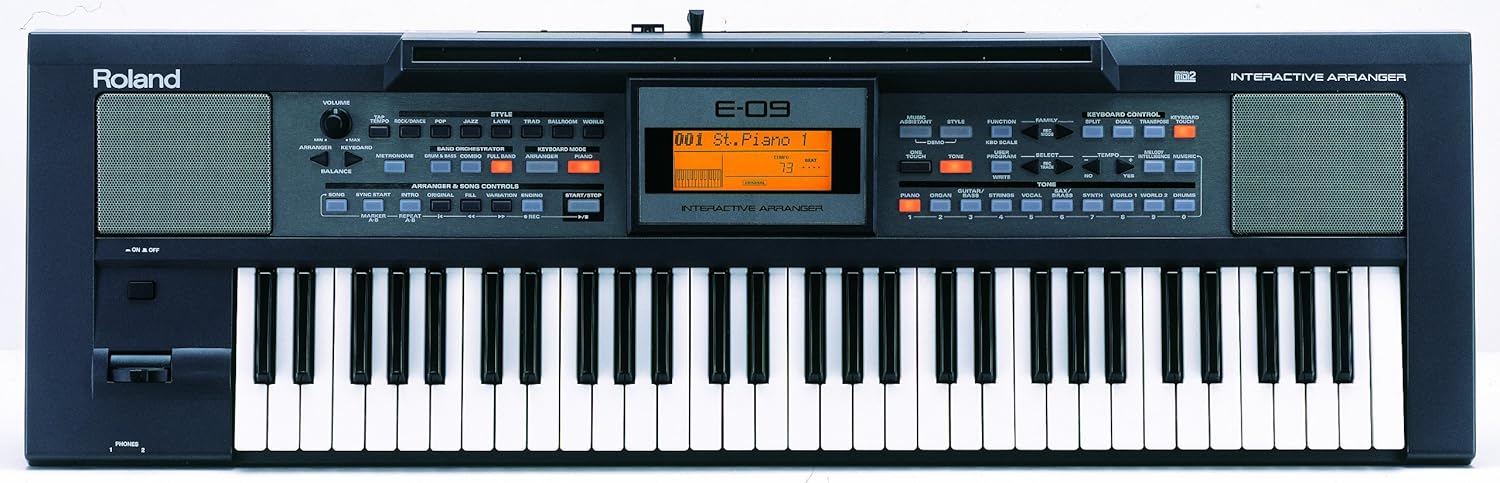
Image: Top-down view of the Roland E-09 Digital Piano, highlighting the keyboard, display, and various control buttons for sound, style, and recording.
- Volume Control: Use the [VOLUME] knob on the left side of the control panel to adjust the overall output volume.
- Sound Selection (Tones): The E-09 features 64-voice polyphony. To select different instrument sounds (Tones), use the [TONE] category buttons (e.g., PIANO, ORGAN, STRINGS) and the numeric keypad or [+/-] buttons to browse.
- Rhythm/Style Selection: The E-09 includes interactive musical styles, including Western, Middle Eastern, and Asian genres. Use the [STYLE] category buttons and the numeric keypad to select a rhythm. Press [START/STOP] to begin/end the rhythm.
- Music Assistant: Utilize the Friendly Music Assistants and One-Touch settings for quick access to suitable tones and styles for various musical genres.
- Multi-Effects: The instrument includes 47 Multi-FX plus dedicated reverb and chorus effects to enhance your sound. Adjust these settings via the display and associated buttons.
- 16-Track Recorder: The built-in 16-track recorder allows you to record and playback your performances. Refer to the detailed instructions in the full manual for recording, editing, and saving your tracks.
- Tempo Control: Adjust the tempo of rhythms and recorded songs using the [TEMPO] buttons.
Maintenance
Proper care will ensure the longevity and optimal performance of your Roland E-09:
- Cleaning: Wipe the instrument with a soft, dry cloth. For stubborn dirt, use a slightly damp cloth and then wipe dry. Avoid using abrasive cleaners, waxes, or solvents, as they can damage the finish.
- Storage: Store the E-09 in a cool, dry place away from direct sunlight, extreme temperatures, and high humidity. If transporting, use a suitable keyboard bag or case to protect it from physical damage.
- Handling: Avoid placing heavy objects on the keyboard. Do not spill liquids on the instrument.
- Power Off: Always turn off the power when the instrument is not in use or before disconnecting any cables.
Troubleshooting
If you encounter issues with your Roland E-09, try these common solutions:
- No Sound:
- Check if the power is ON.
- Ensure the [VOLUME] knob is turned up.
- Verify that headphones or external speakers are properly connected and their volume is adjusted.
- Check if a local/mute function is active (refer to the full manual).
- Keys Not Responding:
- Restart the instrument.
- Ensure no demo mode or specific function is locking the keyboard.
- Rhythm/Style Not Playing:
- Press the [START/STOP] button.
- Check the tempo setting.
- Display Not Working:
- Ensure the power supply is stable.
- If the issue persists after restarting, contact customer support.
For more detailed troubleshooting, please consult the comprehensive user manual available on the Roland website or contact Roland customer support.
Specifications
| Feature | Specification |
|---|---|
| Model Name | E-09 |
| Number of Keys | 61 |
| Polyphony | 64 voices |
| Multi-Effects | 47 types + Reverb, Chorus |
| Recorder | 16-Track |
| Connectivity | Auxiliary, MIDI IN/OUT, Headphones (3.5mm Jack) |
| Product Dimensions | 115.1D x 41.7W x 24.1H Centimeters |
| Item Weight | 10 kg 400 g |
| Color | Black |
| Skill Level | Beginner/Intermediate |
| UPC | 761294400340 |
Warranty and Support
Your Roland E-09 Digital Piano comes with a 1 Year Warranty from the date of purchase. Please retain your proof of purchase for warranty claims.
For technical support, service, or further inquiries, please visit the official Roland website or contact your local authorized Roland service center. You can find contact information and additional resources on the Roland Store on Amazon or the main Roland corporate website.


