
1. Introduction
This manual provides essential information for the safe and efficient operation of your Samlex America PST30S12A 300W Pure Sine Wave Inverter. Please read these instructions thoroughly before installation and use to ensure proper function and longevity of the product.
2. Safety Information
WARNING: Product may contain materials cautioned by California Proposition 65.
Always observe the following safety precautions:
- Ensure proper ventilation around the inverter to prevent overheating.
- Do not expose the inverter to water, rain, or excessive moisture.
- Avoid operating the inverter in environments with flammable fumes or gases.
- Connect the inverter only to a DC power source with the correct voltage (10.5V to 16.5V).
- Always disconnect the power source before performing any maintenance or troubleshooting.
- Ensure all connections are secure and properly insulated to prevent short circuits.
- Use appropriate wiring and fusing for both DC input and AC output connections.
3. Product Features
The Samlex America PST30S12A Pure Sine Wave Inverter offers reliable power conversion with the following key features:
- High efficiency for optimal power usage.
- Low battery voltage alarm to alert users of declining battery levels.
- LED indicators for power status and protection alerts.
- Comprehensive protection systems: input low voltage, input over voltage, over temperature, overload, and short circuit.
- Low idle power draw to conserve battery life.
- Comes with a cigar lighter plug for convenient connection.
- Pure Sine Wave output for sensitive electronics.
4. Package Contents
Verify that all items are present in your package:
- Samlex America PST30S12A 300W Pure Sine Wave Inverter
- DC input cables (with cigar lighter plug and tubular screwdown terminals)
- User Manual
5. Setup and Installation
Follow these steps for proper installation of your inverter:
- Mounting: Choose a dry, well-ventilated location for the inverter. Ensure there is adequate space around the unit for airflow, especially for the temperature-controlled fan.
- DC Input Connection:
- For lower power applications, connect the provided cigar lighter plug to a compatible 12V DC outlet.
- For full 300W output, use the tubular type screwdown terminals. Connect the positive (+) cable from your 12V battery to the positive terminal on the inverter and the negative (-) cable to the negative terminal. Ensure the DC side input fuse (40A) is correctly installed.
- Recommendation: A small screwdriver may be required for securing the screwdown terminals.
- Battery Type: If using batteries indoors or in enclosed spaces, consider AGM (Absorbent Glass Mat) batteries as they do not emit toxic or flammable fumes like some conventional auto batteries.
- Grounding: It is recommended to properly ground the inverter. Connect a grounding wire from the inverter's chassis ground terminal to a suitable earth ground point.
- AC Output Connection: Plug your AC devices into the standard North American Outlet (NEMA 5-15R) on the inverter. Ensure the total power draw of your devices does not exceed the inverter's continuous power rating of 300 Watts.
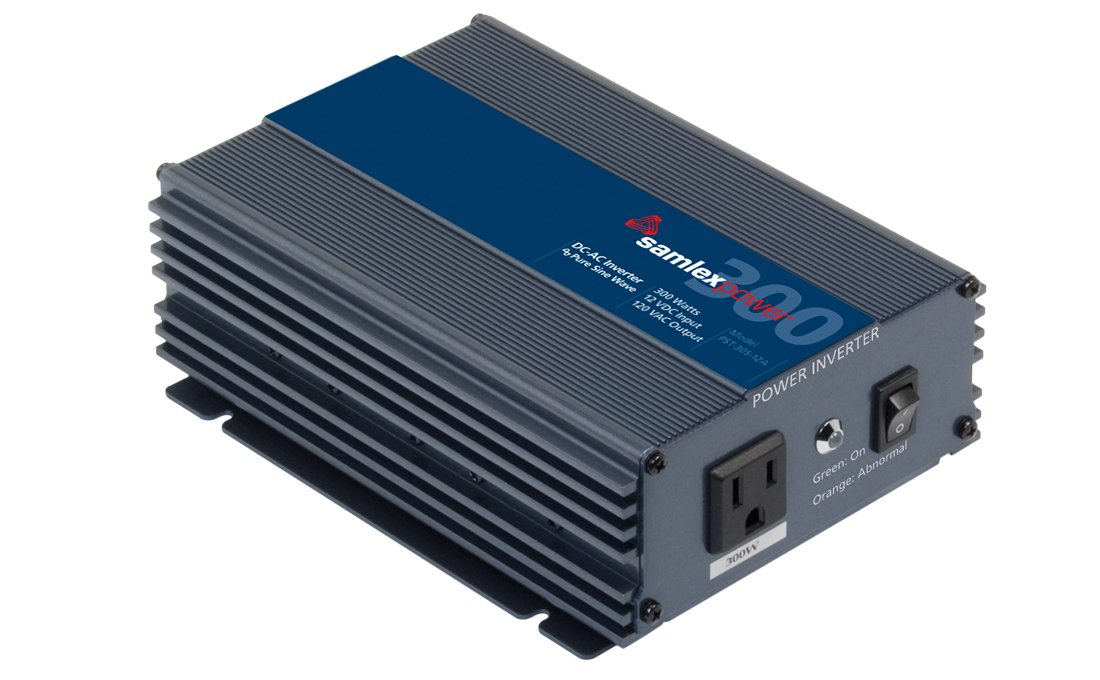
Figure 1: Front view of the Samlex America PST30S12A Inverter, showing the AC output receptacle and LED indicators.
6. Operating Instructions
To operate the Samlex America PST30S12A Inverter:
- Power On: Once all connections are secure, turn on the inverter using its power switch. The LED indicators will illuminate to show the power status.
- LED Indicators: Observe the LED indicators for operational status. Green typically indicates normal operation, while other colors (e.g., red or amber) may signal a fault or protection mode.
- Connecting Devices: Plug your AC-powered devices into the inverter's AC outlet. Ensure the combined wattage of all connected devices does not exceed 300 Watts continuous power.
- Low Battery Alarm: The inverter features a low battery voltage alarm that activates at 10.5V. This indicates that the input battery voltage is getting low and requires recharging.
- Power Off: When finished, turn off the inverter before disconnecting any devices or the DC input power.
7. Maintenance
Regular maintenance helps ensure the longevity and optimal performance of your inverter:
- Cleaning: Keep the inverter clean and free from dust and debris. Use a dry cloth to wipe the exterior. Do not use liquid cleaners.
- Ventilation: Ensure the cooling fan and ventilation openings are not obstructed. The inverter has a temperature-controlled fan that will activate as needed to maintain optimal operating temperature.
- Connections: Periodically check all electrical connections (DC input, AC output, grounding) to ensure they are tight and free from corrosion.
- Battery Care: If using external batteries, follow the battery manufacturer's recommendations for maintenance. For optimal battery life, keep them adequately charged, especially if they are not in regular use.
8. Troubleshooting
If you encounter issues with your inverter, refer to the following common problems and solutions:
| Problem | Possible Cause | Solution |
|---|---|---|
| Inverter does not turn on | No DC input power; Loose connections; Blown fuse | Check battery connections and voltage; Ensure power switch is ON; Inspect and replace DC input fuse (40A) if necessary. |
| Low battery voltage alarm sounds | Input voltage below 10.5V | Recharge or replace the battery. Reduce load if possible. |
| Inverter shuts down (Input Low Voltage Shut-down) | Input voltage drops to 10V | Recharge or replace the battery immediately. |
| Inverter shuts down (High Input Voltage Shut-down) | Input voltage exceeds 16.5V | Check the charging system or battery source for over-voltage. Disconnect immediately. |
| Overload protection activates | Connected load exceeds 300W continuous or 500W surge | Reduce the total wattage of connected devices. Disconnect and reconnect the inverter to reset. |
| Over temperature protection activates | Inverter is overheating | Ensure adequate ventilation. Reduce ambient temperature or load. Allow inverter to cool down. |
| Short circuit protection activates | Short circuit detected at AC output | Disconnect all AC devices and check for short circuits in wiring or devices. |
9. Specifications
| Parameter | Value |
|---|---|
| Continuous Output Power | 300 Watts |
| Surge Output Power (<1 sec) | 500 Watts |
| Output Voltage | 120 VAC +/- 3% |
| Output Frequency | 60 Hz |
| Output Voltage Waveform | Pure Sine Wave |
| Total Harmonic Distortion (THD) | <3% |
| Input Voltage Range | 10.5 to 16.5 VDC |
| Input Current at No Load | <700 mA |
| Low Input Voltage Warning Alarm | 10.5 V |
| Low Input Voltage Shut-down | 10 V |
| High Input Voltage Shut-down | 16.5 V |
| Operating Ambient Temperature | 0 to 40°C +/- 5°C |
| Peak Efficiency | 85% |
| Cooling | Temperature Controlled Fan |
| DC Input Connections | Tubular type screwdown terminals |
| AC Output Connections | 1 x Standard North American Outlet (NEMA 5-15R) |
| DC Side Input Fuse | 40 A |
| Item Weight | 4.85 pounds |
| Product Dimensions | 10 x 7.5 x 4.25 inches |
10. Warranty Information
Specific warranty details for the Samlex America PST30S12A Inverter are typically provided with the product packaging or can be obtained directly from the manufacturer's official website. Please retain your proof of purchase for warranty claims.
11. Customer Support
For technical assistance, troubleshooting beyond this manual, or inquiries regarding your Samlex America PST30S12A Inverter, please contact Samlex America customer support. Refer to the product packaging or the official Samlex America website for current contact information.


