
Pentair 011653
Contents
Pentair C-Series Commercial Bronze Pump with Strainer User Manual
Model: 011653
Introduction
This manual provides essential information for the safe and efficient operation, installation, and maintenance of your Pentair C-Series 7-1/2 HP 3-Phase Commercial Bronze Pump with Strainer, Model 011653. Please read this manual thoroughly before attempting to install, operate, or service the pump. Retain this manual for future reference.
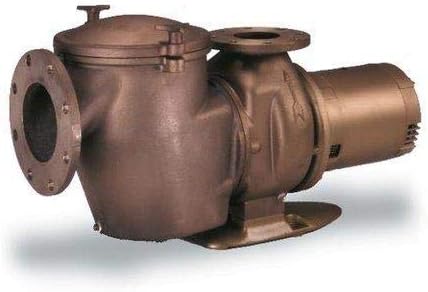
Image: The Pentair C-Series 7-1/2 HP 3-Phase Commercial Bronze Pump with Strainer, Model 011653. This image shows the complete pump assembly, including the motor, pump housing, and integrated strainer basket housing with its lid.
Important Safety Information
Always observe basic safety precautions when installing and operating this equipment. Failure to follow instructions can result in severe injury, death, or property damage.
- Disconnect power before servicing.
- Ensure proper grounding and bonding.
- Do not operate if any part is damaged.
- Consult a qualified professional for electrical connections.
- Keep children and unauthorized persons away from the equipment.
Setup and Installation
Unpacking and Inspection
Carefully remove the pump from its packaging. Inspect for any shipping damage. Report any damage to your supplier immediately.
Location Requirements
- Install the pump as close to the water source as possible.
- Ensure a dry, well-ventilated area, protected from excessive moisture and direct sunlight.
- Provide adequate space around the pump for maintenance and ventilation.
- Mount the pump on a firm, level base to prevent vibration.
Plumbing Connections
The pump features flanged connections for both suction and discharge. Use appropriate gaskets and bolts to ensure a watertight seal. Avoid putting strain on the pump housing from misaligned piping.
Electrical Connections
This is a 3-phase pump. All electrical wiring must be performed by a qualified electrician in accordance with local and national electrical codes. Verify the voltage and phase of your power supply match the pump's requirements (7-1/2 HP, 3-Phase).
- Ensure proper wire sizing for the motor's amperage.
- Connect the ground wire to the designated grounding lug.
- Confirm correct motor rotation before full operation.
Operating Instructions
Priming the Pump
Before starting the pump for the first time, or after draining, it must be primed. Remove the strainer pot lid and fill the strainer basket housing with water until the pump casing is full. Replace the lid securely.
Starting the Pump
- Ensure all valves are open to allow water flow.
- Turn on the power to the pump.
- Observe the pump for proper operation and water flow.
- If the pump does not prime within a few minutes, turn it off, re-prime, and try again.
Stopping the Pump
To stop the pump, simply turn off the power supply at the main switch or circuit breaker.
Maintenance
Regular maintenance ensures optimal performance and extends the life of your pump.
Strainer Basket Cleaning
The integrated strainer basket should be inspected and cleaned regularly, especially if water flow is reduced. Turn off the pump, close isolation valves, remove the strainer lid, empty debris from the basket, and rinse. Reinstall the basket and lid, ensuring a proper seal.
Motor Maintenance
The motor is typically sealed and requires minimal maintenance. Keep the motor free of dirt and debris to ensure proper cooling. Do not obstruct the motor's ventilation openings.
Winterization
In freezing climates, the pump must be drained completely to prevent damage from ice expansion. Disconnect power, open the drain plugs on the pump casing and strainer pot, and allow all water to escape. Store the pump in a dry, protected area if possible, or ensure it is thoroughly dry and covered.
Troubleshooting
| Problem | Possible Cause | Solution |
|---|---|---|
| Pump does not start | No power; tripped breaker; faulty wiring; motor issue | Check power supply, reset breaker; inspect wiring (qualified electrician); contact service. |
| Pump runs but no water flow | Not primed; clogged strainer basket; closed valve; air leak in suction line | Re-prime pump; clean strainer basket; open all valves; check suction line for leaks. |
| Low water flow | Clogged strainer; partially closed valve; undersized piping; impeller obstruction | Clean strainer; open valves fully; consult professional for piping; inspect impeller (qualified technician). |
| Excessive noise or vibration | Cavitation (air in system); loose mounting; worn bearings; foreign object in impeller | Ensure pump is primed and suction line is sealed; tighten mounting bolts; contact service for bearings/impeller. |
For issues not listed or if solutions do not resolve the problem, contact Pentair customer support or a qualified service technician.
Specifications
| Attribute | Detail |
|---|---|
| Model Number | 011653 |
| Brand | Pentair |
| Horsepower (HP) | 7-1/2 HP |
| Phase | 3-Phase |
| Material | Bronze (Pump Housing) |
| Type | Commercial Pump with Strainer |
| ASIN | B003FWP2EO |
| UPC | 788379663629 |
Warranty Information
Pentair products are manufactured to the highest standards and are backed by a limited warranty. For specific warranty terms and conditions applicable to your Model 011653 pump, please refer to the warranty card included with your product or visit the official Pentair website. Keep your proof of purchase for warranty claims.
Customer Support
For technical assistance, parts, or service, please contact Pentair Customer Support:
- Website: www.pentair.com
- Phone: Refer to the Pentair website for regional contact numbers.
- Authorized Service Centers: A list of authorized service centers can be found on the Pentair website.
When contacting support, please have your pump's model number (011653) and serial number ready.
Ask a question about this manual
Ask about setup, troubleshooting, compatibility, parts, safety, or missing instructions. Manuals+ will review the question and use this page’s manual context to help answer it.