
1. Introduction
Thank you for purchasing the Sony ICF-C05iP 30-Pin iPod Alarm Clock Speaker Dock. This device combines an alarm clock, FM radio, and a speaker dock for your iPod or iPhone, designed for convenience and functionality. Please read this manual thoroughly before operating the unit to ensure proper use and to maximize its performance.
Package Contents
- Sony ICF-C05iP Unit
- AC Power Adapter
- Dock Adapters (various sizes for different iPod/iPhone models)
- Documentation (this user manual)
2. Safety Information
Please observe the following safety precautions to prevent electric shock, fire, or damage to the unit.
- Power Source: Use only the supplied AC power adapter. Do not use other adapters.
- Ventilation: Ensure adequate ventilation. Do not block ventilation openings.
- Water and Moisture: Do not expose the unit to rain or moisture. Do not place objects filled with liquids, such as vases, on the unit.
- Heat: Keep the unit away from heat sources such as radiators, heat registers, stoves, or other apparatus (including amplifiers) that produce heat.
- Cleaning: Unplug the unit from the wall outlet before cleaning. Use a dry cloth only.
- Servicing: Do not attempt to service this product yourself. Refer all servicing to qualified service personnel.
- Backup Battery: The backup battery (CR2032) is for timekeeping during power outages. Replace it correctly to avoid explosion risk.
3. Setup
3.1 Power Connection
- Connect the supplied AC power adapter to the DC IN 5V jack on the back of the unit.
- Plug the AC power adapter into a standard wall outlet.
- The unit will power on, and the display will show "AM 12:00" or the current time if the backup battery is installed and functional.
3.2 Backup Battery Installation
A CR2032 lithium battery (not always included, check packaging) is required to maintain clock settings during power interruptions.
- Locate the battery compartment on the bottom of the unit.
- Open the battery compartment cover.
- Insert one CR2032 lithium battery with the (+) side facing up.
- Close the battery compartment cover securely.
Note: If the battery is not installed or is depleted, the clock settings will be lost during a power outage.
3.3 Initial Time Setting
Refer to Section 4.2 for detailed instructions on setting the clock.
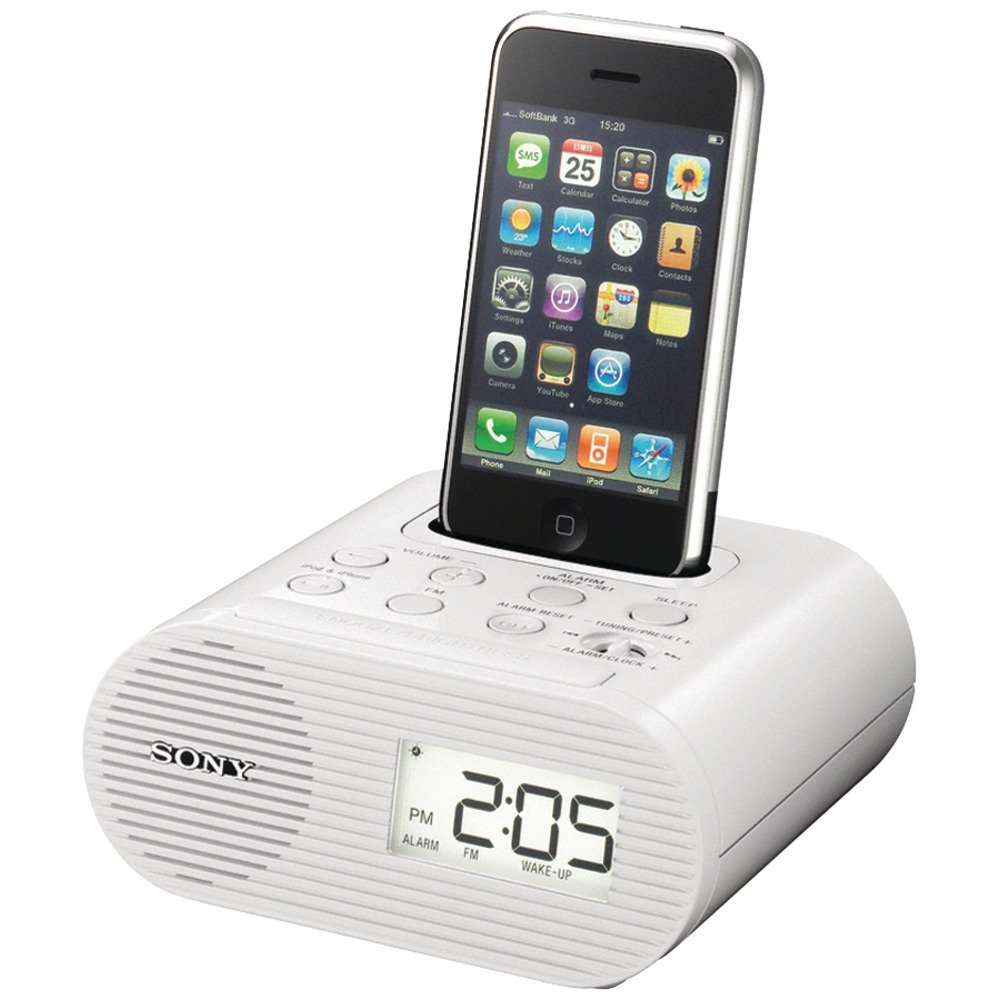
Figure 1: Front view of the Sony ICF-C05iP Alarm Clock Speaker Dock. This image displays the main unit with its digital display, control buttons, and the integrated 30-pin dock connector at the top.
4. Operating Instructions
4.1 Controls Overview
Familiarize yourself with the buttons and controls on your unit. (Refer to the diagram in the included printed documentation for specific button locations.)
- Display: Shows time, alarm status, radio frequency, etc.
- TIME SET: Button for setting the clock.
- ALARM SET A/B: Buttons for setting Alarm A and Alarm B.
- SNOOZE/BRIGHTNESS: Button to temporarily stop the alarm or adjust display brightness.
- VOLUME +/-: Adjusts sound volume.
- FUNCTION: Selects input source (iPod/iPhone, FM Radio).
- TUNING +/-: Adjusts FM radio frequency.
- PRESET +/-: Selects preset FM radio stations.
- SLEEP: Activates the sleep timer.
- DOCK CONNECTOR: For connecting iPod/iPhone.
4.2 Setting the Clock
- Press and hold the TIME SET button until the hour digits flash on the display.
- Press the TUNING + or - buttons to adjust the hour. Pay attention to AM/PM indicators.
- Press TIME SET again; the minute digits will flash.
- Press the TUNING + or - buttons to adjust the minutes.
- Press TIME SET once more to save the time.
4.3 Setting Alarms
The unit features two independent alarms, Alarm A and Alarm B.
- Press and hold the ALARM SET A (or B) button until the alarm time flashes.
- Use TUNING + or - to set the desired alarm hour (observe AM/PM).
- Press ALARM SET A (or B) again; the minute digits will flash.
- Use TUNING + or - to set the desired alarm minutes.
- Press ALARM SET A (or B) again to select the alarm source:
- iPod/iPhone: Wakes you to music from your docked device.
- FM Radio: Wakes you to the last tuned FM station.
- Buzzer: Wakes you to a standard buzzer sound.
- Press ALARM SET A (or B) one last time to confirm and activate the alarm. An alarm indicator will appear on the display.
Snooze Function: When the alarm sounds, press the SNOOZE/BRIGHTNESS button to temporarily silence it. The snooze duration is programmable from 10 to 60 minutes. (Consult the printed manual for specific snooze duration setting instructions.)
Stopping the Alarm: To stop the alarm completely, press the ALARM SET A (or B) button corresponding to the active alarm. The alarm indicator will disappear.
4.4 Using the iPod/iPhone Dock
The unit is compatible with various 30-pin iPod and iPhone models, including: iPod mini; iPod nano 1G, 2G, 3G, 4G, 5G; iPod classic 4G, 5G, 5.5G, 6G; iPod touch 1G, 2G; iPhone 1G, 3G, 3GS.
- Select the appropriate dock adapter for your iPod or iPhone model and insert it into the dock connector.
- Carefully place your iPod or iPhone onto the dock connector. Ensure it is seated firmly.
- The device will begin charging automatically.
- Press the FUNCTION button repeatedly until "iPod" or "iPhone" appears on the display.
- Use your iPod/iPhone controls to select and play music. The audio will play through the unit's speakers.
- Adjust the volume using the VOLUME +/- buttons on the unit.
Note: If your device has a case, you may need to remove it for proper docking.
4.5 FM Radio Operation
- Press the FUNCTION button repeatedly until "FM" appears on the display.
- Manual Tuning: Press the TUNING + or - buttons to manually tune to a desired frequency.
- Automatic Tuning: Press and hold the TUNING + or - buttons for a few seconds. The unit will automatically scan and stop at the next strong station.
- Setting Presets (20 available):
- Tune to the desired FM station.
- Press and hold one of the PRESET buttons (e.g., PRESET 1) until the preset number flashes.
- Use TUNING + or - to select the desired preset number (1-20).
- Press the PRESET button again to save the station.
- Recalling Presets: Press the PRESET + or - buttons to cycle through your saved stations.
4.6 Sleep Timer
The sleep timer allows you to fall asleep to music from your iPod/iPhone or FM radio, which will automatically turn off after a set period.
- While playing music from your iPod/iPhone or FM radio, press the SLEEP button repeatedly.
- Each press will cycle through available sleep times: 15, 30, 60, 90 minutes, or OFF.
- Select your desired sleep duration. The unit will automatically turn off after this time.
4.7 Display Brightness
Adjust the display brightness to suit your preference, especially in a bedroom environment.
- Press the SNOOZE/BRIGHTNESS button (when the alarm is not sounding).
- Each press will cycle through the brightness levels: High, Medium, Low.
- Select the desired brightness level.
5. Maintenance
5.1 Cleaning the Unit
- Before cleaning, unplug the AC power adapter from the wall outlet.
- Wipe the exterior of the unit with a soft, dry cloth.
- Do not use abrasive pads, scouring powders, or solvents such as alcohol or benzene, as these may damage the finish.
5.2 Replacing the Backup Battery
If the clock loses time during a power outage, the CR2032 backup battery may need replacement. Refer to Section 3.2 for installation instructions.
6. Troubleshooting
If you experience problems with your unit, consult this section before seeking professional service.
| Problem | Solution |
|---|---|
| No power. |
|
| Clock loses time during power outage. |
|
| iPod/iPhone not charging or playing. |
|
| Alarm does not sound. |
|
| Poor FM radio reception. |
|
7. Specifications
- Model: ICF-C05iP (ICFC05IPWHT)
- Power Requirements: AC 120V, 60Hz (via supplied AC adapter)
- Backup Battery: 1 x CR2032 Lithium Battery (for clock backup)
- Radio Frequency Range: FM 87.5 - 108 MHz
- Dimensions (W x H x D): Approximately 8.6 x 6.7 x 3.6 inches (21.8 x 17.0 x 9.1 cm)
- Weight: Approximately 1.45 pounds (0.66 kg)
- Manufacturer: Sony
- Date First Available: March 25, 2010
Specifications are subject to change without notice.
8. Warranty and Support
For detailed warranty information and customer support, please refer to the separate warranty card included with your product or visit the official Sony support website. You can typically find support resources, FAQs, and contact information by searching for your product model (ICF-C05iP) on the Sony website.
Online Support: https://www.sony.com/electronics/support
Please have your model number (ICF-C05iP) and serial number ready when contacting support.