
Introduction
Thank you for choosing the SmarTek ML-246-SL Rotating Clock. This manual provides essential information for the safe and efficient operation of your new clock. Please read these instructions thoroughly before use and retain them for future reference.
Safety Information
- Battery Safety: Use only the specified battery type. Do not mix old and new batteries, or different types of batteries. Insert batteries with correct polarity (+/-). Remove exhausted batteries promptly. Do not dispose of batteries in fire.
- Placement: Place the clock on a stable, flat surface or mount securely if designed for wall mounting. Avoid direct sunlight, extreme temperatures, and high humidity.
- Cleaning: Disconnect power (remove batteries) before cleaning. Use a soft, dry cloth. Do not use abrasive cleaners or solvents.
- Children: Keep the clock and its components, especially batteries, out of reach of small children.
- Disassembly: Do not attempt to disassemble or repair the clock yourself. Refer all servicing to qualified personnel.
Package Contents
Please check that all items are present and in good condition:
- SmarTek ML-246-SL Rotating Clock Unit
- User Manual
- (Batteries are not included)
Setup
1. Battery Installation
The SmarTek ML-246-SL Rotating Clock requires batteries for operation (not included).
- Locate the battery compartment cover on the back of the clock.
- Remove the cover by sliding or unscrewing it.
- Insert the required number and type of batteries (e.g., 1 x AA battery) according to the polarity indicators (+ and -) inside the compartment.
- Replace the battery compartment cover securely.
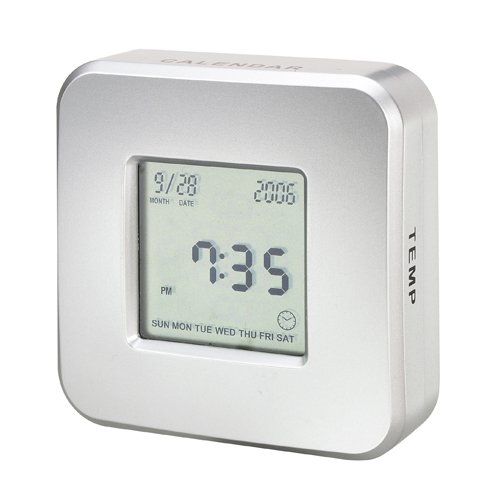
Image showing the front view of the SmarTek ML-246-SL Rotating Clock, illustrating its design and display area.
2. Setting the Time
Once batteries are installed, the clock will begin to operate. To set the correct time:
- Locate the time-setting knob or wheel on the back of the clock.
- Gently turn the knob/wheel in the indicated direction (usually clockwise) until the hands display the correct time.
- Ensure the clock is placed in its desired location, away from strong vibrations or magnetic fields.
Operating Instructions
The SmarTek ML-246-SL is a rotating clock, designed to display time with a unique visual movement. Once batteries are installed and the time is set, the clock will operate continuously.
- Time Display: The clock displays time using traditional hour and minute hands.
- Rotating Feature: The central mechanism or a specific element of the clock is designed to rotate, providing a dynamic visual effect. This rotation is automatic and continuous as long as the clock is powered.
- Reading the Time: Read the time as you would with any analog clock, observing the position of the hour and minute hands against the clock face.
Maintenance
- Cleaning: Wipe the clock surface with a soft, dry, lint-free cloth. Do not use liquid cleaners, sprays, or abrasive materials.
- Battery Replacement: When the clock hands begin to slow down or stop, it is time to replace the batteries. Follow the "Battery Installation" steps in the Setup section. Always replace all batteries at the same time.
- Storage: If the clock will not be used for an extended period, remove the batteries to prevent leakage and damage. Store in a cool, dry place.
Troubleshooting
| Problem | Possible Cause | Solution |
|---|---|---|
| Clock not working / Hands not moving | Dead or incorrectly installed batteries. | Check battery polarity. Replace with fresh batteries. |
| Clock runs slow or fast | Weak batteries. | Replace with fresh batteries. |
| Rotating feature not working | Insufficient power from batteries. Obstruction. | Replace batteries. Ensure no foreign objects are obstructing the rotating mechanism. |
If you experience issues not listed above, or if the problem persists after attempting the solutions, please contact customer support.
Specifications
- Model Number: ML-246-SL
- ASIN: B003DNZVCS
- Power Source: Battery (Batteries not included)
- Manufacturer Part Number: ML-246-SL
- Product Type: Rotating Clock
Warranty and Support
For warranty information or technical support, please refer to the documentation included with your purchase or visit the official SmarTek website. Keep your proof of purchase for warranty claims.
Note: Specific warranty terms may vary by region and retailer.